T-Auto/dsh-ops
dsh-ops
dsh-ops is a community DeepSeek Harness plugin. Read the repository README before installing.
Install
npx @deepseek-ai/dsh plugin --profile web add dsh-opsRestart `dsh web` after install. Bundle APIs can change during the developer preview.
README badge

[](https://dshhub.dev/plugins/dsh-ops)Paste this into your README. The star count updates with every catalog sync.
From the README
Excerpt from T-Auto/dsh-ops, cleaned of badges and images.
<strong>中文</strong> | <a href="README.en.md">English</a>
dsh-ops
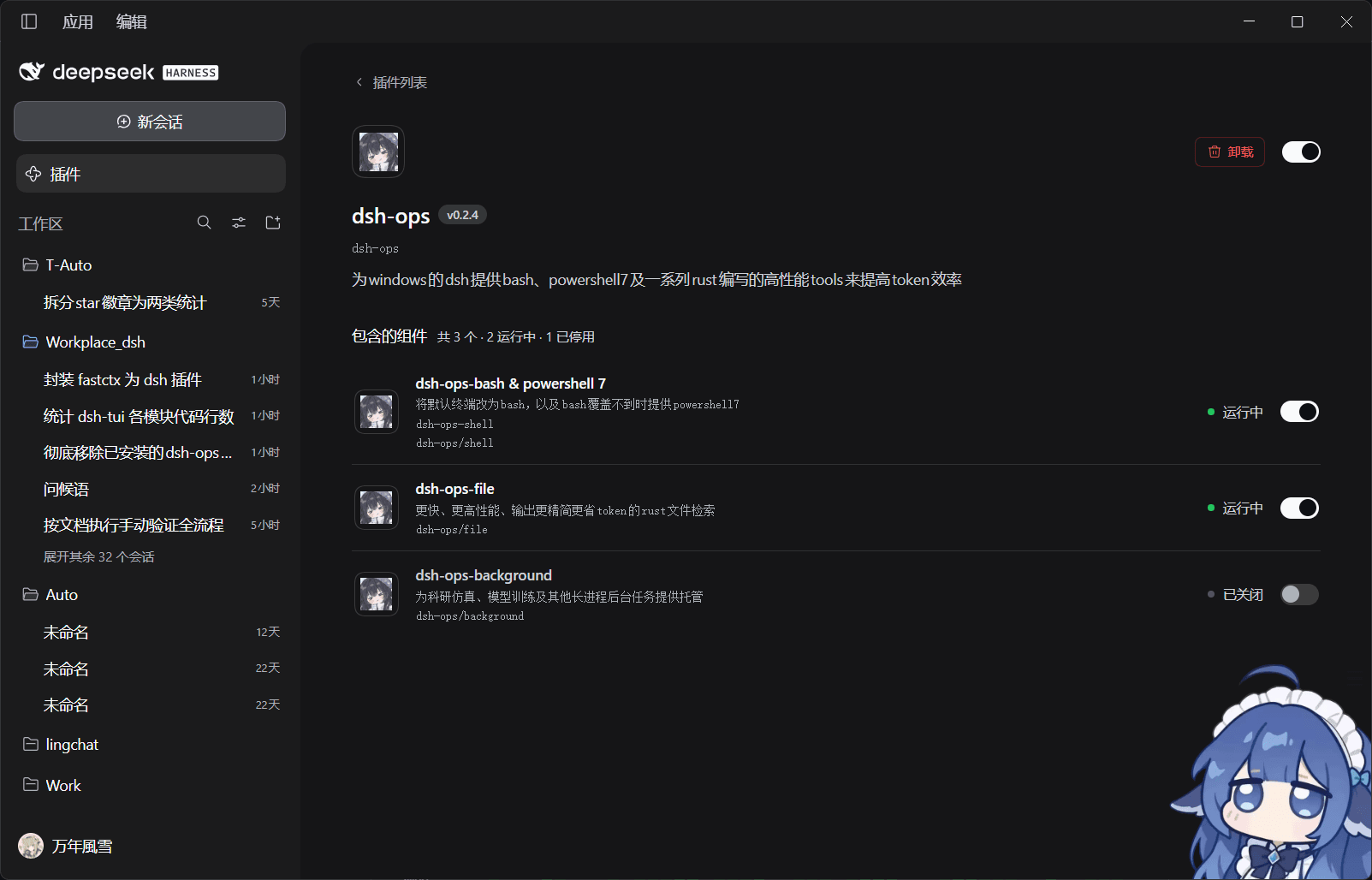
以提高token效率为目的,提供新增的ops系列工具并隐藏部分官方工具为方案的插件,低改动面,低侵入性,与其他插件广泛兼容。
-
(仅 Windows)启用与 dsh 原生 bash 行为一致的 ops_bash;启用模式行时用它替换官方 pwsh,兼容模式则保留官方工具
-
四个预设模式行分别增强内置 Minimal/Standard/PTC/Cordis preset:Standard 与 Cordis 替换官方 read/glob/grep,PTC 提供类型化 SDK,Minimal 只替换 Windows shell;discovery 行启用时其会话始终获得动态加载入口;兼容模式(默认关闭)可保留全部官方工具
-
启用 DSH 预留的
tools_addition动态工具加载,并提供渐进式纰漏的工具,作为高级功能(如pdf、word读取、超多文件批量修改)的加载平台,大大减少常见特定场景的token消耗量,且不会导致系统提示词膨胀 -
为 Native 模式提供返回紧凑、带行号和更好错误回馈的工具以遏制报错循环,减少调用轮次
-
为 PTC 模式提供一些返回结构化 JSON 值的工具以降低 ai 在 ptc 模式下编写 TypeScript 代码的token总量和心智负担
-
PTC SDK 目录包含 18 个 API:15 个文件/文档工具,加批处理、结果引用和加载器。
安装、更新、卸载
官方插件市场
在目标 DSH 应用的插件市场中输入 npm 包名 dsh-ops,选择自定义地址,输入 https://mirrors.huaweicloud.com/repository/npm/,安装后选择启用。目前不推荐用npmmirror安装,有bug。
当然,如果你确定可以连接 npm 官方源那就选择官方源,如果你不确定那就按教程操作。
npm 一键安装
安装方法
npx --yes dsh-ops@latest install --profile desktop
npx --yes dsh-ops@latest install --profile web
npx --yes dsh-ops@latest install --profile tui
必须显式选择目标 profile;tui 映射到 dsh-TUI 产品的 dsh-tui profile,不是旧的 tui 目录。请先初始化目标应用。该入口委托官方 DSH CLI 安装,不另写一套 profile 锁与回滚逻辑。
桌面端必须使用桌面应用自带的 CLI;默认探测 %LOCALAPPDATA%\Programs\DeepSeek Harness\resources\runtime\cli\bin\dsh.cmd。安装在其它位置时加 --dsh-cli "<安装目录>\resources\runtime\cli\bin\dsh.cmd"。Web/TUI 需要可用的 DSH CLI,可同样显式指定。
安装或卸载时可加 --dry-run 预演。它按指定路径或 PATH(Windows 同时使用 PATHEXT)解析 CLI,检查文件、POSIX 执行权限及通过 Node 启动的入口文件,并在预演时同样拒绝不安全的 Windows 命令脚本路径;检查失败返回非零。预演只打印计划,不启动 CLI、不修改 profile。成功表示这些静态检查已通过,不保证所选程序的身份、版本、profile 兼容性或后续安装结果。
也可以直接使用官方命令:
dsh plugin --profile web add dsh-ops
dsh plugin --profile dsh-tui add dsh-ops
"<桌面安装目录>\resources\runtime\cli\bin\dsh.cmd" plugin --profile desktop add dsh-ops
普通 DSH CLI 不能管理保留的 desktop profile;不要把它与桌面自带入口混淆。
更新方法
宿主兼容范围明确声明为 DSH 0.2.0-rc.2 与 0.2.1-rc.2。 组件图标导出、profile 刷新及配置/schema 检查见 宿主兼容范围与展示元数据。
重新运行相同的 npx --yes dsh-ops@latest install --profile ...,或用官方 CLI add dsh-ops@latest。按应用提示重载;替换已加载代码时重启应用。
卸载与查看状态
npx --yes dsh-ops@latest status --profile desktop
npx --yes dsh-ops@latest uninstall --profile desktop
把 desktop 换成 web 或 tui 即可。也可在市场卸载,或执行官方 dsh plugin --profile ... remove dsh-ops。插件依赖(含 Windows bash 可选载荷)随 profile 管理;单独 provision 的 Bash 用 dsh-ops bash-runtime remove --yes 移除,不误删系统 shell、其它 profile 的副本或包管理器共享缓存。
旧版显式 provision 的 <DSH_HOME>/dsh-ops/ 文件(provision 的 shell,以及早期版本可 provision 的 FastCtx 运行时)需单独清理:npx --yes dsh-ops@latest uninstall --yes。已移除的后台组件留下的 ~/.fastctx/ 状态默认不删;需要时显式加 --purge-fastctx。
组件 bundle 现为八行:mode-minimal、mode-standard、mode-ptc、mode-cordis、discovery、compat、panel、tui。旧的 shell、file、ptc、hide-official 行已移除,请删除为它们保存的 profile 覆盖,并按需重设模式开关。
原 dsh-ops/background 组件(FastCtx 后台任务)已移除。仍保留该行的 profile 照常加载:该行不发布任何工具,只记录一条警告,可直接删除。
可选 OPS 只读侧栏
在 dsh-TUI 中启用 dsh-ops/tui 行并重启,即可添加 OPS 侧栏;不抢焦点,不执行额外工具调用。没有 tuiPanels 的宿主仅让该可选行等待,不影响其它组件。见 侧栏说明。 聚焦后可用 f 筛选、n/p 本地翻页、a 确认跨会话提醒;只浏览有界保留元数据,不拉取结果分页。
文档
…