PolinniZhong/dsh-personal-center
dsh-personal-center
dsh-personal-center is a community DeepSeek Harness plugin. Read the repository README before installing.
Install
npx @deepseek-ai/dsh plugin --profile web add github:PolinniZhong/dsh-personal-centerRestart `dsh web` after install. Bundle APIs can change during the developer preview.
README badge

[](https://dshhub.dev/plugins/dsh-personal-center)Paste this into your README. The star count updates with every catalog sync.
From the README
Excerpt from PolinniZhong/dsh-personal-center, cleaned of badges and images.
dsh-personal-center
A local, offline personal center for DeepSeek Harness — usage stats, cost estimation, custom instructions, global font size, and a desktop pet.
A local plugin for DeepSeek Harness (DSH) desktop / web. Adds a Personal Center section to Settings, with four tabs:
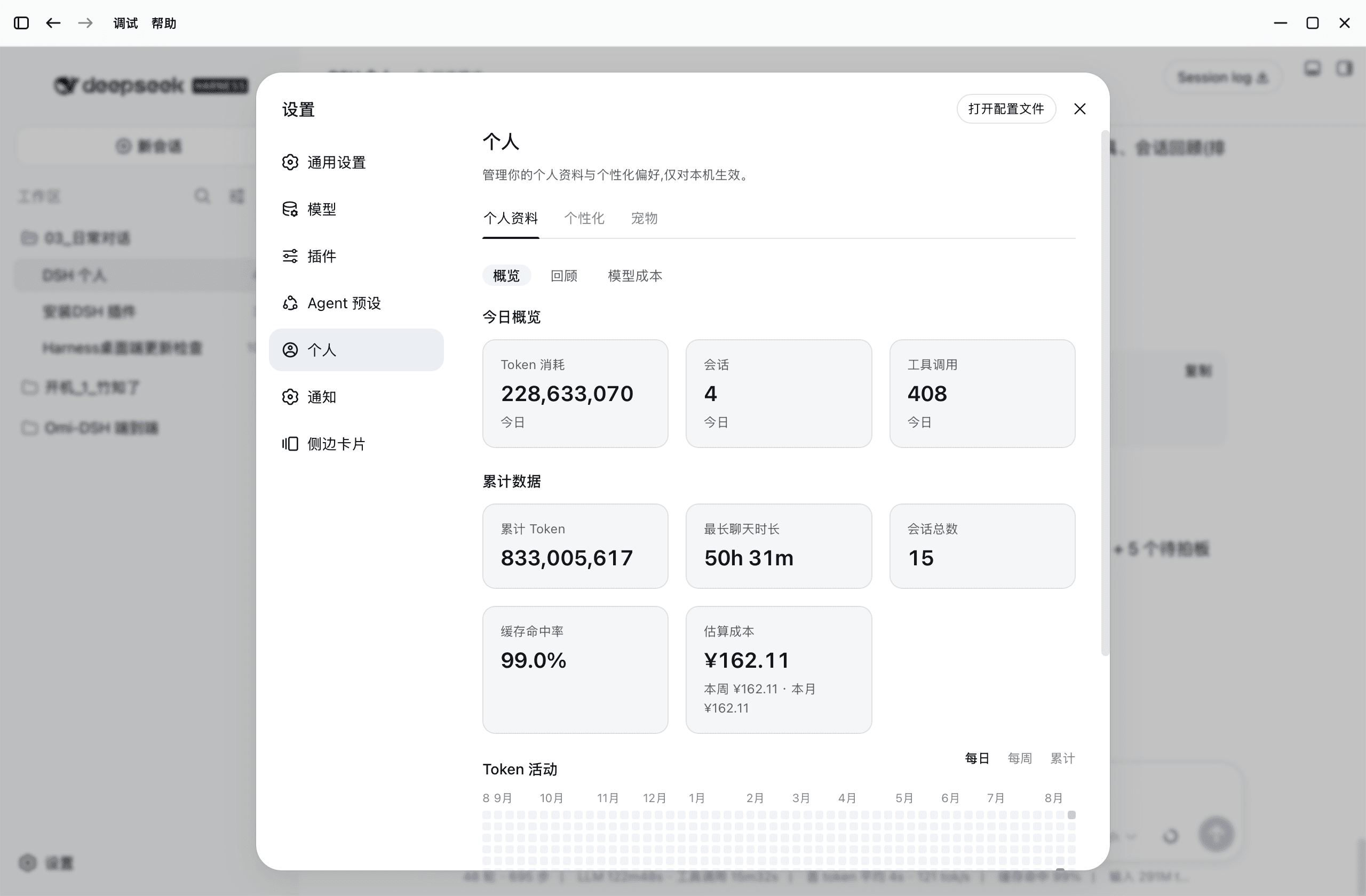
- Token Usage — real usage stats: today / cumulative tokens, session count, tool calls, a GitHub-style activity heatmap (daily / weekly / cumulative), per-model breakdown, top tools, and session review; with sub-tabs (Overview / Review / Model Cost).
- Personalization — global custom instructions (like ChatGPT / Codex "Personalization → Custom instructions"), applied to all chats on this machine.
- Appearance — a global font-size stepper (default 14, range 11–16, step 1): scales the whole UI instantly and remembers your choice.
- Desktop Pet — bitmap (black / blue whale) and vector ("round black / round blue") skins, driven by your real usage (5 emotions), with a session-status overview (double-click a session to jump into it).
Model cost estimation lives inside Token Usage: per-model pricing (peak / off-peak, per currency, official presets) plus cache-hit-rate stats.
100% local — no network, no reading chat content. See PRIVACY.md. Bilingual UI (中文 / English), follows DSH's language automatically.
📸 Screenshots
Four tabs (v1.0)
| Token Usage | Personalization |
|---|---|
| Appearance (global font size) | Pet |
|---|---|
Feature details
| Token Usage · light | Review · dark |
|---|---|
| Pet panel · light | Pet panel · dark |
|---|---|
| Session status overview (double-click to jump) |
|---|
Five emotion animations (happy / busy / tired / wallet-pain / dozing):
| Black whale | Blue whale |
|---|---|
New actions (v0.8.0) (thinking / waiting / celebrate / drag / wave):
| Black whale | Blue whale |
|---|---|
| Model cost · dark |
|---|
| Personalization · per workspace (layered instructions + templates) |
|---|
✨ Features
Token Usage (statistics)
- Today overview: token consumption / sessions / tool calls;
- Cumulative data: total tokens / longest chat / total sessions / cache-hit rate / estimated cost;
- Token activity: GitHub-contribution-style heatmap with daily / weekly / cumulative views;
- Per-model breakdown: tokens, requests, per-model cache-hit rate and cost split by provider + model;
- Top tools: sorted by call count (including MCP tools in
mcp__<server>__<tool>form); - Session review: recent sessions (title / date / duration / tokens / cache-hit rate), auto-excludes archived sessions.
Data source: aggregates local session logs in real time — numbers only, never reads content. See docs/common/DESIGN.md.
Model Cost (estimation)
- Per-model cost per million tokens, split by currency (¥/$);
- Peak / off-peak pricing (DeepSeek official: Beijing 9:00–12:00 & 14:00–18:00 peak, off-peak = half);
- Built-in presets (deepseek / kimi / gemini / gpt) with provider→model autocomplete, editable;
- Shows this week / this month / cumulative cost.
Personalization (layered instructions: v0.7)
…