Small-tailqwq/dsh-deep-whale
Deep-Sea Maid Atelier
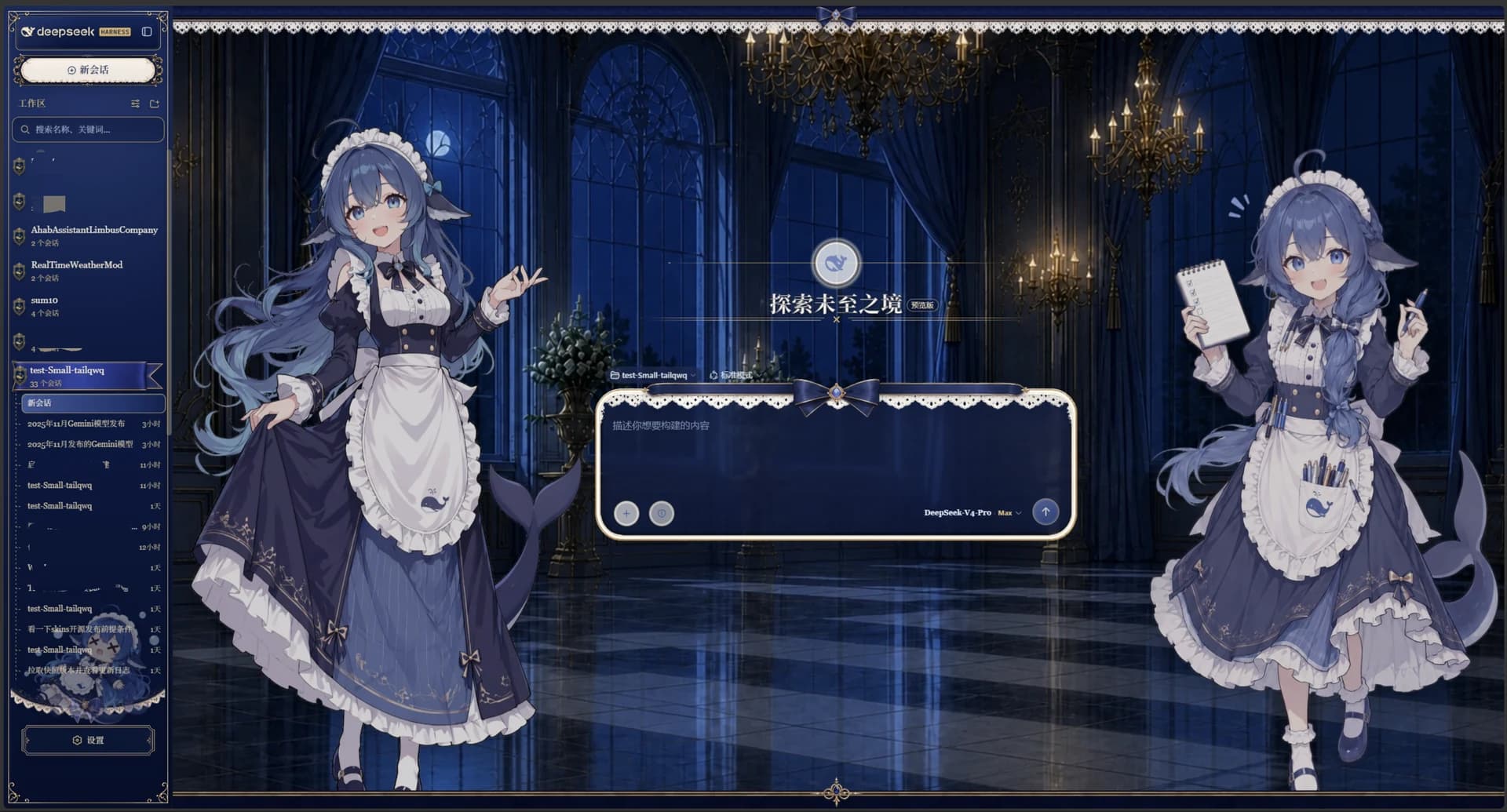
A whale-girl skin series for DSH Web. Deep-Sea Maid Atelier. CC BY-NC-SA 4.0.
Install
npx @deepseek-ai/dsh plugin --profile web add github:Small-tailqwq/dsh-deep-whaleRestart `dsh web` after install. Bundle APIs can change during the developer preview.
README badge

[](https://dshhub.dev/plugins/dsh-deep-whale)Paste this into your README. The star count updates with every catalog sync.
From the README
Excerpt from Small-tailqwq/dsh-deep-whale, cleaned of badges and images.
dsh-deep-whale · 鲸鱼娘皮肤系列
DeepSeek Harness Web GUI 的鲸鱼娘主题皮肤系列(独立分发仓库)。
效果预览
点击图片可查看完整尺寸。
| 皮肤 | 亮色模式 | 暗色模式 |
|---|---|---|
| maid-atelier | ||
| orca-link |
住户
| 皮肤 | 包名 | 说明 | 许可 |
|---|---|---|---|
| maid-atelier | @dsh-external/dsh-client-ui-skin-maid-atelier | 深海女仆工坊:双女仆背景、深海蓝蕾丝界面与 Q 版侧栏 | CC BY-NC-SA 4.0 |
| orca-link | @dsh-external/dsh-client-ui-skin-orca-link | 虎鲸链路:珍珠白机械舱、黑曜虎鲸操作员与电蓝链路信号 | CC BY-NC-SA 4.0 |
| skin-manager | @dsh-external/dsh-client-ui-skin-deep-whale-manager | 通用皮肤发现、切换与皮肤自声明配置面板 | MIT |
版权所有人
| 版权所有人 | 版权所有内容 | 对应皮肤 | 个人主页 |
|---|---|---|---|
| 上善 | 鲸鱼娘角色形象原作 | maid-atelier / orca-link | Pixiv · Bilibili(上善无形) |
| ZipZipPipe | 加入 DeepSeek 元素的女仆鲸鱼娘二次设计 | maid-atelier | Pixiv · Bilibili(ZipZipPipe) |
*反馈问题尽可能在 issue 中发起,而不是跑去联系上面两位老师。但是,看鲸鱼娘二创可以去关注一下,谢谢喵
安装
皮肤的安装手段只有一个正确姿势:让你的 dsh 读取本仓库的 INSTALL.md(标准安装入口),它会引导 dsh 使用自带的
dsh-skin-install技能执行——默认安装 skin-manager 与仓库内全部皮肤,但只激活你选中的一套。技能会在新增包之前预置互斥开关,避免两套皮肤曾经同时运行(详见皮肤互斥机制与 issue #65)。
标准流程:让 dsh 按 INSTALL.md 安装(推荐,唯一保证互斥的路径)
-
让你的 dsh 读取本仓库的标准安装入口:
读取 https://github.com/Small-tailqwq/dsh-deep-whale/INSTALL.md 并按其中指引安装皮肤 -
INSTALL.md 会把 dsh 引导到仓库自带的
dsh-skin-install技能(若 dsh 无法读取远端文件:先git clone到本地,在 dsh 中把 clone 目录打开为工作区——技能会被自动发现——或让它读取本地INSTALL.md路径)。技能随后依次完成:列出全部皮肤并明确“全部安装、只选择激活哪一套” → 交代署名链与许可(CC BY-NC-SA 4.0)→ 先原子预置两个 patch 层的互斥
disabled行 → 绝对路径注册 skin-manager 与全部皮肤 → 验证组合配置与冷启动。首次新增包需要用户重启一次;之后切换只走配置热重载,无需重启。已安装/已知目标时走快车道:直接说“切换到 maid-atelier”或“安装 orca-link”,技能跳过询问与扫描,预计 1–2 分钟完成。
皮肤互斥机制(必读)
- 先分清:
skin-manager不是皮肤,而是皮肤管理器(提供发现、切换与定制面板),需要常驻启用;互斥的对象是皮肤本身——本仓库的皮肤是 maid-atelier 与 orca-link。 - 皮肤启停由 patch 层控制:profile 的
~/.dsh/profiles/web/cordis.patch.yml与 home 层的~/.dsh/cordis.patch.yml里各自的- id: <wiring.id>+disabled: true/false行(两层都要写,home 层优先级更高)。 - patch 里没有某皮肤行的
disabled行 → 该皮肤默认启用。一次把多套皮肤(maid-atelier 与 orca-link)都装上、又从未切换时,它们会同时运行:装饰层互相叠加、侧栏/设置区被搅乱,典型症状是设置按钮消失、侧栏宽度/布局异常、界面混乱(原版正常)。 - skin-manager(设置 → 皮肤管理)激活时会自动把互斥行写入两个 patch 层;手写时“只保留一套”必须显式停用其余每一套。
- 第三方市场等渠道若绕过标准安装流程,skin-manager 会在启动时合并 profile→home 两层状态;检测到实际同时启用两套及以上皮肤时,自动原子回退到“官方默认”。已有零套或一套启用的合法选择不会被改写。
- 安装了皮肤管理器后,皮肤定制项(如“不那么二次元模式”的可见时段)保存在当前浏览器,由管理器统一应用。
手动安装(备用路径,必须先预置互斥状态)
git clone --depth 1 https://github.com/Small-tailqwq/dsh-deep-whale   # clone 到任意位置(浅克隆足够,跳过历史)
node <clone 的绝对路径>/.agents/skills/dsh-skin-install/scripts/stage-mutual-exclusion.mjs --profile web --target maid-atelier
dsh plugin --profile web add <clone 的绝对路径>/skin-manager   # 常驻皮肤管理面板(推荐)
dsh plugin --profile web add <clone 的绝对路径>/maid-atelier   # 深海女仆工坊
dsh plugin --profile web add <clone 的绝对路径>/orca-link      # 虎鲸链路
第一条
node命令必须在任何plugin add之前执行;它保留非皮肤 YAML,并把 maid-atelier 设为唯一启用项。要默认启用虎鲸则把 target 改成orca-link,要保持原版则改成official。不要整文件覆盖 patch。若跳过这一步,两套新安装皮肤会默认同时启用。
方式 A(推荐):设置 → 皮肤管理 → 点击要用的那一套「切换」。管理器自动把互斥 disabled 行写入两个 patch 层并热重载,刷新页面即可。
…