lhuans/dsh-genui
dsh-genui
GenUI for DeepSeek Harness: interactive charts, forms, calculators, dashboards, and mini apps rendered inline in assistant replies, with actions that flow back to the model.
Install
npx @deepseek-ai/dsh plugin --profile web add dsh-genui`Restart `dsh web` after install. Bundle APIs can change during the developer preview.
README badge

[](https://dshhub.dev/plugins/lhuans-dsh-genui)Paste this into your README. The star count updates with every catalog sync.
From the README
Excerpt from lhuans/dsh-genui, cleaned of badges and images.
dsh-genui
English · 简体中文
Turn DeepSeek Harness replies from a wall of text into an interface you can actually click.
You ask the AI to run a calculation and get back a formula. You ask it to file a request and get eight Markdown bullets. You ask about last week's traffic and get numbers lined up as plain text.
Nothing is wrong — but you still do the work yourself: copy, paste, do the math in your head, then type another message saying "I'll take the second one."
dsh-genui is a plugin for DeepSeek Harness (DSH). Install it, ask the same questions, and the answer grows a real interface: calculator keys you can press, dropdowns you can pick from, charts with actual axes. Whatever you click or fill in flows back into the conversation, and the AI picks up from there.
One command to install. No changes to DSH source.
Three real examples
All three screenshots are from a live DSH session — not mockups.
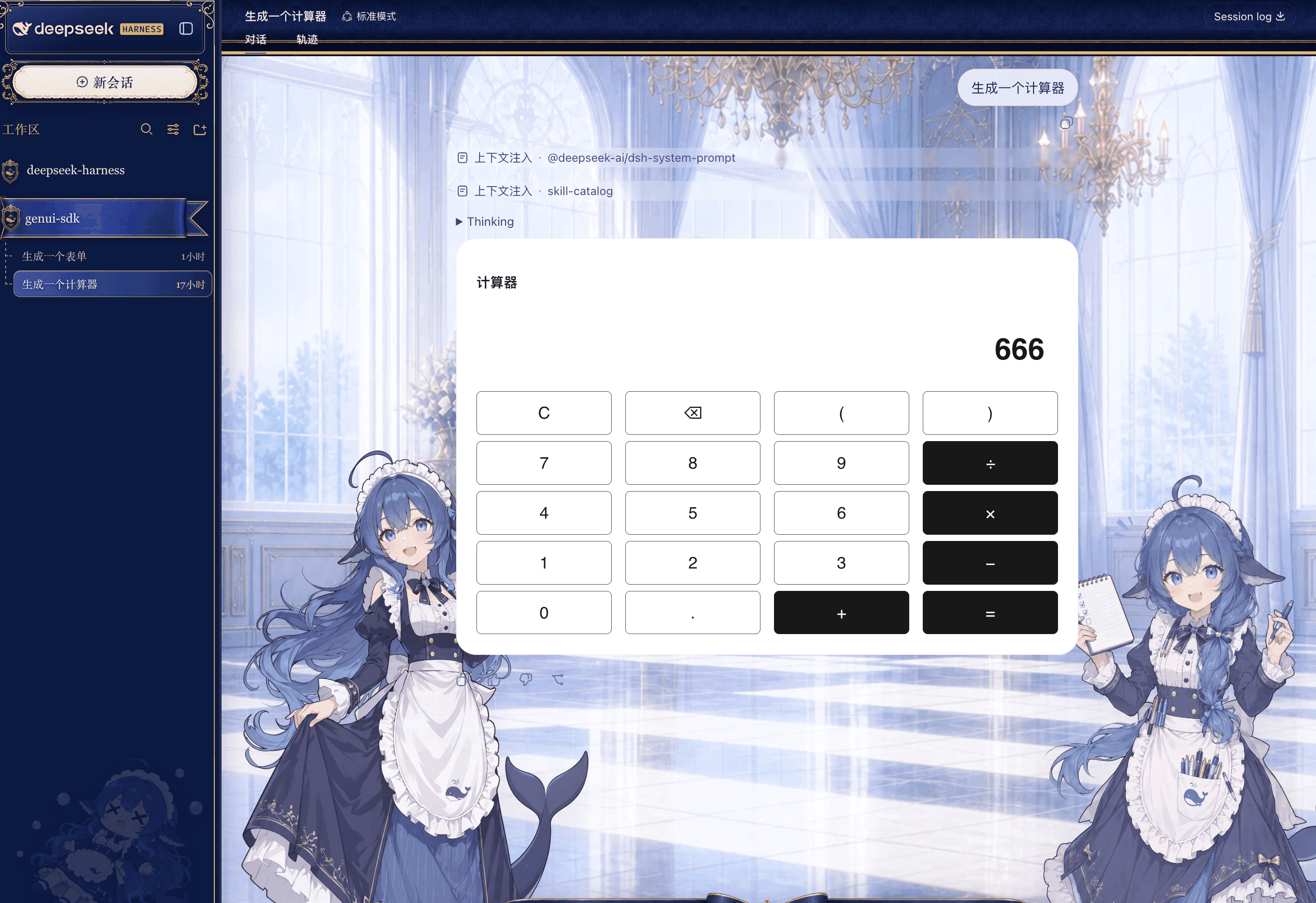
"Generate a calculator"
Digits, operators, parentheses, backspace, clear — every key works. That 666 was typed on the keypad, not written into the text by the model.
"Generate a form"
One sentence produces a full project proposal form: required-field validation, radio group, dropdown, headcount stepper, date picker, toggle, checkboxes, long text.
Hit Submit and your answers go back into the conversation, so the AI can rank the priority, draft a schedule, or write the proposal for you.
"Show the last 7 days of traffic as a line chart"
Two series, legend, axes, gridlines — a rendered chart, not ASCII art.
Before and after
| Situation | Plain chat | With dsh-genui |
|---|---|---|
| You need a tool | The AI hands you code to run yourself | The tool appears in the reply, usable right away |
| Collecting input | "Please provide the following 8 items", typed one by one | One form: pick, fill, submit |
| Reading data | Text tables, trends left to imagination | Lines, bars, pies — the trend is obvious |
| Making a choice | You reply "option B" | Click a button, the choice carries into the next turn |
| Setup cost | — | One dsh plugin add, no source changes |
What you can ask for
Just talk normally. You never write JSON or learn a syntax. Each category below includes a prompt you can copy as-is.
Data: charts
Bar, line, pie, ring, radar, gauge, funnel, scatter, waterfall, and other common chart types.
"Chart revenue for the last three quarters as bars, and mark year-over-year growth"
"Show the order split by channel as a pie chart"
"Build a conversion funnel: 100k impressions, 8k clicks, 600 orders, 520 payments"
Good for weekly reports, retros, review decks, and anytime you'd rather not open a spreadsheet.
Input: forms
Text fields, textareas, dropdowns, radios, checkboxes, toggles, number steppers, date pickers, search boxes, transfer lists. Submitted values return to the conversation automatically.
"Make a time-off request form with leave type, start and end date, days, and reason"
"Build a survey asking which features people use most and how satisfied they are"
"Give me a customer intake form, phone number required"
Much nicer than being interrogated over eight turns — fill it in once and you're done.
Tools: little apps
The fun category. One sentence, and the AI builds you something that actually works.
…

