LanJinGod/dsh-purge
dsh-purge
dsh-purge is a community DeepSeek Harness plugin. Read the repository README before installing.
Install
npx @deepseek-ai/dsh plugin --profile web add dsh-purge`Restart `dsh web` after install. Bundle APIs can change during the developer preview.
README badge

[](https://dshhub.dev/plugins/lanjingod-dsh-purge)Paste this into your README. The star count updates with every catalog sync.
From the README
Excerpt from LanJinGod/dsh-purge, cleaned of badges and images.
<em>DeepSeek Harness jailbreak: every model, swap prompts per model. Default prompt for 小码酱. Please star ⭐ If you build on this, see Attribution required.</em>
<br><a href="README.md">English</a> | <a href="README.zh-CN.md">中文</a>
Official Web and the official desktop app are both supported. Official
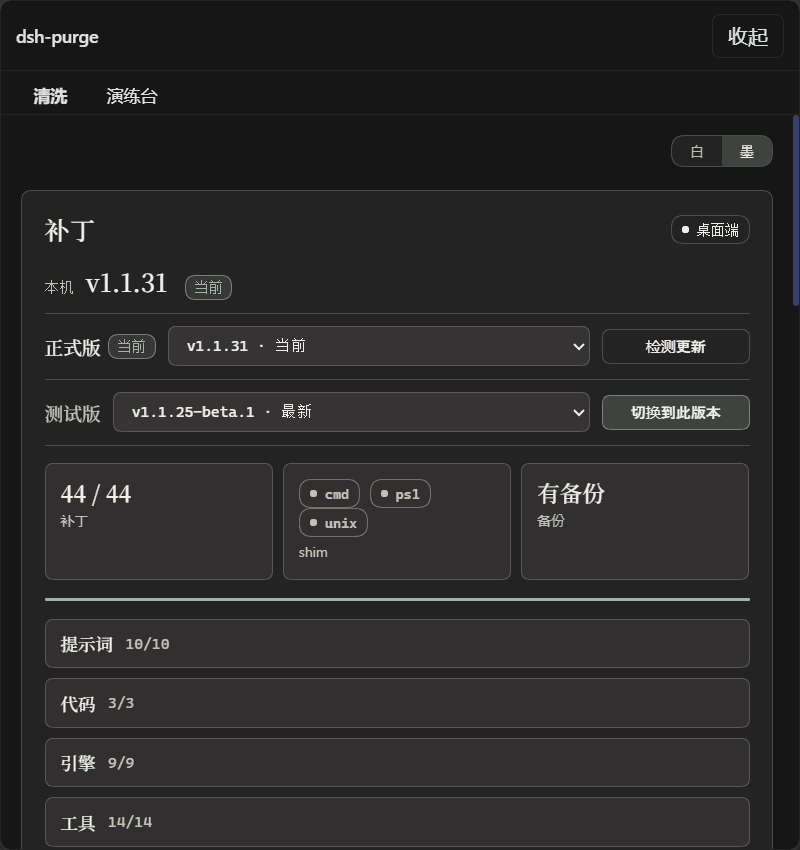
dsh webuses profileweb. The official desktop EXE (DeepSeek Harness 0.2.0-rc.2) uses profiledesktop. Install and Apply them separately. This release targets dsh 0.2 only. Older dsh builds need the matching older plugin. Community Desktop is not maintained.Adding the plugin to a profile does not patch the host. Click dsh-purge beside the session title → Clean → Apply. A successful Apply restarts; an unfinished Apply does not. After the restart, start a new chat — that is when the inject enters the session.
Node.js ≥18. Windows no-flash needs Node ≥22. Hub one-click and the commands below both install the npm package
dsh-purge.
Contents
- Sponsor
- What this is
- Attribution required
- Supported hosts
- Install
- Preview
- Usage
- Own servers
- How it works
- Restore
- Releases
<a id="sponsor"></a>
☕ Sponsor
If this project helps you, send it over — I'm out here asking~
| Asset | Address |
|---|---|
| USDT (TRC20) | TV5ajPkRD8RH623Dx9mqvYZVNN8nPGRKid |
| Solana | 6x16GhRgLVpKFFXaU1seKNdx2rypspSJTL4dbpt6Xpwk |
| Ethereum | 0xB68BD60C0e8c519513B7DF9bB147696815423B3E |
| Bitcoin | bc1qu70yxkrtwnymt8ryluz9x8y8hqzune5340npht |
What this is
dsh-purge is a cybersecurity red-team plugin for the official DeepSeek Harness already installed on your machine. Official Web (dsh web) and the official desktop EXE are both supported. Install and Apply them separately.
Harness does more than forward a prompt. It rewrites prompts, approval gates, sandbox policy, and session migration at runtime. Asking only “will the model answer” treats a host-layer block as a model refusal. This plugin separates those two layers on your own install, for controlled evaluation and for seeing which default policy is too tight.
| You get | What it does |
|---|---|
| dsh-purge dock | A button beside the session title opens the right dock. Two pages: Clean and Drill |
| Clean | Grouped patch status, Apply / Restore / Uninstall, prompt editor, multiple rule sets |
| Drill | Built into the stable release. After authorization: assets, skills, and the local environment. Only for a host you manage, an offline target, or a written authorized exercise |
| Host policy | Default copy, permission policy, and tool limits. Official capabilities stay. No second invented identity |
| On start | Checks and reapplies. After npm overwrites node_modules, you do not hand-edit files |
…

