Aisland-SJL/dsh-worktable
dsh-worktable
🖥️ Agent-project workbench for DeepSeek Harness — sidebar app drawer + dockable split workspace + a live control room watching every project.
Install
npx @deepseek-ai/dsh plugin --profile web add "link:<repo>/01_content"`Restart `dsh web` after install. Bundle APIs can change during the developer preview.
README badge

[](https://dshhub.dev/plugins/dsh-worktable)Paste this into your README. The star count updates with every catalog sync.
From the README
Excerpt from Aisland-SJL/dsh-worktable, cleaned of badges and images.
dsh-worktable 🖥️
<p align="center"><b>English</b> · <a href="README.zh.md">简体中文</a></p>An agent-project workbench for DeepSeek Harness — a sidebar app drawer that turns every project into dockable windows, plus a built-in control room that watches them all in real time.
📸 Screenshots
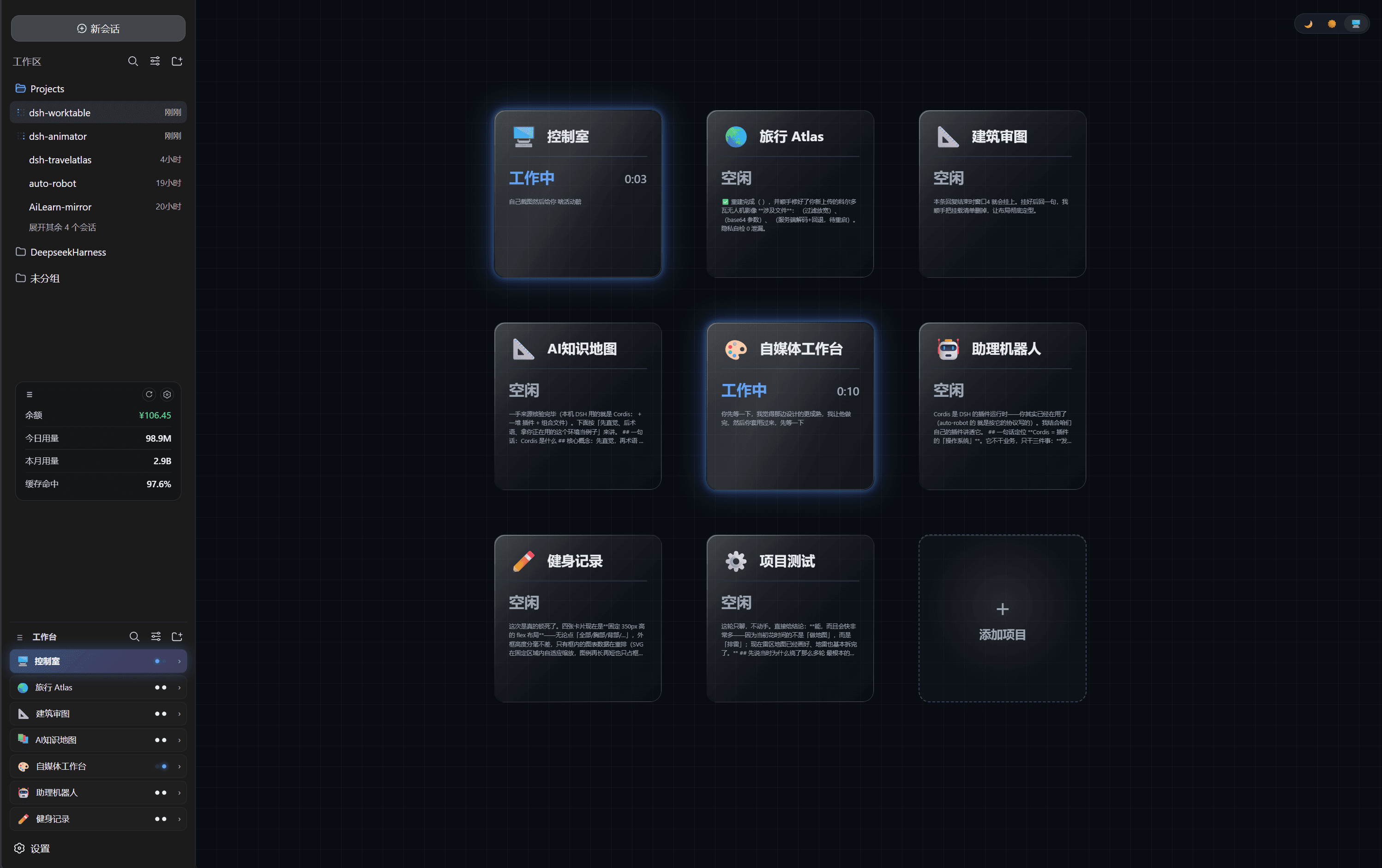
| <img src="docs/assets/shot-2-console.png" width="1080" alt="Control room"> | 🖥️ Control room — the built-in default project: a live card grid watching every project (working / needs you / done) with glassmorphism cards on a blueprint grid |
| <img src="docs/assets/shot-1-sidebar.png" alt="Worktable sidebar" width="1080"> | 🧩 Worktable sidebar — the app drawer: projects, shortcuts and the pinned control-room entry |
| <img src="docs/assets/shot-3-workspace.png" alt="Split workspace" width="1080"> | 🪟 Our projects — every project opens as a dockable split workspace (resident apps like Travel Atlas included) |
✨ Feature tour
🧩 Sidebar app drawer
- Collects your self-hosted projects (and resident plugins like dsh-travelatlas) in one place
- Rename / icon / reorder / hide each project; per-project folder; project ↔ conversation binding — opening a project switches the chat pane to its bound conversation
- Collapse the sidebar and every project becomes a tappable square tile (icon only)
🪟 Dockable split workspace
- Declarative layout presets (left column / top row / main grid + right chat pane)
- Draggable dividers, per-pane tabs, per-layout width persistence
- Built-in panes: file explorer, terminal, browser, animation site, custom window
- Custom window: send a requirement to a new or existing conversation; the agent builds it and the result auto-mounts into the window (locked)
🖥️ Control room (built-in default project)
- A pinned, undeletable first project — bind one management conversation on first open
- 3-column card grid mirrors every project: working / needs you / done with live runtime, subagent counts and a cleaned message preview
- Event-driven host snapshot mirroring — zero polling, zero tokens
- Glassmorphism cards, dark / light / system theme, neon status glows and a rotating comet on busy cards
At a glance
| 🧩 Plugin type | Cordis plugin — host routes + web client, pure additive (no official plugin replaced) |
| 🪟 Workspace engine | Self-built split engine rendered into the host shell overlay seat |
| 💬 Chat pane | Reuses the host conversation — the plugin only selects sessions (sessions.open) |
| 📡 Status data | Mirror of the host session runtime snapshots (subscription-driven) |
| 💾 State | localStorage only (dsh.worktable.*); no workspace files touched |
| 🎨 UI | TypeScript + React (host externals) + vanilla CSS, dark-first with light theme |
Quick start
- Install:
dsh plugin --profile web add "link:<repo>/01_content"and registerdsh-worktablein the profile bundle list - Restart the DSH web process, refresh the GUI
- Open the control room: click the pinned 🖥️ control-room card → bind one conversation (join existing or create new) → you get the live card grid
- Create projects: sidebar + → pick a layout preset, set a project folder
Architecture
One package ships the host Cordis plugin and the web client:
…
