Jiyr0119/dsh-workspace-explorer
dsh-workspace-explorer
Workspace file explorer plugin for DeepSeek Harness: right-side file tree panel, click or drag file references into the composer, native DSH look
Install
npx @deepseek-ai/dsh plugin --profile web add -wRestart `dsh web` after install. Bundle APIs can change during the developer preview.
README badge

[](https://dshhub.dev/plugins/dsh-workspace-explorer)Paste this into your README. The star count updates with every catalog sync.
From the README
Excerpt from Jiyr0119/dsh-workspace-explorer, cleaned of badges and images.
dsh-workspace-explorer
⭐ If you find this useful, give it a Star — it makes the author's day · <a href="https://github.com/Jiyr0119/dsh-workspace-explorer">★ Give a Star</a>
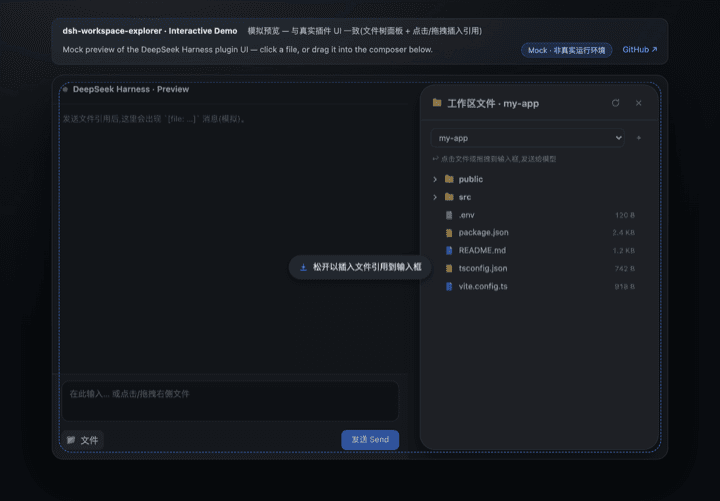
A workspace file explorer for the DeepSeek Harness Web UI: a “Workspace Files” capsule button in the session header (feature name + folder icon, beside the Session log button) opens an animated popup showing the current workspace's directory tree — click or drag a file to send its reference to the model.
Inspired by the VS Code / Cursor project tree, filling the gap of a missing directory view in DSH after workspaces are added.
🖥 Demo
Demo GIF (recorded at v0.5.1): the “Workspace Files” pill entry, multi-select batch insert, folder drag → compact tree text, paginated preview, and the settings tab. The v0.6.0 split-view preview and file editing are shown in the screenshots below.
<b>Screenshots</b> · 截图
Features
- 📂 Animated popup — a “Workspace Files” capsule button (feature name + folder icon, same style as the native Session log download button) sits in the session header and opens a floating panel with a spring-like fade/scale-in animation; the popup is measured live to sit between the session header and the composer (the chat area's right side), so it never covers the input box
- 🗂 Top tab bar — click at the top of the panel to switch between Files and Settings; the Settings page tunes behavior live (hide noise dirs, show sizes, reference format, preview lines, panel width) and mirrors into DSH Settings → Workspace Explorer
- 🗂 Lazy-loading tree — directories load on demand; noise dirs (
node_modules,.git,dist,__pycache__, …) are hidden automatically - 🎨 File-type icons — filled, color-coded document badges per extension (TS / JS / Python / JSON / Markdown / image / config / shell, …); amber folders that brighten when expanded
- 🖱 Click to insert — click a file row to append a
[file: relative-path]reference to the composer; after sending, the model resolves it with itsreadtool - 🖱 Drag & drop — drop a file into the composer to insert at the caret (fullscreen dashed hint); dropping elsewhere appends to the end. Folders are draggable too — dropping a directory inserts a depth-limited compact tree listing
- 🖱 Multi-select & batch insert — Shift / ⌘ click to select multiple rows, then insert all of them at once (files → references, folders → tree listings)
- 🌓 Theme-aware — built entirely on DSH's
--dsw-alias-*design tokens; adapts to light/dark with a native dialog look (16px radius, lv3 shadow) - 🔍 Search & filter — filter files by name across loaded directories (flat result list with a match count)
- 👁 Paginated preview — preview any text file with prev/next line paging (total lines & current page shown); insert the reference, or paste the full content for small files (≤ 32 KB)
- ✏️ Split view preview — click the 👁 icon before any file to open a 340px left-side preview panel; the file tree stays visible on the right for easy navigation
- 📝 File editing — click "Edit" in the preview panel to enter textarea mode; save writes directly to disk with change detection (warns if the file was modified externally)
- 🌐 i18n — zh/en dictionaries registered through DSH's locale service; the panel follows the DSH UI language
Quick Start
Installation & usage
…

