ayahunter/dsh-trail
dsh-trail-workspace
dsh-trail-workspace is a community DeepSeek Harness plugin. Read the repository README before installing.
Install
npx @deepseek-ai/dsh plugin --profile web add dsh-trailRestart `dsh web` after install. Bundle APIs can change during the developer preview.
README badge

[](https://dshhub.dev/plugins/dsh-trail)Paste this into your README. The star count updates with every catalog sync.
From the README
Excerpt from ayahunter/dsh-trail, cleaned of badges and images.
dsh-trail
Friendly Trajectory — a new-user-friendly replacement for the DeepSeek Harness Web "轨迹" (Trajectory) tab: the raw event ledger becomes a storyline anyone can read.
中文 · Usage · Development
The built-in trajectory view is a power tool: untranslated jargon with no legend, five
toolbar toggles, a zoomable/draggable timeline, a separate inspector, and an event table
that never answers "what did I ask → what did the AI do → what came back". dsh-trail
replaces that tab with a storyline design — one collapsible card per round,
plain-language tool names, inline argument previews, and guidance for every state. It
reads only the session snapshot, adds no Host half, and uninstalling restores the
original view.
Features
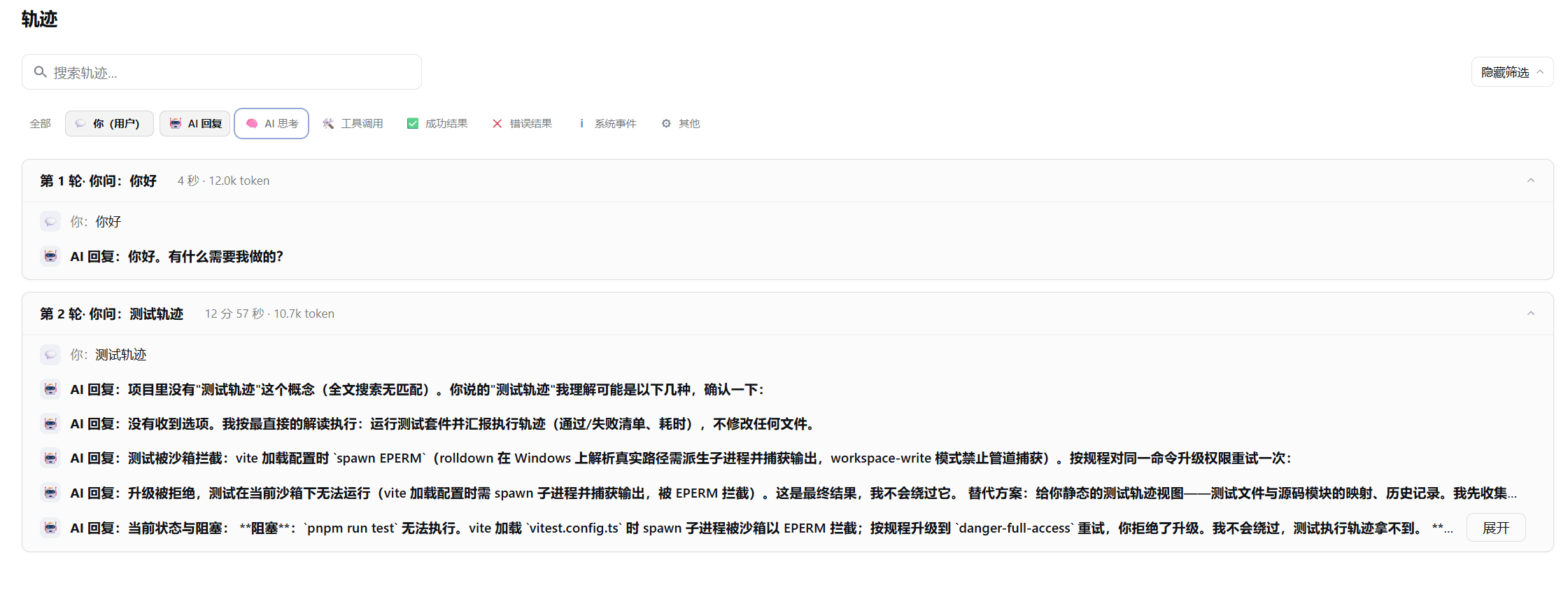
- Turn cards — one card per round: what you asked → what the AI thought → which tools it called → the outcome, with duration, model and token meta when present.
- Plain-language tool labels —
readrenders as 读取文件 (read a file) with a one-line note; unknown tools fall back gracefully. - Inline argument previews — the touched file or command is visible on the row; raw arguments, results, timing and error metadata fold into a Details toggle.
- Category filter — 全部 (all) plus eight row categories, combinable and remembered across sessions.
- Fuzzy search — ignores case, punctuation and full-width forms; multi-word terms match as ordered subsequences.
- Live round — dashed card with status pills (thinking / generating / running tool · elapsed) and a spinner; durations are never fabricated.
- Zero product coupling — renders purely from top-level session snapshot fields; no Host half, no new data endpoints.
Screenshots
The Friendly Trajectory view inside the official Web GUI — turn cards summarize each round, and reasoning, tool arguments and full replies stay folded until expanded:
Install
dsh plugin --profile web add dsh-trail dsh-trail-bundle
Restart the profile and open any session: the 轨迹 tab is now the storyline view. The
bundle disables the shipped ui-trajectory row and mounts this view in its place, so
exactly one 轨迹 tab remains.
To go back to the original view:
dsh plugin --profile web remove dsh-trail dsh-trail-bundle
Update
dsh plugin --profile web update dsh-trail dsh-trail-bundle
Upgrades are never applied automatically; restart the profile afterwards. Two pnpm
behaviors can make an update look stale right after a release: the registry metadata
cache and the 24-hour minimumReleaseAge supply-chain policy for freshly published
versions. If update reports "Already up to date" while npm shows a newer version,
clear the cache (pnpm cache delete dsh-trail) or pin explicitly
(dsh plugin --profile web add dsh-trail@<version> dsh-trail-bundle).
Quick start
Open a conversation and click 轨迹. Read it top-down as a story: expand any folded reasoning or reply with 展开, and open 详情 on a tool row for raw arguments, results, timing and tokens. Use the search box to jump to a file or command, and the category bar to isolate e.g. only 工具 rows — both stay applied while you browse.
Architecture
…
