HiWhaleW/dsh-toolbox
dsh-toolbox
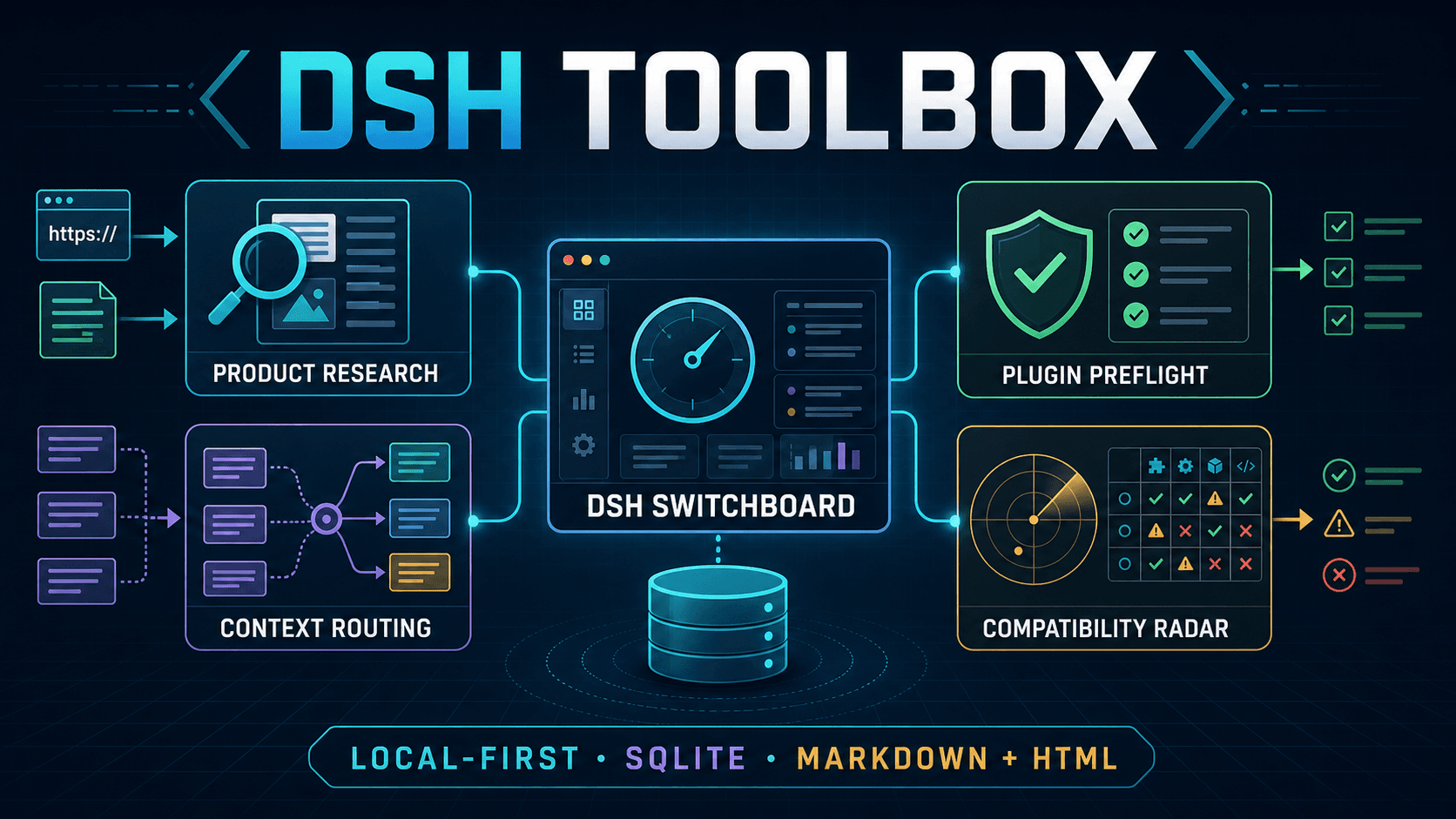
Local-first DeepSeek Harness plugins for product research, context routing, plugin preflight, and compatibility monitoring.
Install
npx @deepseek-ai/dsh plugin --profile toolbox add ./dist/dsh-toolbox-product-research-workbench-0.2.1.tgzRestart `dsh web` after install. Bundle APIs can change during the developer preview.
README badge

[](https://dshhub.dev/plugins/dsh-toolbox)Paste this into your README. The star count updates with every catalog sync.
From the README
Excerpt from HiWhaleW/dsh-toolbox, cleaned of badges and images.
给 DeepSeek Harness 的本地工具箱。<br> 产品研究、上下文切换、插件预检和兼容性监控,都收进一个安全的可视化控制台。
<a href="https://dsh-toolbox.lisongyang0130.chatgpt.site"><strong>在线交互演示</strong></a> · <a href="#five-minute-installation"><strong>五分钟安装</strong></a> · <a href="https://github.com/HiWhaleW/dsh-toolbox/issues"><strong>反馈问题</strong></a>
[!NOTE] 在线版是安全演示:健康检查、Bundle 开关、变更计划、活动和回滚只在当前浏览器内存中模拟,刷新即复原。它不会连接访客电脑,也不会读取 DSH Profile、API 凭据或 SQLite 数据。安装本地版后才会接通真实 DSH 链路。
[!IMPORTANT] Experimental MVP · 仅限非商业用途。 DeepSeek Harness 仍处于 Developer Preview,版本升级可能影响 Profile Bundle 兼容性。本项目独立开发,与 DeepSeek 无隶属或背书关系。
DSH Toolbox 是什么
DSH Toolbox 是给单人本地工作流准备的 DeepSeek Harness 配套工具。四个插件作为原生 DSH Profile Bundles 运行;DSH Switchboard 则位于当前 Harness 进程之外,负责查看 Profile、运行健康检查、预览 Bundle 变更、创建备份并安全回滚。
默认没有账号、托管后端、行为分析、遥测、后台注册表检查或自动升级。真实运行数据保存在本机 SQLite;需要修改 Profile 时,一定先生成计划,用户确认后才写入,并保存可追溯的事务记录。
五个组成部分
| 组件 | 日常用途 | 工具数 |
|---|---|---|
@dsh-toolbox/product-research-workbench | 导入 URL/文本证据,整理发现、评估机会、备份项目并生成 Markdown/HTML 报告。 | 12 |
@dsh-toolbox/context-switchboard | 把任务路由到有边界的上下文,激活原生运行时上下文并支持回滚。 | 10 |
@dsh-toolbox/plugin-preflight | 安装前检查本地 Bundle 的包语义、能力、策略、SBOM 与指纹。 | 2 |
@dsh-toolbox/compatibility-radar | 发现 Bundle,对比目标运行时,保存/比较快照并生成升级报告。 | 7 |
@dsh-toolbox/dsh-switchboard | 发现 DSH Profile、检查 Bundle、规划变更、验证、备份、报告与回滚。 | CLI / 控制面 |
前四项是可以独立安装的 DSH Profile Bundles;第五项是统一的本地控制面。Product Research Workbench 和相关报告支持 Markdown + HTML 输出,运行数据默认使用 SQLite 保存。
在线演示与本地完整版
| 能力 | 在线演示 | 本地完整版 |
|---|---|---|
| 查看四个页面和固定右侧活动栏 | 可用 | 可用 |
| 切换 Profile、筛选活动、审阅 Bundle 计划 | 浏览器内存模拟 | 连接真实本地数据 |
运行 dsh --dump-config 健康检查 | 模拟成功结果 | 真实执行 |
| 写入 Profile、备份、回滚、生成报告 | 不写入,刷新即复原 | 计划确认后真实执行 |
| 数据去向 | 当前浏览器内存 | 用户电脑上的 SQLite 与私有目录 |
Requirements
- Node.js
^22.19.0 || >=24.0.0(node:sqliteis built in) - npm, for packing the local bundles
@deepseek-ai/[email protected]- A local DSH profile you are allowed to modify
Read-only Switchboard inspection works without the DSH CLI on PATH. Applying or rolling back a change requires the CLI by default because a successful dsh --profile <name> --dump-config is the runtime safety gate.
The tested runtime combination is:
| Component | Tested version |
|---|---|
| DeepSeek Harness | 0.1.1-rc.2 |
| DSH Tools | 0.1.1-rc.2 |
| Cordis | 4.0.1 |
| Node.js | 24.x and the declared 22.19+ range |
Install the pinned DSH CLI if it is not already available:
npm install --global @deepseek-ai/[email protected]
dsh --version
Five-minute installation
Clone the source, create the four npm tarballs, and install them into one DSH profile:
git clone https://github.com/HiWhaleW/dsh-toolbox.git
cd dsh-toolbox

mkdir -p dist
npm pack --workspace @dsh-toolbox/product-research-workbench --pack-destination dist
npm pack --workspace @dsh-toolbox/context-switchboard --pack-destination dist
npm pack --workspace @dsh-toolbox/plugin-preflight --pack-destination dist
npm pack --workspace @dsh-toolbox/compatibility-radar --pack-destination dist

…
