miuzel/dsh-subagent-ui
dsh-subagent-workspace-ui
Searchable workspace subagent manager for DeepSeek Harness Web
Install
npx @deepseek-ai/dsh plugin --profile web add file:.Restart `dsh web` after install. Bundle APIs can change during the developer preview.
README badge

[](https://dshhub.dev/plugins/dsh-subagent-ui)Paste this into your README. The star count updates with every catalog sync.
From the README
Excerpt from miuzel/dsh-subagent-ui, cleaned of badges and images.
DSH Subagent Workspace UI
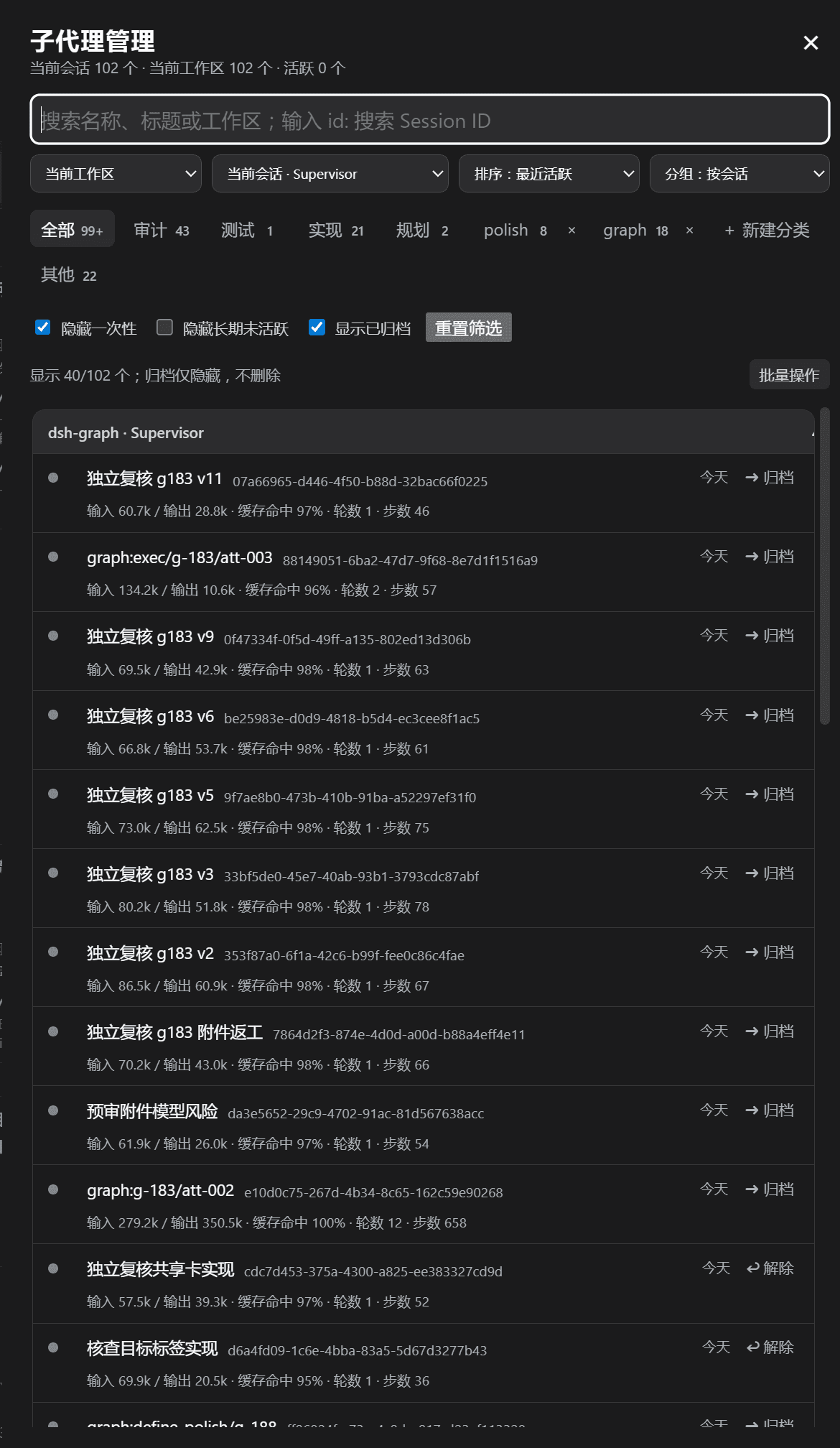
A Web client plugin that adds a 子代理管理 button to the conversation-header action row. It opens a searchable panel for the subagents currently discovered by the DSH client runtime.
Features
- Compact title-bar trigger shows the active-child count and animated activity dot without opening the panel.
- Defaults to the main session's current workspace and current session, even when the user is viewing a child session.
- Workspace and session selectors support current workspace, all workspaces, named workspaces, current session, and named sessions.
- Sort by recent activity, name, or type; recently running children remain near the top after they finish.
- Group by session, workspace, category, type, or no grouping. Session headers show the workspace and parent session name.
- Browser-local classification tabs support custom regular expressions. Built-ins include all, other, review, test, implementation, and planning.
- One-shot children carry a compact
⚡ 一次性badge; continuable children remain visually uncluttered. - Archive state is local and never deletes a DSH session. Single-row archive actions and a batch mode support shift-selection, select-all, time-based selection (up to 1,000 rows), batch archive, restore, and archive-all.
- Load catalogs in pages of 40 with an independent wheel-scroll container; batch time selection expands loading up to 1,000 children.
- Batch mode changes cards into selection targets and hides individual archive/restore actions. The highlighted 完成 button exits batch mode.
- Open a loaded child at its exact
{ parentSessionId, childSessionId, mode }address. In normal mode the whole card opens the child; archive controls do not. - Show session IDs beside names, compact metadata, token totals, and creation time in the relative-time tooltip.
- Active children are grouped at the top in a collapsible section. When the runtime exposes conversation snapshots, the panel shows the latest two lines of live output, recent tool calls, context injection, command status, and a gray final snapshot after completion.
Screenshot guide
The screenshots demonstrate the compact manager and active-agent floating panel:
- Header — title, current-session/workspace counts, and close action.
- Search and scope row — ordinary name/title/workspace search, with
id: xxxreserved for Session ID search; workspace, session, sorting, and grouping selectors stay on one compact row. - Classification row — built-in and custom categories, with custom-category deletion inside the same tab frame.
- Filter row — hide one-shot, hide stale children, show archived, and reset filters.
- Results — collapsible active group, workspace/session group headers, Session ID beside each name, relative activity time, and archive status.
- Live activity — when available, the last two output lines or the latest tool/context status appear at the bottom of the card; the final snapshot remains gray after completion.
Install in the Web profile
From this directory:
dsh plugin --profile web add file:.
The bundle includes cordis.patch.yml, which inserts the manager and disables DSH’s stock ui-subagent lineage dropdown while the package is installed. Removing the package removes this bundle layer and restores the underlying ui-subagent setting. Restart the existing dsh web process, then refresh http://127.0.0.1:3080 after the plugin is available.
…
