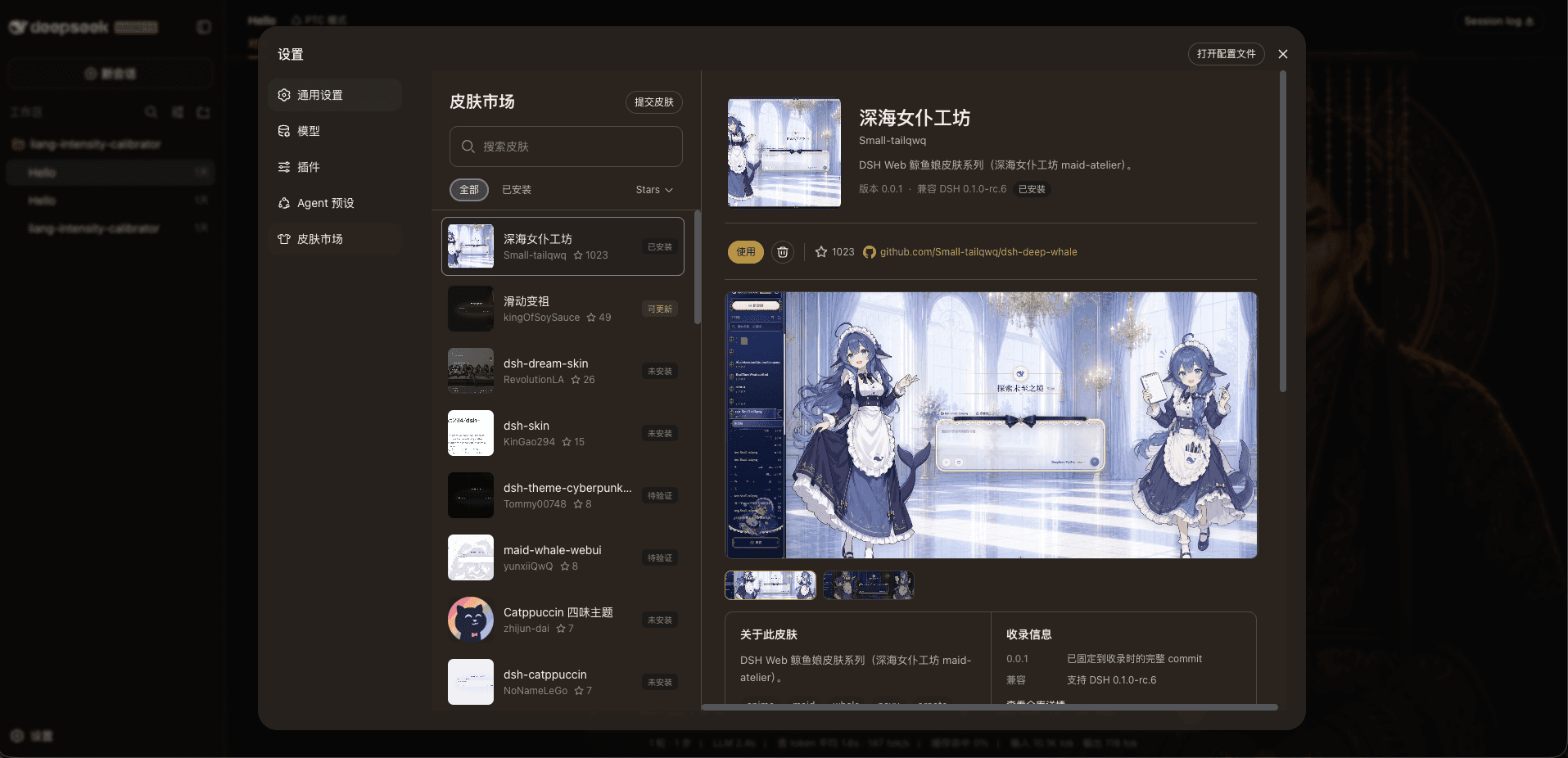
kingOfSoySauce/dsh-skin-market
dsh-skin-market
dsh-skin-market is a community DeepSeek Harness plugin. Read the repository README before installing.
Install
npx @deepseek-ai/dsh plugin --profile web add "dsh-skin-market@latest"Restart `dsh web` after install. Bundle APIs can change during the developer preview.
README badge

[](https://dshhub.dev/plugins/dsh-skin-market)Paste this into your README. The star count updates with every catalog sync.
From the README
Excerpt from kingOfSoySauce/dsh-skin-market, cleaned of badges and images.
DSH 皮肤市场
一个嵌入 DSH 设置页的皮肤市场,可以浏览、安装、使用、停用、更新和卸载社区皮肤。
在线预览
近期收录
- 2026-08-21:UniverFV/dsh-Furina-theme(
0.1.0)——芙宁娜主题 Furina Theme - 更多请查看收录日志
安装
方式一,命令安装:
安装前请确保已关闭其他皮肤插件,避免冲突
dsh plugin --profile web add "dsh-skin-market@latest"
方式二,提示词安装:
<strong>点击展开提示词</strong>
复制以下给 DSH 即可,会先检查冲突,再安装皮肤市场
请把 dsh-skin-market 插件安装到 DSH 的 web profile。不能先安装再检查,必须严格按以下顺序执行:

1. 安装前只读检查 web profile 的 package.json(dependencies 与 dsh.profile.bundles)、profile 的 cordis.patch.yml 和 $DSH_HOME/cordis.patch.yml(如有)。
2. 从当前启用的 bundles 中识别皮肤、主题或外观插件:排除 @deepseek-ai/dsh-base、@deepseek-ai/dsh-web-app 和 dsh-skin-market;读取候选 package.json 的名称、描述、dsh.client/dsh.bundle 声明,必要时再读 README。无法确定的候选先列出包名和描述。
3. 如果发现已启用的皮肤插件,列出它们并停在安装前,提醒我先停用以避免冲突;未经我确认不得修改任何 profile 文件,也不得执行安装。
4. 如果没有冲突,明确说“未检测到已启用的皮肤插件”,然后直接执行:

dsh plugin --profile web add "dsh-skin-market@latest"

5. 安装后读取 web profile 的 package.json,确认 dependencies 和 dsh.profile.bundles 中都有 dsh-skin-market;缺失则报告安装或注册失败。
6. 告诉我如何重启 DSH Web,并确认重启后可从“设置 → 皮肤市场”打开。不要替我安装任何皮肤。

如果安装命令报错(例如 pnpm 不在 PATH、allowBuilds 构建审批、manifest 缺失),再读 https://github.com/kingOfSoySauce/dsh-skin-market 的 README「安装失败时,可以让 DSH 自己排查」一节处理,或把完整报错贴给我。
安装失败时,可以让 DSH 自己排查
皮肤市场的安装、更新和卸载会调用 DSH 的 profile 插件管理器;当前 DSH 使用
pnpm管理 profile 依赖。如果出现pnpm is not recognized、package manifest missing或allowBuilds相关报错,不必手动猜测 profile 状态。含子目录路径的 GitHub 目标(
github:…#commit&path:/…)请优先用市场页一键安装。Windows 上不要把这段 spec 交给dsh plugin add:cmd.exe 会在&处截断。需要手动安装时用:pnpm add "github:owner/repo#<commit>&path:/subdir" --dir $env:USERPROFILE\.dsh\profiles\web
<strong>点击展开排查提示词</strong>
把完整原始报错填入后复制给你的 DSH Agent:
请帮我排查 DSH Web 皮肤市场的安装失败。下面是完整原始报错:

<把完整报错粘贴到这里>

请严格按以下 3 步处理,并报告每一步的结果:

1. 确认当前使用的 profile 名称和实际目录,并检查 DSH 进程自身是否能找到 pnpm(Windows 同时检查 pnpm.cmd)。如果 pnpm 不在 PATH,先说明如何安装或修复 pnpm,并停止把问题误判为 allowBuilds 配置问题。
2. 只有确认 pnpm 可用后,才检查 profile 的 pnpm-workspace.yaml。若 pnpm 输出了构建审批 key,只把报错中完整、精确的 key 合并到 allowBuilds,对应值设为 true;不要启用 dangerouslyAllowAllBuilds,也不要放宽其他包。不要读取 .env、凭据或聊天记录。
3. 重新执行原来的皮肤安装命令。完成后验证 profile package.json 依赖、node_modules 中目标包的 package.json、dsh.client/dsh.bundle 声明和 loader 注册项;如果仍失败,请指出具体失败阶段和完整错误,不要把 package manifest missing 当作根因。
更新本插件
方式一,页面更新(推荐):
在「设置 → 皮肤市场」标题右侧点击“更新”,完成后会提醒重启 DSH Web。
方式二,命令更新:
dsh plugin --profile web add "dsh-skin-market@latest"
完成后需手动重启 DSH
方式三,提示词更新:
<strong>点击展开提示词</strong>
复制以下内容给 DSH Agent:
请把已安装在 DSH Web profile 的 dsh-skin-market 更新到 npm 最新版本。

请严格按以下顺序执行:
1. 确认当前使用的是 web profile,并读取其 package.json,确认已安装 dsh-skin-market;不要先卸载,也不要修改其他皮肤。
2. 执行:

dsh plugin --profile web add "dsh-skin-market@latest"

3. 更新后重新读取 web profile 的 package.json,确认 dsh-skin-market 依赖和 bundle 注册仍然存在。
4. 告诉我更新前后版本,并提醒我确认没有 Agent 正在运行后重启 DSH Web。不要替我更新或卸载任何社区皮肤。
收录你的皮肤
如果你开发了 DSH 皮肤,先准备一个公开的 GitHub 仓库,再复制下面整段提示词给你的 Agent。把 <你的皮肤仓库地址> 换成真实地址即可。
这不是终端命令,而是交给 Agent 的任务说明:
<strong>点击展开提示词</strong>
复制以下整段提示词给你的 Agent:
请把我的 DSH 皮肤提交到 DSH 皮肤市场。

皮肤仓库:<你的皮肤仓库地址>
目标目录仓库:https://github.com/kingOfSoySauce/dsh-skin-market
目录路径:registry/skins

…

