PolinniZhong/dsh-session-workbench
dsh-session-workbench
dsh-session-workbench is a community DeepSeek Harness plugin. Read the repository README before installing.
Install
npx @deepseek-ai/dsh plugin --profile web add dsh-session-workbenchRestart `dsh web` after install. Bundle APIs can change during the developer preview.
README badge

[](https://dshhub.dev/plugins/dsh-session-workbench)Paste this into your README. The star count updates with every catalog sync.
From the README
Excerpt from PolinniZhong/dsh-session-workbench, cleaned of badges and images.
dsh-session-workbench — Session Workbench for DeepSeek Harness
Search every past session and recall the ones you need as
@references; manage the conversation-view tab bar (show/hide + reorder). One plugin, three entry points.
What it is
DeepSeek Harness ships with a full-text search engine (SQLite FTS5) and cross-session references (@session mention), but neither has a user-facing interface. This plugin adds the missing discover → browse → insert layer:
- Search — full-text search across all your past sessions (all workspaces), with workspace / time-range / archive filters, and cursor pagination;
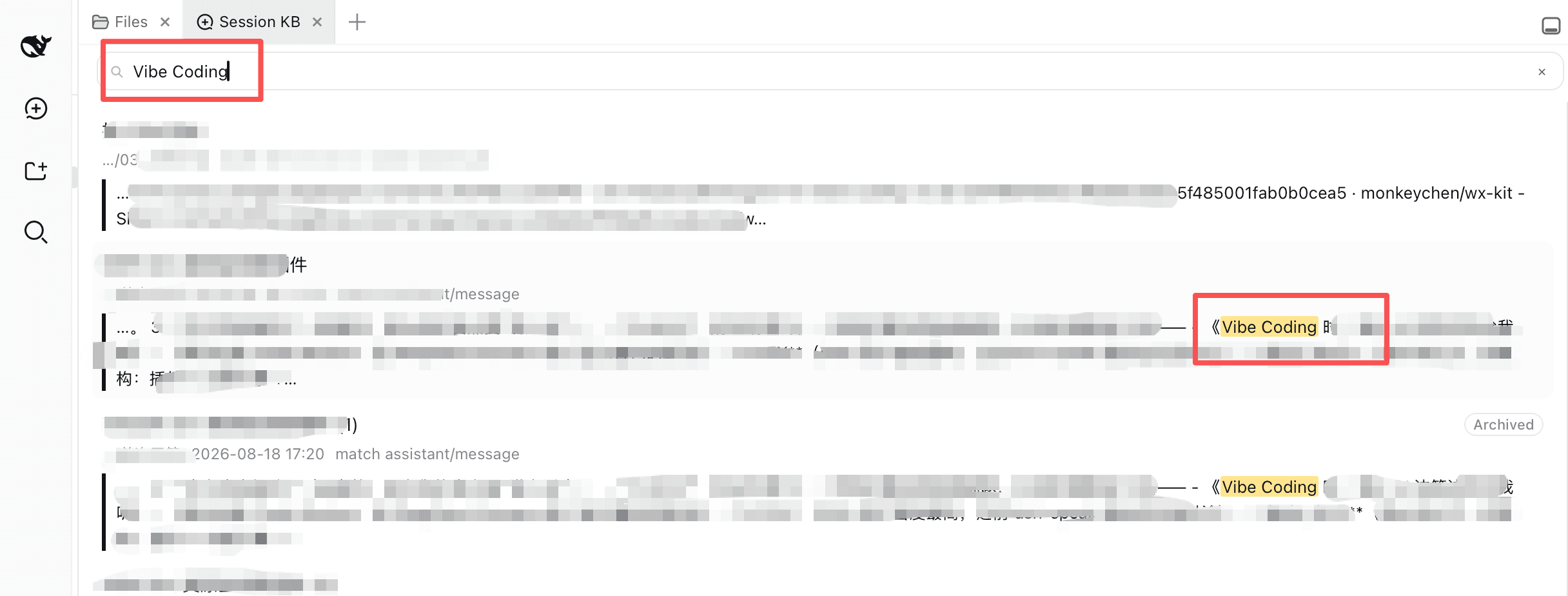
- Fragment hits (v1.1) — results are per-session best-hit fragment cards: the matched sentence highlighted with its surrounding context (lazy-loaded), so you see the sentence, not just which session;
- Same-session hits (v1.2) — expanding a fragment card shows a "More hits in this session" fold with the other matches (first 5, then load more), each highlighted — no more hunting for the rest of a session's matches;
- Locate (v1.1, composite anchors in v1.2) — click Locate on a fragment card to open that session, page the window back, and scroll to the exact message with a flash highlight; v1.2 matches the hit sentence plus its preceding text so repeated wording lands on the right occurrence; when unmatched, a non-blocking toast tells you to scroll manually;
- Recall — pick up to 3 sessions and insert them into the input as reference chips in one click; on send, the platform injects read-only snapshots (
## Referenced sessions) and the AI answers with your historical context; - Recent — a minimal recent-sessions list so you can find things fast without searching;
- Archives — search includes archived sessions by default (with an "Archived" badge and all / active-only / archived-only filters) — after DSH archives a session it's visible nowhere else, so search is the only way back; the Recent list excludes archived sessions by default;
- Settings — enable/disable switch + default search scope + privacy statement;
- Conversation views (new in 1.0.0) — manage the session tab bar: show/hide each custom view and reorder them by drag-and-drop, from both the 会话工作台 settings entry (会话视图 partition) and a right-click / double-click panel on the tab bar itself.
Everything runs fully locally with zero network requests; only session metadata and hit snippets are read, and no session is ever modified or deleted (see PRIVACY.md).
The UI is deliberately native-feeling: every color, spacing, radius, font, and interaction (header row, inline search, grouped menu, pill buttons, checkboxes) is measured from DSH's own design system — better-sidebar, the workspace sidebar, and the settings sections — so the plugin looks and behaves like a built-in feature, not a third-party skin.
Why this plugin (differentiation): ecosystem search plugins stop at "which session"; in-session navigation plugins (10+) only jump within the current session. Session KB is the only plugin that closes the loop cross-session search → snippet-level hit → locate the exact message in the old session → @recall.
Screenshots
Fragment search (v1.1) — searching "Vibe Coding" returns per-session fragment cards: matched sentence highlighted, context below:
…
