robiteame/dsh-session-tree-extension
dsh-session-tree-extension
dsh-session-tree-extension Append-only, multi-branch conversation trees for DeepSeek-Harness — a PI-Agent-style SessionTree. The agent's history becomes a tree of immutable nodes, forkable at any historical node, with standard LLM message reconstruction, versioned JSON snapshots, and a WebUI tree panel embedded in the existing chat composer (no sta
Install
npx @deepseek-ai/dsh plugin --profile <profile> add @robiteame/dsh-session-treeRestart `dsh web` after install. Bundle APIs can change during the developer preview.
README badge

[](https://dshhub.dev/plugins/dsh-session-tree-extension)Paste this into your README. The star count updates with every catalog sync.
From the README
Excerpt from robiteame/dsh-session-tree-extension, cleaned of badges and images.
dsh-session-tree
Append-only, multi-branch conversation trees for DeepSeek-Harness — fork any historical node, clone a branch into a new session, and browse the whole lineage as one merged WebUI graph. Old history is never edited or deleted.
Three commands:
| Command | What it does |
|---|---|
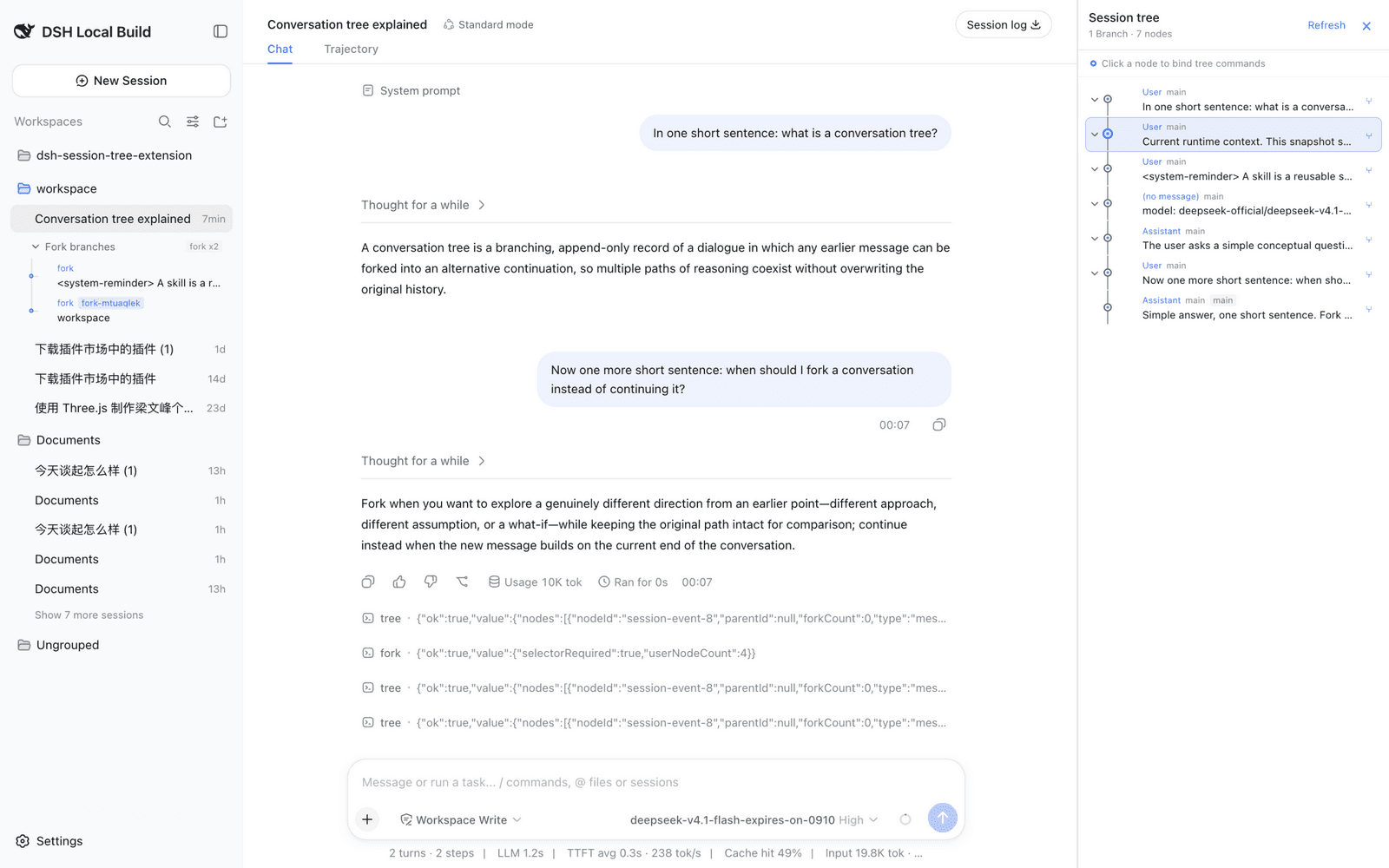
/tree | Open the merged lineage graph: every non-subagent session and node, clickable and bindable |
/fork | Branch from any historical node — the fork appears in the graph and as an inline menu under its source session |
/clone | Duplicate the current conversation into an independent new session under the same project |
Screenshots
Tree panel (light and dark) with the sidebar's inline fork-branch menu:
The inline /fork branch menu beneath its source session:
Published as four npm packages under the @robiteame scope:
| Package | Role |
|---|---|
@robiteame/dsh-session-tree | Carrier Bundle: one install mounts everything below through its composition layer |
@robiteame/dsh-pi-agent-session-tree | Host domain service: the SessionTree/SessionTreeStore domain model and the sessionTree Remote |
@robiteame/dsh-tool-session-tree | Command surface: the /tree /fork /clone commands |
@robiteame/dsh-client-ui-session-tree | WebUI tree panel: additive right-side overlay on official builds, native details dock on patched builds |
Install (users)
One command — from the plugin market UI, or from a Harness checkout's CLI:
dsh plugin --profile <profile> add @robiteame/dsh-session-tree
Prebuilt tarballs install the same way and need no build scripts:
dsh plugin --profile <profile> add robiteame-dsh-session-tree-0.3.0.tgz
After installing, restart the profile. The composition gains three rows
(pi-agent-session-tree, tool-session-tree, ui-session-tree) that load the
Host service, the commands, and the browser panel. Verify the composed layer:
dsh --profile <profile> --dump-config # should list the three session-tree rows
Requires DeepSeek-Harness 0.1.5-rc.2 (or a compatible 0.1.5 build) and
Cordis ^4.0.2; the target installation provides those peers. No install
scripts run — the tarballs ship prebuilt lib/ artifacts.
The three commands
/tree — open the tree panel
/tree opens the right-side panel as one merged graph for the current
session's lineage: ancestors, forks, and clones appear in a single git-style
view, with user messages, assistant replies, tool calls, and model switches
shown as connected nodes. Shared copied prefixes are deduplicated, fork points
carry session badges, and the current session's path stays highlighted. Click
a node to bind it; clicking a node owned by another session opens that session
first. Collapse individual subtrees or whole session branches to focus the
graph.
/fork — branch from any historical node
…
