dingyi222666/dsh-session-notification
dsh-session-notification
dsh-session-notification is a community DeepSeek Harness plugin. Read the repository README before installing.
Install
npx @deepseek-ai/dsh plugin --profile web add @dingyi222666/dsh-session-notificationRestart `dsh web` after install. Bundle APIs can change during the developer preview.
README badge

[](https://dshhub.dev/plugins/dsh-session-notification)Paste this into your README. The star count updates with every catalog sync.
From the README
Excerpt from dingyi222666/dsh-session-notification, cleaned of badges and images.
dsh-session-notification
English | 中文
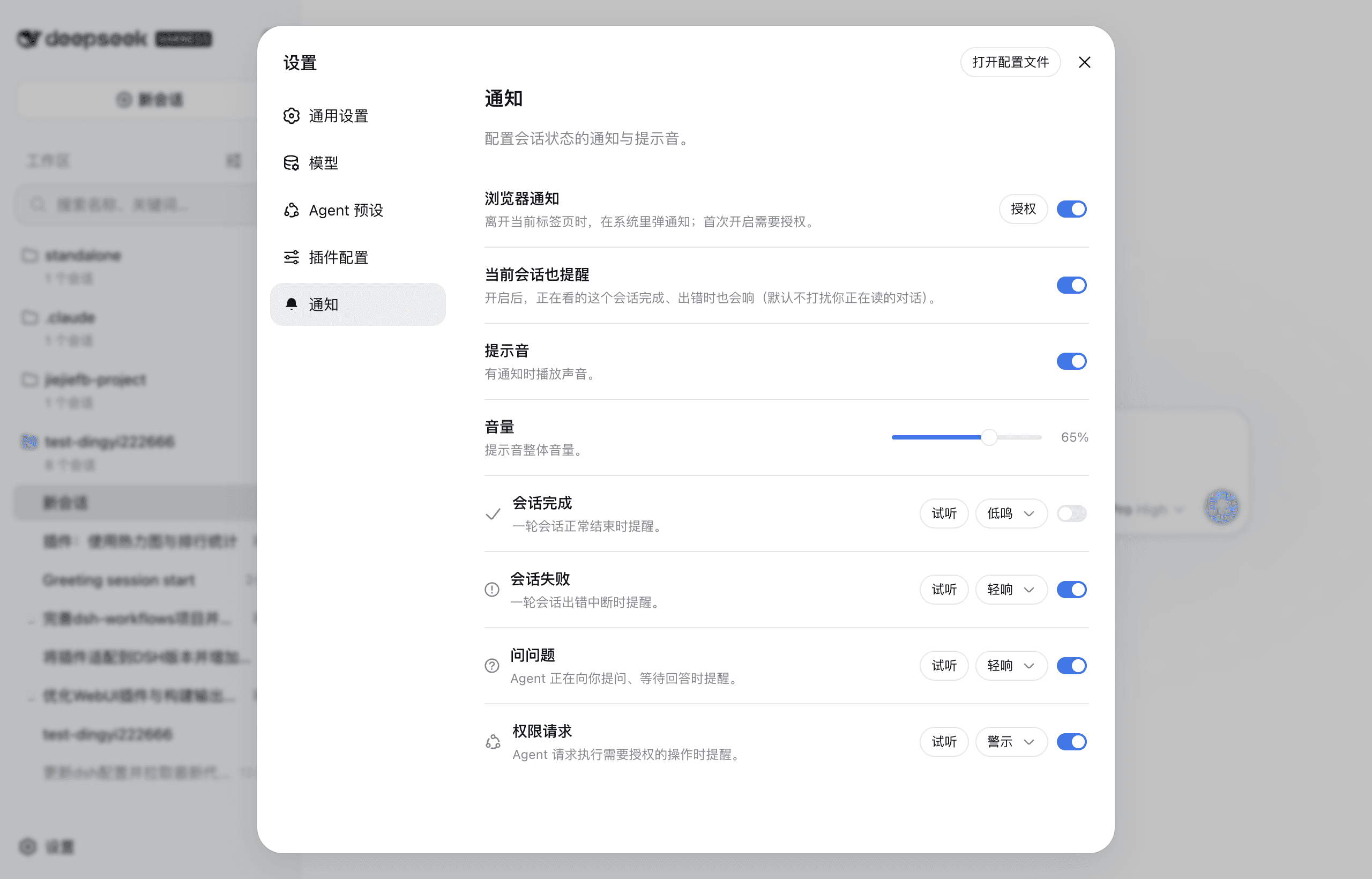
A notification plugin for the dsh web GUI. When a session finishes, hits an error, asks you a question, or needs your permission, you get a heads-up: a sound plays, and when you step away from the tab a system notification keeps you in the loop.
Screenshots
| The settings panel with the Notifications entry in the sidebar and the section content | The sound picker for each kind (the official dropdown) |
|---|---|
Install
# Install from npm (requires dsh >= 0.1.7-rc.2)
dsh plugin --profile web add @dingyi222666/dsh-session-notification
# Restart dsh web for it to take effect
dsh web
Everything lives in this plugin — no harness (host) changes:
- The settings section is registered through the client slot system (
settings.section), exactly like official sections. - Preferences persist in the browser (localStorage) and sync across tabs; nothing requires a host settings namespace or any other host-package change. (dsh 0.1.7 derives plugin config forms from Loader entries, so the node half has no namespace to reserve and stays inert.)
- The settings shell maps only its own section ids to nav icons, so the Notifications nav row shows the shell's default gear.
The four notification kinds
| Kind | When it fires | Default sound |
|---|---|---|
| Session completed | A turn ends normally (turn/end completed) | chime |
| Session failed | A turn breaks with an error, or the host reports an agent error | fault |
| Question asked | The agent is waiting for your answer (question/requested) | pop |
| Permission requested | The agent requests an authorized operation (approval/requested) | alert |
Each kind can be enabled or disabled and reassigned to any of the four built-in sound effects (or muted). The four sounds are synthesized with Web Audio — no audio files are shipped — and the master volume is adjustable with the official-style slider (0–100%). A fixed loudness boost (~+6 dB) with a soft limiter on the playback chain makes every sound noticeably louder without distortion; custom audio feeds the same chain. The shared AudioContext is suspended as soon as playback is over and resumed by the next sound, so an idle notification never keeps the system audio stream (or a macOS sleep assertion) open.
Custom audio
Beyond the four built-in sounds, each kind accepts your own audio file (mp3/ogg/wav, up to 1 MB): pick Custom audio on a kind's row to upload one, and it replaces the built-in for that kind — with a Replace and remove affordance, plus the Custom audio in use tag. Custom files are stored browser-locally (they are device media, not shared preferences).
Browser notifications & the quiet default
Browser (system-level) notifications are off by default; turning the switch on asks for the browser's permission first (a user gesture). Once granted, a notification is shown when the event's session is not the one you are reading, or when the tab is in the background. Notifications carry the page's own icon (the favicon the harness serves). A completed session's notification carries its final reply text (the last assistant message). The Test notification button in the section sends one immediately to verify the channel once permission is granted. The session you are reading stays quiet by default — its own events don't interrupt you; flip the Alert for the current session toggle if you want it to alert too.
…
