SiriLee/dsh-rewind
dsh-rewind-plugin
DeepSeek Harness plugin: in-place conversation rewind in the same session window (Claude Code /rewind semantics) + optional file restore
Install
npx @deepseek-ai/dsh plugin --profile web add dsh-rewind-pluginRestart `dsh web` after install. Bundle APIs can change during the developer preview.
README badge

[](https://dshhub.dev/plugins/dsh-rewind)Paste this into your README. The star count updates with every catalog sync.
From the README
Excerpt from SiriLee/dsh-rewind, cleaned of badges and images.
dsh-rewind
In-place conversation rewind for DeepSeek Harness: Claude Code's /rewind semantics inside the same session window — cut the model context back to an earlier user message, and optionally restore workspace files from disk-persisted before-backups.
English | 中文
A deliberately focused plugin with one job: rewind to any earlier user message, in place.
| Mode | Conversation | Workspace files |
|---|---|---|
| Rewind conversation only | Cut back to the target message | Untouched |
| Rewind conversation and code | Cut back to the target message | Restored to their state before it (modified files written back, later-created files deleted) |
Rewinding is time-travel: the target message and everything after it (agent replies, tool calls) are withdrawn from the model context and the rendered transcript — no new session, no window switch — and the target's text is offered back in the composer so you can edit and re-send it.
The plugin never rewrites the append-only session log and never touches your git repository.
Preview
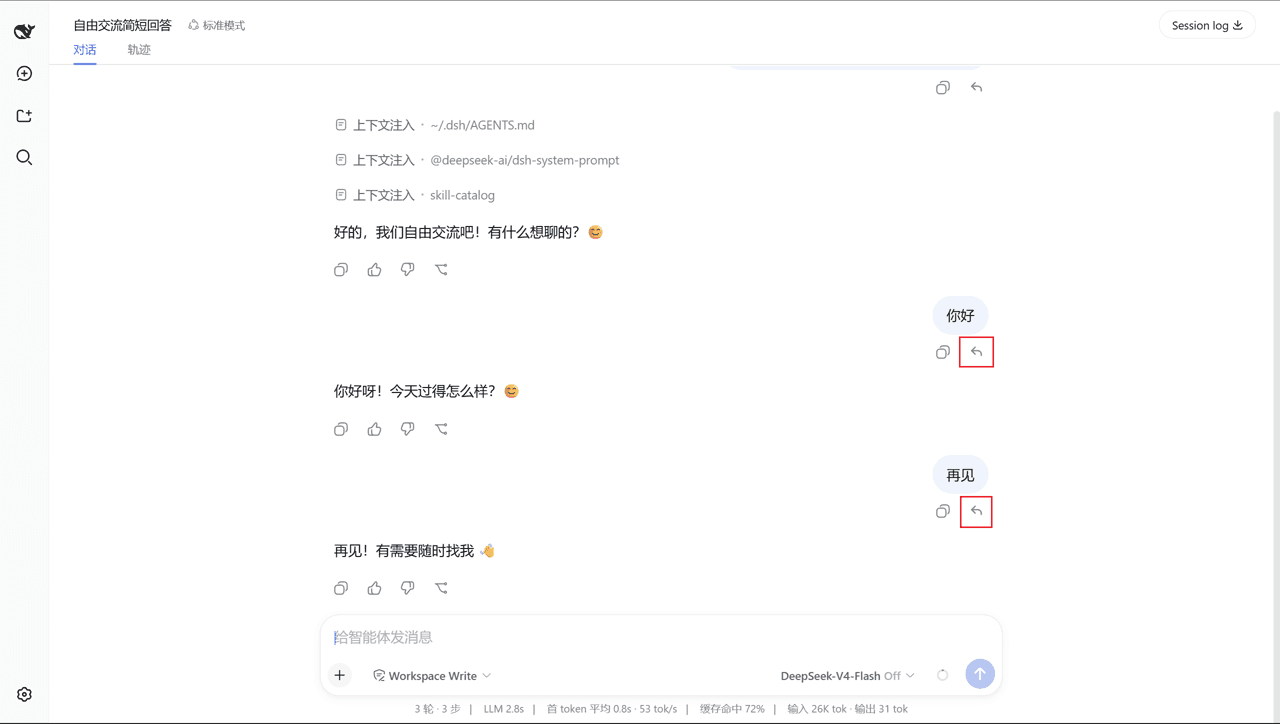
Each user message gains a compact ↶ rewind action in its action row. Clicking it opens a mode-selection popover; "conversation and code" first shows the exact restore / delete list for confirmation (the option is hidden when there are no tracked changes — like Claude Code's code-restore visibility).
<td align="center"><img src="assets/screenshots/rewind-button.png" width="440" alt="Per-message ↶ rewind button"><br><sub>Per-message ↶ rewind button</sub></td>
<td align="center"><img src="assets/screenshots/mode-popover.png" width="440" alt="Mode-selection popover"><br><sub>Mode-selection popover</sub></td>
<td align="center"><img src="assets/screenshots/impact-list.png" width="440" alt="Impact list"><br><sub>"Conversation and code" impact list</sub></td>
<td align="center"><img src="assets/screenshots/rewind-candidates.png" width="440" alt="/rewind candidate picker"><br><sub>/rewind candidate picker</sub></td>
Install
dsh plugin --profile web add dsh-rewind-plugin
Restart dsh web (--profile web) after installing.
⚠️ The npm name
dsh-rewindbelongs to another author's package — install withdsh-rewind-plugin.
For contributors: install from a local checkout or a pinned commit — dsh plugin --profile web add /path/to/dsh-rewind or dsh plugin --profile web add github:SiriLee/dsh-rewind#<sha>. A git install fails on first run until you add an allowBuilds key to the profile's pnpm-workspace.yaml (pnpm blocks git dependencies from running build scripts); after that it runs the plugin's prepare and installs it.
Usage
- Hover any user message you sent — a ↶ rewind button appears in its action row.
- Click it. The target is that message; a small popover offers the two modes ("conversation and code" is hidden when no tracked file changes exist after the target).
- The rewind executes as an in-session command; a result message confirms, and the withdrawn message's text is filled back into the composer for editing and re-sending.
Command-line entry: type a bare /rewind and press Enter to open the candidate picker; selecting a target continues the same flow as the button.
Both the candidate picker and the mode popover support the keyboard: ↑↓ to move, Enter to confirm, Esc to cancel/back.
…

