Chael-Chael/dsh-reference-anything
dsh-reference-anything
Reference Anything in DeepSeek Harness—enhance the @ menu to reference commands, skills, files, DSH sessions, and conversations from external chatbot platforms
Install
npx @deepseek-ai/dsh plugin --profile web add dsh-reference-anythingRestart `dsh web` after install. Bundle APIs can change during the developer preview.
README badge

[](https://dshhub.dev/plugins/dsh-reference-anything)Paste this into your README. The star count updates with every catalog sync.
From the README
Excerpt from Chael-Chael/dsh-reference-anything, cleaned of badges and images.
<a name="readme-top"></a>
<h1>dsh-reference-anything</h1>One @ for them all.
English · 简体中文 · 📰 News · 🧭 Roadmap · 📦 Installation · 🚀 Usage · [🐛 Report Bug][github-issues-link]
[![][github-version-shield]][github-version-link] [![][typescript-shield]][typescript-link] [![][dsh-plugin-shield]][repository-link] <br/> [![][github-stars-shield]][github-stars-link] [![][github-forks-shield]][github-forks-link] [![][github-issues-shield]][github-issues-link] [![][github-license-shield]][github-license-link]<br/> [![][npm-downloads-shield]][npm-package-link]
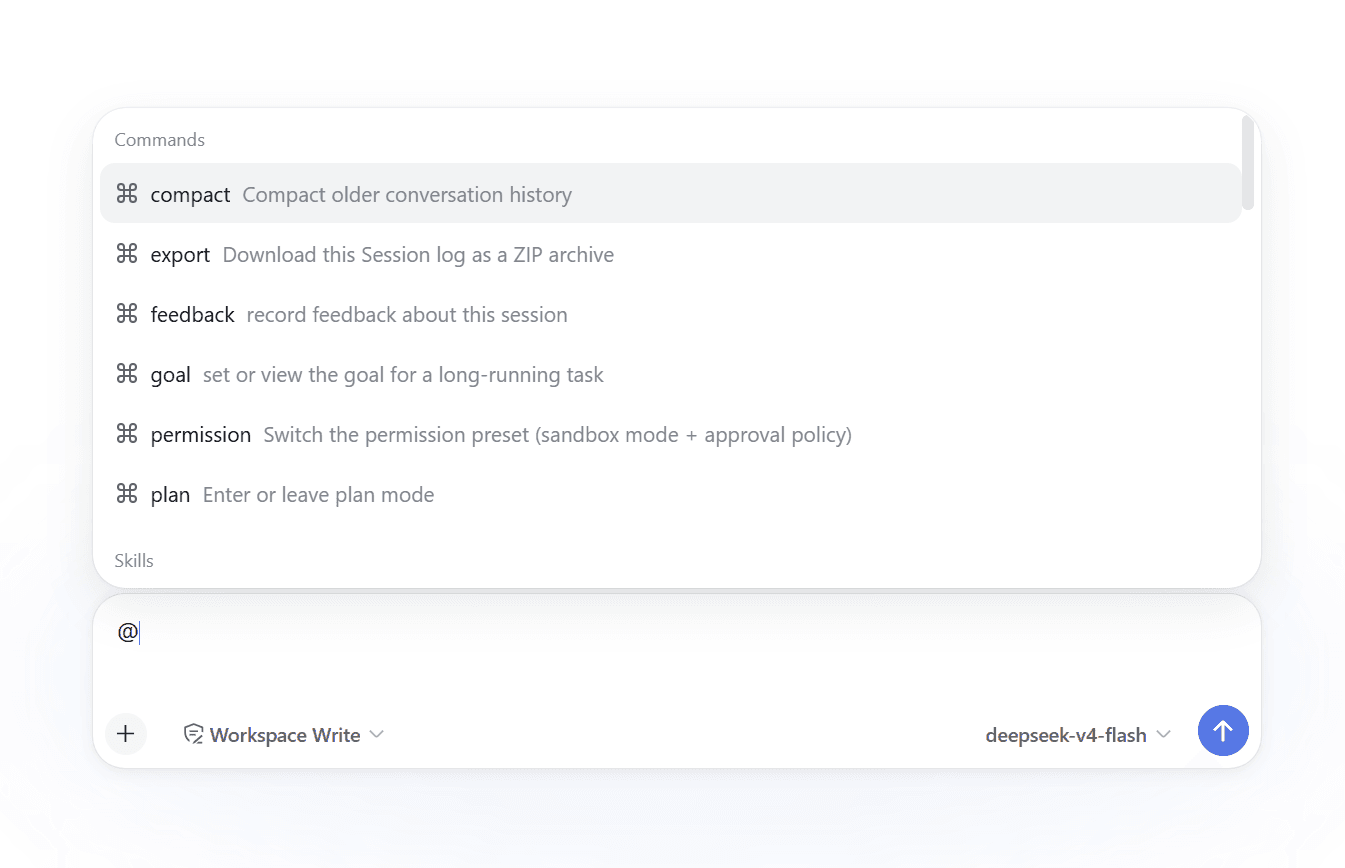
Reference Anything is an enhancement for the DeepSeek Harness (DSH) @ menu. It brings multiple reference sources into one searchable menu, so you can mention the context you need without switching tools or copying content manually.
After typing @, you can browse and click items in the menu with your mouse, or use the keyboard to enter text, search, and narrow down the results.
Use one @ menu to reference:
- DSH commands and Skills
- Workspace files and folders
- DSH session history
- Transcripts left on disk by other local agent CLIs (Claude Code, Codex, Cursor, and eleven more)
- ✨ NEW: Historical conversations from online chatbots like ChatGPT, Claude, Gemini, DeepSeek, Grok, and Kimi
- Files from cloud drives connected through OpenList
Beyond extending what @ can reference, Reference Anything also enhances the @ menu itself:
-
Customize visible groups: enable or hide
Commands,Skills, files, DSH sessions, local agent conversations, and external conversations, then arrange them in any order -
Customize result counts: set each group's collapsed row count and hard candidate cap independently
-
Choose how to browse: expand or collapse individual groups, or use DSH's native scrolling list
-
Enhanced visual icons: distinguish reference sources with type icons and platform logos, making menu items easier to identify
<th width="50%">Native DSH display</th> <th width="50%">Reference Anything icon enhancements</th> <td width="50%"><img src="./images/at-files-native-comparison.png" alt="Native DSH file list" width="100%" /></td> <td width="50%"><img src="./images/at-files-enhanced-comparison.png" alt="Reference Anything file-type icon enhancements" width="100%" /></td>
Type @, search across enabled sources, and insert the selected reference into the current task. Each source keeps its own access and loading behavior: files use DSH's permission-constrained tools, DSH sessions use the native session-reference protocol, local agent transcripts are streamed straight off disk, cloud-drive files are fetched a window at a time over the drive's own API, and external conversation bodies are read on demand.
The External conversations group — and only that group — uses OpenCLI to reach AI chat sessions you are already logged into. By default it stores conversation titles locally and the agent fetches remote content on demand; an optional offline-mirror mode stores the latest complete bodies locally instead. Local agent conversations need none of that: those transcripts are already files on your own disk, so that group reads them directly, with no browser, no OpenCLI, and nothing mirrored.
[!IMPORTANT] This version targets DSH
0.1.0-rc.8or newer. It uses the native@trigger menu, official file/session Remotes, and the native Composer reference renderer.
…

