Yunado/dsh-qwen38-local-qol
dsh-qwen38-local-qol
dsh-qwen38-local-qol is a community DeepSeek Harness plugin. Read the repository README before installing.
Install
npx @deepseek-ai/dsh plugin --profile web add github:Yunado/dsh-qwen38-local-qol#v0.3.3Restart `dsh web` after install. Bundle APIs can change during the developer preview.
README badge

[](https://dshhub.dev/plugins/dsh-qwen38-local-qol)Paste this into your README. The star count updates with every catalog sync.
From the README
Excerpt from Yunado/dsh-qwen38-local-qol, cleaned of badges and images.
dsh-qwen38-local-qol
A QoL plugin for DeepSeek Harness (DSH) for running Qwen3.8 locally, with no core patches and no pi-ai patchfile.
- Model support: Qwen3.8-27B · Qwen3.8-Flash-Next
- Serving engines: llama.cpp
llama-server· NInfer · TabbyAPI (ExLlamaV3) · oMLX (Apple Silicon MLX) - Note: the llama.cpp lane is the standard OpenAI-compatible
/v1API - any server speaking it is expected to work there (Strata, Unsloth Desktop, LM Studio).
Install
dsh plugin --profile web add github:Yunado/dsh-qwen38-local-qol#v0.3.3
Recommended: pin a release tag (newest tag listed on Releases); drop the #tag fragment to track main, the bleeding edge.
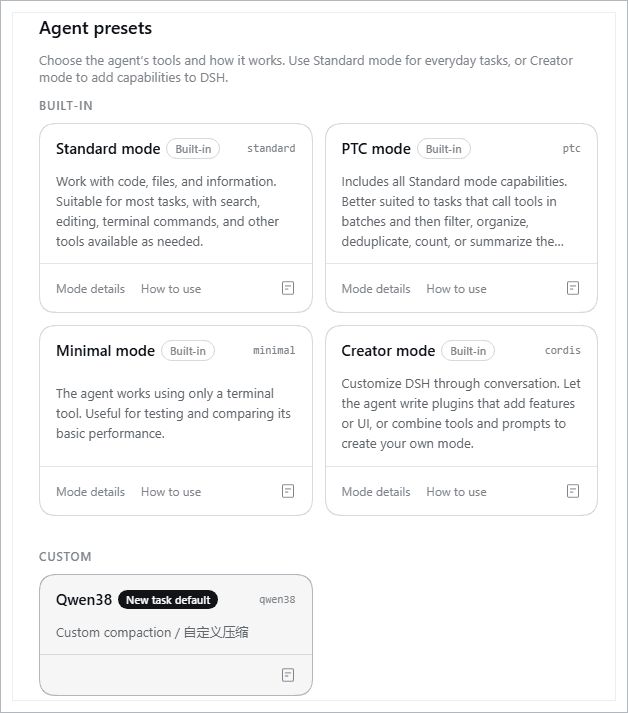
Restart dsh web: the plugin's bundle patch declares the qwen38 agent preset (full roster with the qol compaction backend) and points the profile default at it when no default is configured - nothing is generated on disk at boot. New sessions use it automatically; existing sessions keep the preset they were created with.
You can also pin a specific release: add a tag to the spec (#v0.3.3 or any past release). See Releases for what each tag pins and how to upgrade from it. Pinning a tag is the recommended setup - main is the bleeding edge (unreleased fixes and experiments land there first); move off a tag only when you actually want the newest changes.
DSH compatibility
| DSH host | Plugin | Status |
|---|---|---|
| 0.2.1-alpha.1 and newer (production runs 0.2.1-rc.2) | #v0.3.3 | tested (production, 0.2.1-alpha.1 and 0.2.1-rc.2); older plugin tags fail every turn there, the host removed the built-in {{cwd}} prompt variable |
| 0.2.0-rc.2 | #v0.3.2 or #v0.3.3 | tested (production); v0.3.3 only removes content on top, no new host requirements |
| 0.1.7-alpha.1 - 0.2.0-rc.1 | #v0.3.3 | should work - same seam batch, not exercised |
| 0.1.6-alpha.2 and older | #v0.2.0 | supported line |
main targets the rc.2 seam batch; stay on #v0.2.0 with older hosts.
Upgrading from v0.2.0 (host first, then plugin):
# 1) update the DSH host to 0.2.0-rc.2 or newer (normal host update).
# 2) re-pin the plugin (profile dir; Windows: %USERPROFILE%\.dsh\profiles\web):
cd ~/.dsh/profiles/web
npm pkg set 'dependencies.dsh-qwen38-local-qol=github:Yunado/dsh-qwen38-local-qol#v0.3.3'
pnpm install
rm -rf ~/.dsh/.agent-presets/qwen38    # optional: old boot-generated preset (superseded, inert)
# 3) restart dsh web. Sessions already on qwen38 keep working (same id, new
#    declaration). For new sessions: if a different preset is your default,
#    pick Qwen38 on the Agent presets page. Then open Settings -> Qwen3.8
#    Local and fill the line config once (the old settings.yaml section is
#    not read by the new storage).
What it supports
…

