MichengAI/dsh-pua
dsh-pua
dsh-pua is a community DeepSeek Harness plugin. Read the repository README before installing.
Install
npx @deepseek-ai/dsh plugin --profile web add @michengai/dsh-pua@latestRestart `dsh web` after install. Bundle APIs can change during the developer preview.
README badge

[](https://dshhub.dev/plugins/dsh-pua)Paste this into your README. The star count updates with every catalog sync.
From the README
Excerpt from MichengAI/dsh-pua, cleaned of badges and images.
DSH PUA
Help your agent try another approach and verify its work before calling it done.
简体中文 · Русский · Features · Screenshots · Installation · Usage · Configuration · Commands · Session events · Changelog
DSH PUA brings PUA to DeepSeek Harness. When an agent repeatedly fails, gives up too early, or claims completion without checking, it encourages a different approach, investigation, and evidence. Community-maintained; not an official DeepSeek AI or PUA product.
Features
- Try another approach: prompt the agent to reconsider its reasoning instead of repeating ineffective attempts.
- Check before claiming completion: encourage verification and evidence for the result.
- Choose a style: 15 company-inspired styles, plus P7, P9, P10, encouragement, motherly, and other persona modes.
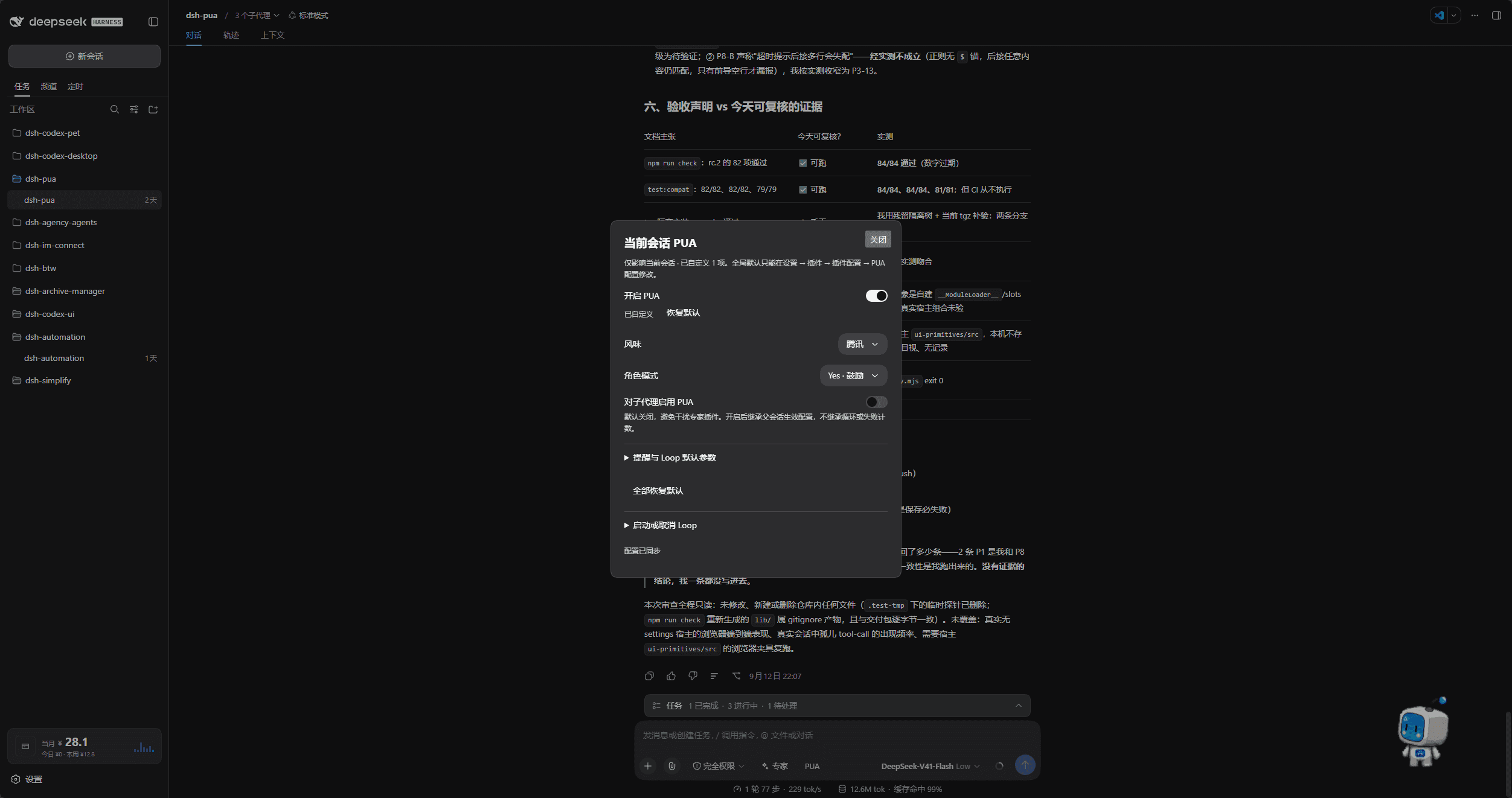
- Configure through the UI: save global settings in plugin settings and adjust individual conversations from chat.
- Continue based on verification: start a Loop to keep working until verification passes, the iteration limit is reached, or you cancel.
- Integrity guard: deny reads of hidden benchmark answers, including web searches for them, and remind before edits touch test, scoring, or CI assets.
- Markdown tables: status, progress, and KPI panels use GFM pipe tables that DSH can render, instead of Unicode box drawings.
Results depend on the model and task. The plugin does not guarantee a solution every time.
Screenshots
Global settings
Open Plugins in the sidebar, then @michengai/dsh-pua, to set default enablement, style, persona, and subagent behavior. Earlier DSH hosts still use Settings → Plugins → PUA Configuration. Screenshots show the Chinese interface.
Current conversation
Click PUA to the right of Experts to adjust the current conversation. Restore individual defaults or start and cancel a Loop from the same panel.
DSH product ecosystem
For a desktop workbench, download DSH Codex Desktop. Existing DeepSeek Harness installations can add plugins as needed by following each project's README. Below are 11 first-party plugins; consult the corresponding desktop release notes and bundled catalog for what that version includes.
…

