rongxingda/dsh-prompt-enhance
dsh-prompt-enhance
Prompt enhancement plugin for the DeepSeek Harness web GUI: one-click rewrite of the composer draft into a structured prompt, with preview, fill-back, and undo.
Install
npx @deepseek-ai/dsh plugin --profile web add dsh-prompt-enhanceRestart `dsh web` after install. Bundle APIs can change during the developer preview.
README badge

[](https://dshhub.dev/plugins/dsh-prompt-enhance)Paste this into your README. The star count updates with every catalog sync.
From the README
Excerpt from rongxingda/dsh-prompt-enhance, cleaned of badges and images.
dsh-prompt-enhance
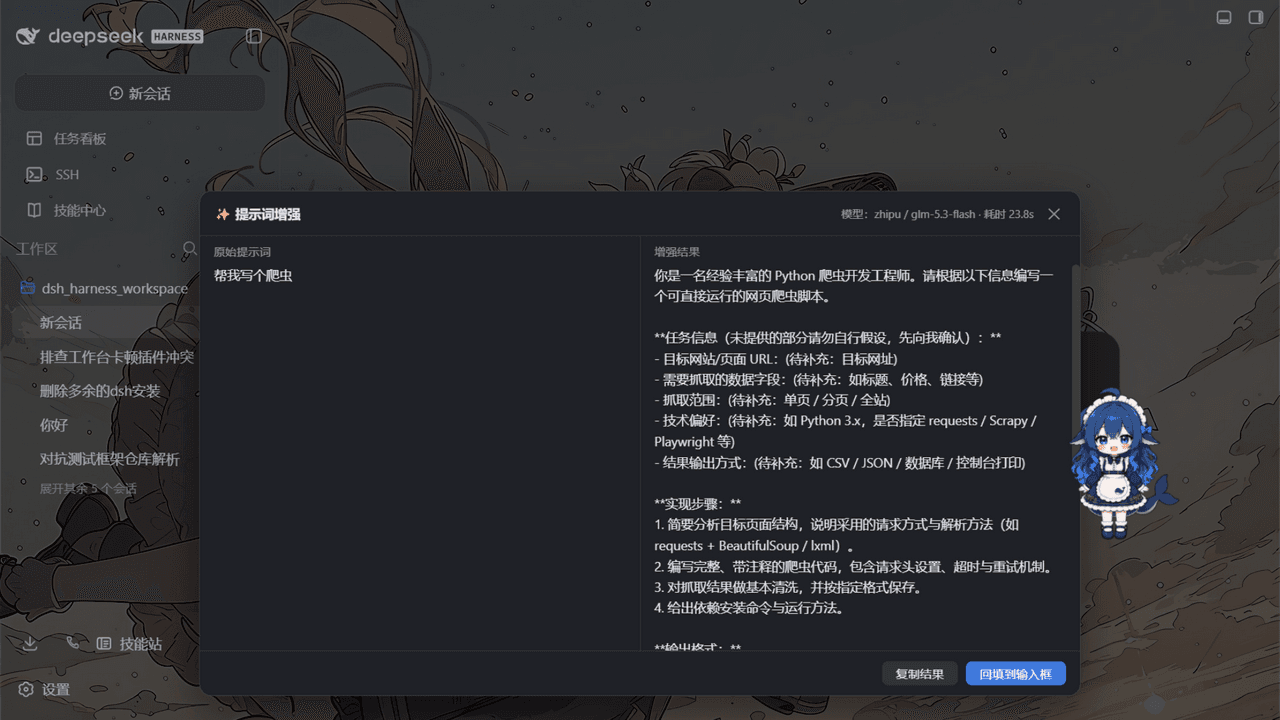
Prompt enhancement for the DeepSeek Harness web GUI — one click turns a rough composer draft into a well-structured prompt: explicit role and goal, executable steps, output format, acceptance criteria, and edge cases. Your intent is never changed, nothing is fabricated, and the original draft is always preserved.
English | 简体中文
Why
Good agent prompts state who the model should be, what to deliver, in what format, and how success is judged. Most drafts don't. This plugin adds a WorkBuddy-style "enhance" affordance to the dsh composer: it sends your draft through a low-temperature rewrite pass (via the harness's own LLM service), shows the result next to the original, and lets you apply, copy, or discard it. Undo is one click away, and every failure path leaves your draft exactly as you typed it.
Features
| ✨ Composer button | A small button in the input box's tool row (next to the send button), always at hand |
| 🔀 Preview panel | Original vs. enhanced side by side, with model name and elapsed time |
| ↩️ One-click undo | After applying, a quiet bar above the composer restores the original draft |
| ⌨️ Shortcut | Default Ctrl+Alt+E, fully configurable, acts on the composer you are working in |
💬 /enhance command | Rewrite any text from the slash-command plane; the result never enters model history |
| 🧠 Model routing | Settings pair → current session model → harness default model, in that order |
| 🔑 Zero credential setup | Calls ride the harness LLM service; keys come from the harness credential store |
| ⚙️ Live settings | Every knob (model override, temperature, budgets, system prompt, shortcut) hot-applies from Settings → 插件配置 |
| 🛡️ Draft safety | Empty, over-length, images-only, and command-chip inputs are rejected locally; upstream failures are mapped to readable messages; the draft is never mutated on failure |
How it works
flowchart LR
    A[Composer draft] --> B{Local guards<br/>empty / length / chips / busy}
    B -- pass --> C["POST /prompt-enhance/enhance<br/>(loopback-fenced host route)"]
    B -- reject --> P[Preview panel:<br/>readable error, draft untouched]
    C --> D["ctx.llm.stream<br/>rewrite with system strategy"]
    D --> E[Normalize:<br/>strip fences, trim, refuse empty]
    E --> F[Preview panel:<br/>original / enhanced]
    F -- Apply --> G["setDraft(enhanced)<br/>original pushed to undo stack"]
    F -- Cancel / Copy --> H[Draft untouched]
    G --> U[Undo bar: one click restores]
The plugin is one npm package with two halves, following the dsh plugin conventions:
…

