Viger1/dsh-preview
dsh-preview
👁 Eyes for your DeepSeek Harness agent — it opens, sees, and fixes what it builds. Headless-browser verification tools + a bundled self-check skill.
Install
npx @deepseek-ai/dsh plugin --profile web add dsh-previewRestart `dsh web` after install. Bundle APIs can change during the developer preview.
README badge

[](https://dshhub.dev/plugins/dsh-preview)Paste this into your README. The star count updates with every catalog sync.
From the README
Excerpt from Viger1/dsh-preview, cleaned of badges and images.
dsh-preview
English | 中文
A verification loop the agent runs on itself, not just browser tools.
Reading a page without a vision model is ordinary now — several plugins here do it, and do it well. What this ships is the discipline around it: a bundled frontend-verify skill that makes the agent open what it just built, check the console, assert layout facts from computed styles, exercise the UI, fix what it finds, and re-verify — before claiming the work is done. The six tools exist to serve that loop.
The distinction matters because the failure this addresses is not "the agent cannot see the page". It is that the agent never thinks to look, reports work as finished from re-reading its own source, and leaves you to open the browser and describe what broke.
What it looks like
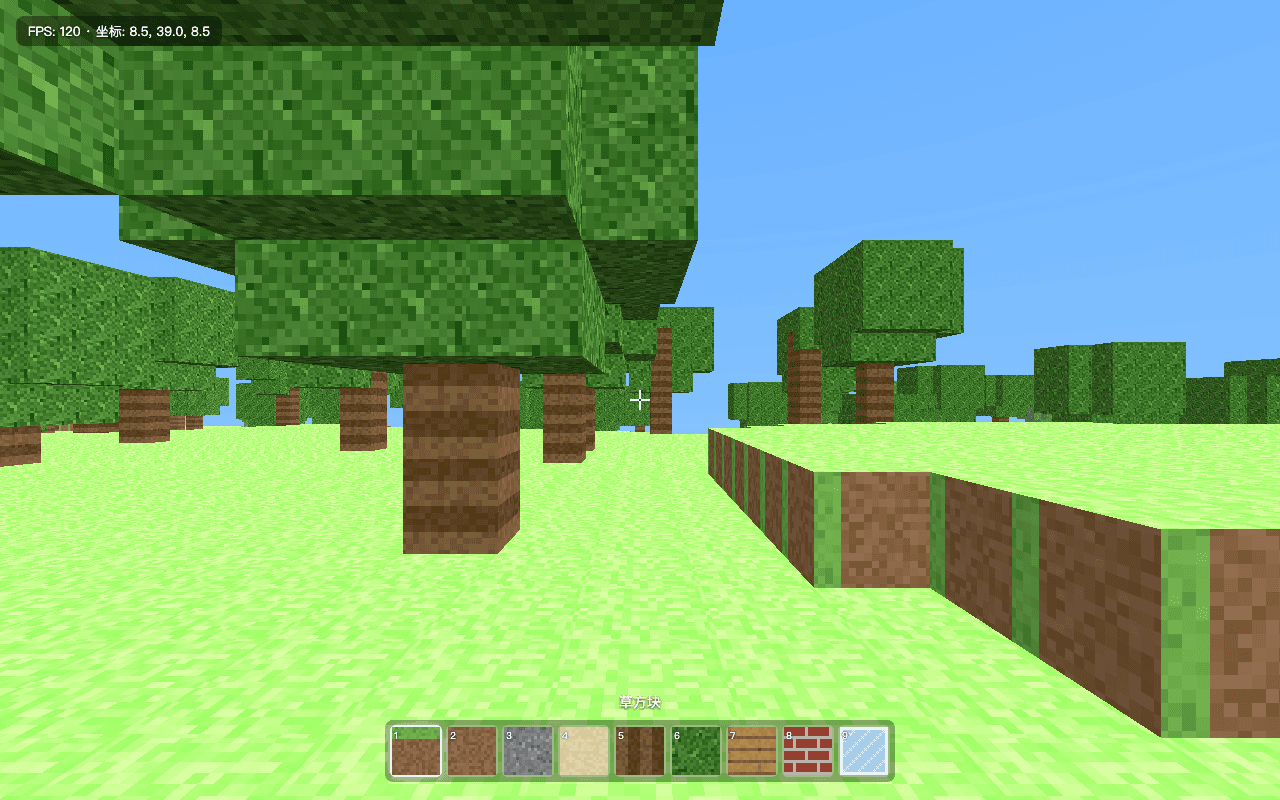
Screenshot taken by the agent itself, mid-verification.
A real, unedited run: a dsh agent (DeepSeek-V4-Pro) was asked to verify a Three.js voxel game it had built earlier. With dsh-preview installed it did all of this autonomously:
browser_open http://localhost:8091— page loaded, no console errors during load.browser_console— one 404 (/favicon.ico), correctly triaged as harmless; all 7 local resources returned 200.browser_read— confirmed the start screen copy, control help, and HUD text.browser_interact(click the start button) — overlay closed, HUD appeared, it watched the coordinates fall from 41.0 to 39.0 and FPS settle at 120, and concluded the physics and render loops were alive. No new errors.browser_screenshot— before/after PNGs saved into the workspace for the human.- Reported exactly what it verified — and what it couldn't (GPU rendering fidelity, real pointer-lock feel).
No human relayed a single screenshot.
Install
dsh plugin --profile web add dsh-preview
Works with any Chromium on your machine — Google Chrome and Microsoft Edge are picked up automatically; otherwise run npx playwright install chromium once and set browserChannels to [chromium].
Requires Node ^22.19 || >=24 (same as dsh itself).
Tools
| Tool | What it does |
|---|---|
browser_open | Open an http(s) URL or a local file/directory (served automatically over 127.0.0.1). Returns a pageId and any console errors raised during load. |
browser_console | Console messages + failed network requests captured since load. |
browser_read | Deterministic no-vision reading: rendered text, outer html, or styles (bounding box + key computed styles of a selector). |
browser_interact | Click / type / press / scroll-to on a selector; reports console errors the interaction caused. |
browser_screenshot | Viewport, full-page, or single-element PNG saved into the workspace. |
browser_close | Close a page when verification is done. |
browser_read is the heart of the design: a text-only model verifies layout facts (box sizes, colors, display values, rendered copy) deterministically, instead of hallucinating over pixels. Screenshots are for the human in the loop.
The bundled skill — the actual product
frontend-verify teaches the loop: open → console → read → interact → screenshot → fix → re-verify, report what passed verbatim, and name what could not be verified rather than implying full coverage. That last rule is why the demo above ends with the agent volunteering that it could not judge GPU rendering or pointer-lock feel.
…
