Noob-stupid/dsh-plugin-gating-hub
dsh-plugin-console
Framework upgrade safety & plugin version gating for DSH, with a fully customizable multi-source plugin market for intranet-only and offline installs.
Install
npx @deepseek-ai/dsh plugin --profile web add @noob-stupid/dsh-plugin-consoleRestart `dsh web` after install. Bundle APIs can change during the developer preview.
README badge

[](https://dshhub.dev/plugins/dsh-plugin-gating-hub)Paste this into your README. The star count updates with every catalog sync.
From the README
Excerpt from Noob-stupid/dsh-plugin-gating-hub, cleaned of badges and images.
<sub><b>Web</b> & <b>Desktop</b> — both supported.</sub>
English: README.md | 中文: README.zh.md
DSH Plugin Gating Hub (dsh-plugin-gating-hub)
Renamed from dsh-plugin-hub — old URLs redirect.
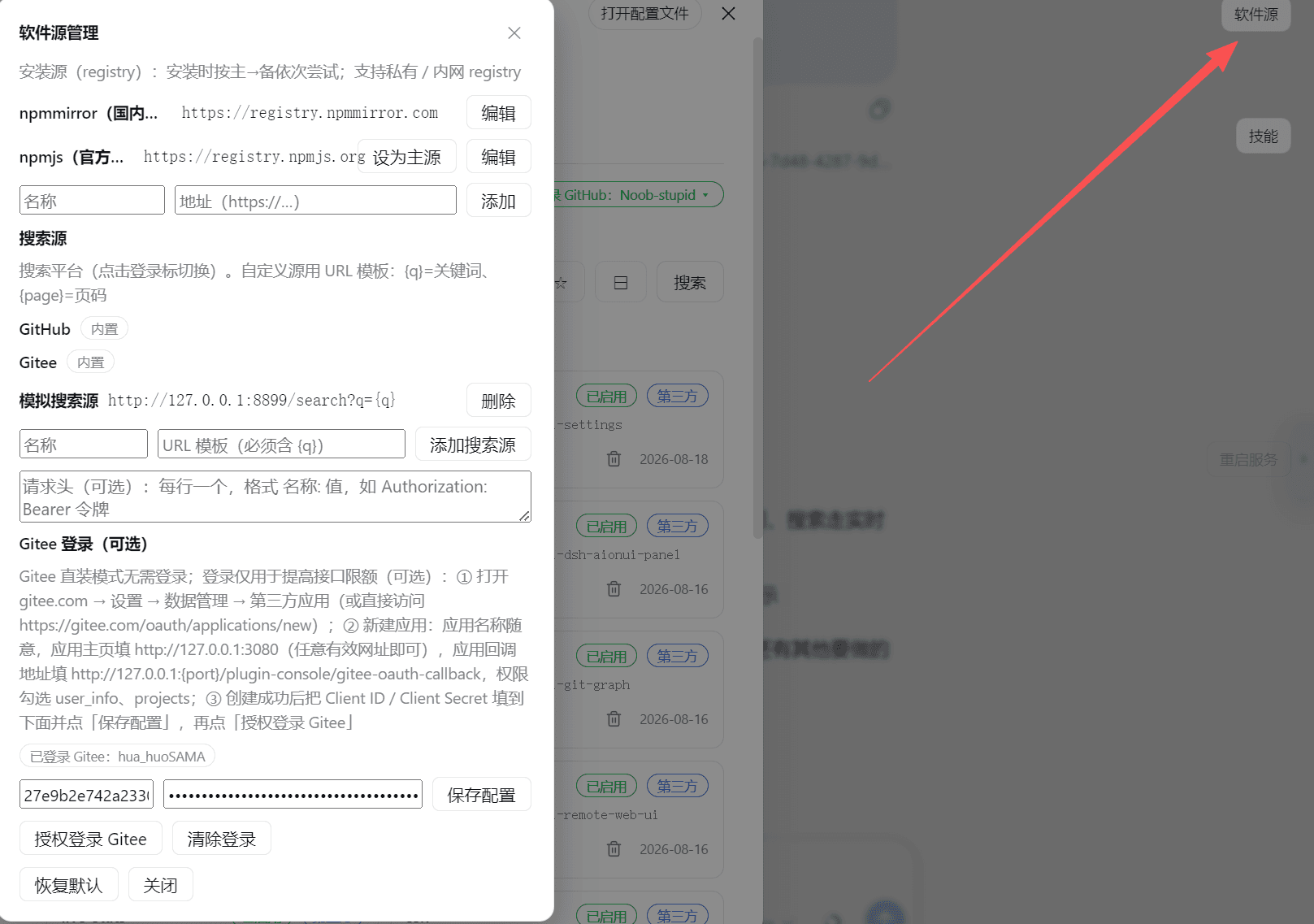
Framework upgrade safety & plugin version gating for DeepSeek Harness (DSH): one-click framework upgrade with auto-rollback on failure → one-click rollback to the previous version after an upgrade → plugins the new framework cannot load are auto-disabled → the plugin upgrade gate refuses a version the host can't take. A built-in multi-source plugin market & index (500+ plugins / 300+ skills, zero GitHub API calls) rides on top as the discovery layer — and every source is swappable: install source (incl. a private intranet registry), search source (URL template + headers), index source (self-hosted intranet index), Git source (incl. a local
file://bare repo), so plugins can be installed on an intranet-only or fully offline machine.
Why DSH Plugin Gating Hub
- 🛡️ Framework upgrade safety, end-to-end — one-click upgrade: config backup + full-tree checkpoint (rollback point) → online install (service stays up, page never disconnects) → version verification → auto-restart. A failed install auto-rolls the whole tree back, version check catches fake success, 15-min hard timeout + stall detection — the framework is never left broken. → details
- ↩️ One-click rollback to the previous version — after an upgrade the framework card keeps a 「roll back to previous」 button: stop service → restore full tree → relaunch → health check, state visible throughout.
- 🚫 Incompatible plugins auto-disabled — the adapt gate force-disables plugins the new
framework cannot load (enable locked; the server rejects
/togglewith 409 — unbypassable); 「Check update → Update & adapt」auto-verifies and unlocks them. - 🔒 Plugin upgrade gating — a version/declaration gate (
dsh.engines.framework/engines.dsh+@deepseek-ai/*ranges, built-in zero-dependency semver engine) decides whether a plugin version may run on this host, so an upgrade can't silently take plugins out. - 🧩 Built-in discovery layer — multi-source plugin market (GitHub / Gitee / custom sources)
plus the static index of
dsh-pluginrepos (500+ by stars) and a Skills tab (up to 300); browse, search, one-click install, zero GitHub API calls (served via CDN). Every source is swappable — private intranet npm registry, custom search source (URL template + headers), self-hosted index source, Git source (incl. localfile://bare repo) — so an intranet-only / offline machine can still browse and install. - 🤖 AI Empower — give the console a package name or GitHub repo, the local AI reads its docs and drafts a safe, confirmable deployment plan (install / config / start / health-check); server components get an automatic control card. → details
Install
# npm release (recommended: prebuilt, no git / build authorization needed)
dsh plugin --profile web add @noob-stupid/dsh-plugin-console

# or install from GitHub source (needs git; allowBuilds authorization on first add)
dsh plugin --profile web add github:Noob-stupid/dsh-plugin-hub
Then restart the dsh service → refresh the page → Settings → Plugins → Plugin Console.
…
