liqiGeGe/dsh-plugin-execution-graph
dsh-plugin-execution-graph
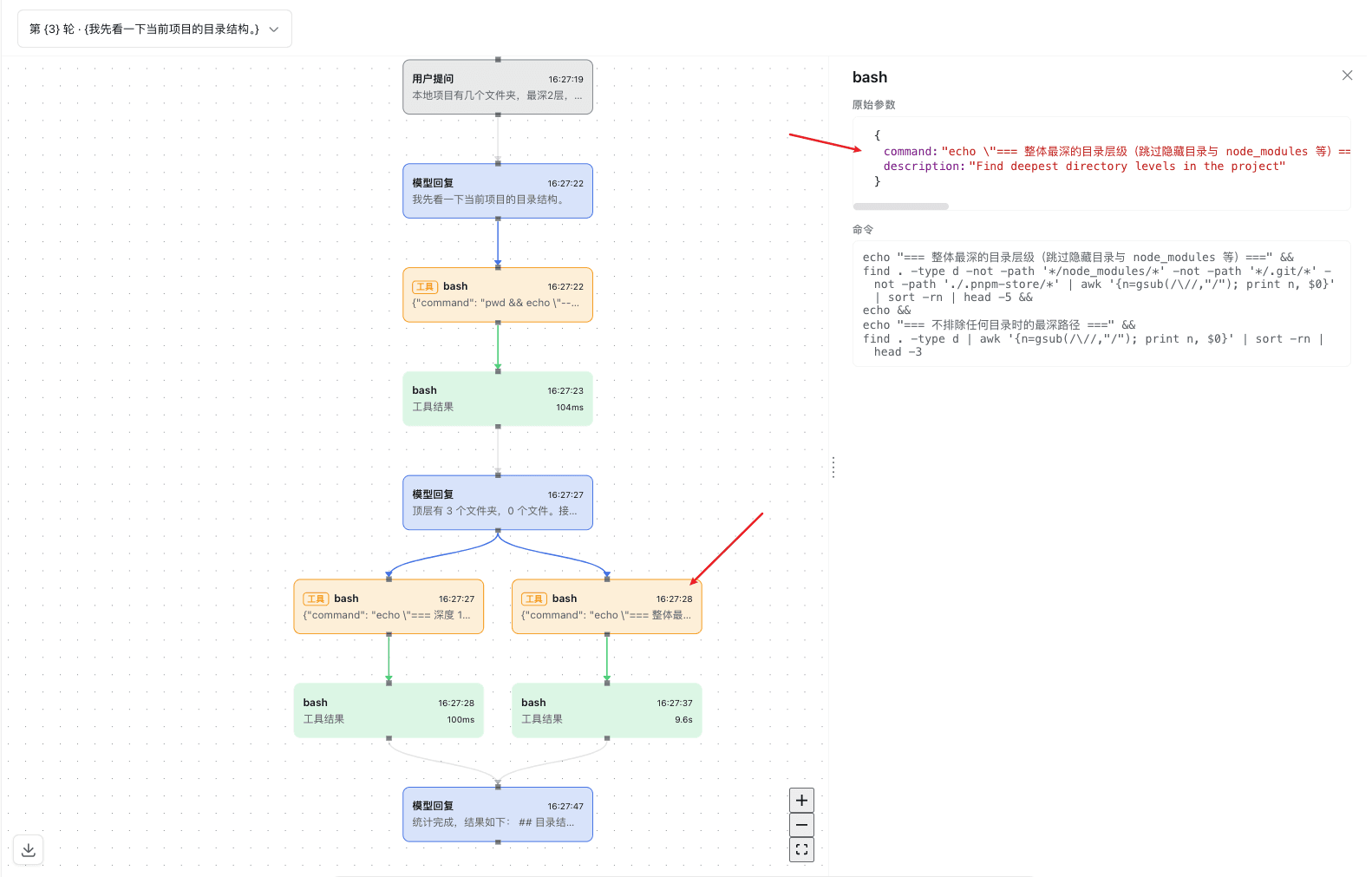
A DeepSeek Harness (DSH) client plugin that adds an "Execution graph" tab to the conversation view. It reconstructs one session turn's activity as a vertical timeline on a React Flow canvas
Install
npx @deepseek-ai/dsh plugin --profile <name> add dsh-plugin-execution-graphRestart `dsh web` after install. Bundle APIs can change during the developer preview.
README badge

[](https://dshhub.dev/plugins/dsh-plugin-execution-graph)Paste this into your README. The star count updates with every catalog sync.
From the README
Excerpt from liqiGeGe/dsh-plugin-execution-graph, cleaned of badges and images.
dsh-plugin-execution-graph
English | 中文
A DeepSeek Harness (DSH) client plugin that adds an "Execution graph" tab to the conversation view. It reconstructs one session turn's activity as a vertical timeline on a React Flow canvas: the turn's request-header, assistant-message, tool-call, and tool-result nodes are ranked into timeline steps stacked top-to-bottom and connected by arrowed edges from each step to the next. turn-group container nodes are not drawn — one turn is shown at a time (defaulting to the session's last), so a container box would be redundant. Tool calls are never merged by name — each call and its result are independent nodes tied by a resolves edge, an assistant message's tool-call blocks connect to their tool-call nodes by a triggers edge, and same-group nodes chain by a sequence edge in event order. Parallel tool calls triggered by one assistant message share a timeline step and spread horizontally; a column is capped at ten steps and then wraps into the next column block to the right, and when a column's last row holds several parallel nodes feeding the next column, their connectors converge through a merge junction before bending into the next column. A running tool call (present in the shared Session window's running-call-id set, with no settled result yet) renders with a distinct dashed, pulsing border instead of a fabricated result. A tool-call card puts its Tool kind label and tool name on one row and a truncated argument preview on the next. Selecting a node fills a persistent detail sidebar to the right — resizable (320–600px, collapsible) — that shows a Payload JSON tree for tool calls and a line-broken command block for shell commands. A turn selector above the canvas lists every turn and defaults to the last; switching turns re-centers the canvas at scale 1. A download button in the canvas's lower-left corner exports the whole graph as a PNG. Each assistant-message card carries a fold toggle on its right edge: collapsing hides the tool calls/results that follow it up to the next assistant message (an in-place view transform — columns and coordinates stay fixed), leaving a fold capsule that bridges the collapsed reply to the next one and can be clicked to expand. The package provides no service and declares no Context merge; it registers target-specific Conversation Event Definitions, a Graph view snapshot builder, and one tab in the conversation's 'conversation.view' slot ring.
Plugin results
Plugin declaration and lifecycle
This is a pure-consumer Cordis plugin with two entry faces:
- Node half (
src/index.ts) — a no-opapply(); the plugin has no host-side behavior. - Client half (
src/client/index.ts) — the real plugin. It exportsinjectandapply(ctx), following the DSH function-plugin contract (no default export).
apply(ctx) performs exactly these side effects, each registered reversibly through the Cordis effect system so that unloading the plugin reverts them in full:
…

