ZSeven-W/dsh-openpencil
dsh-openpencil
The DeepSeek Harness plugin for OpenPencil — preview, inspect, and edit real .op documents inside a conversation.
Install
npx @deepseek-ai/dsh plugin --profile web add @zseven-w/dsh-openpencil@nextRestart `dsh web` after install. Bundle APIs can change during the developer preview.
README badge

[](https://dshhub.dev/plugins/dsh-openpencil)Paste this into your README. The star count updates with every catalog sync.
From the README
Excerpt from ZSeven-W/dsh-openpencil, cleaned of badges and images.
<strong>The DeepSeek Harness plugin for OpenPencil — preview, inspect, and edit real <code>.op</code> documents inside a conversation.</strong><br /> <sub>Exact Multi-Frame Previews • Interactive Canvas • Managed Editor • Agent-Native Design Tools</sub>
<sub>npm: <a href="https://www.npmjs.com/package/@zseven-w/dsh-openpencil"><code>@zseven-w/dsh-openpencil</code></a> · Current plugin release: <code>0.1.0-rc.7</code> · Tested through DSH <code>0.1.1-rc.2</code></sub>
<a href="./README.md"><b>English</b></a> · <a href="./README.zh.md">简体中文</a> · <a href="./README.zh-TW.md">繁體中文</a> · <a href="./README.ja.md">日本語</a> · <a href="./README.ko.md">한국어</a> · <a href="./README.fr.md">Français</a> · <a href="./README.es.md">Español</a> · <a href="./README.de.md">Deutsch</a> · <a href="./README.pt.md">Português</a> · <a href="./README.ru.md">Русский</a> · <a href="./README.hi.md">हिन्दी</a> · <a href="./README.tr.md">Türkçe</a> · <a href="./README.th.md">ไทย</a> · <a href="./README.vi.md">Tiếng Việt</a> · <a href="./README.id.md">Bahasa Indonesia</a>
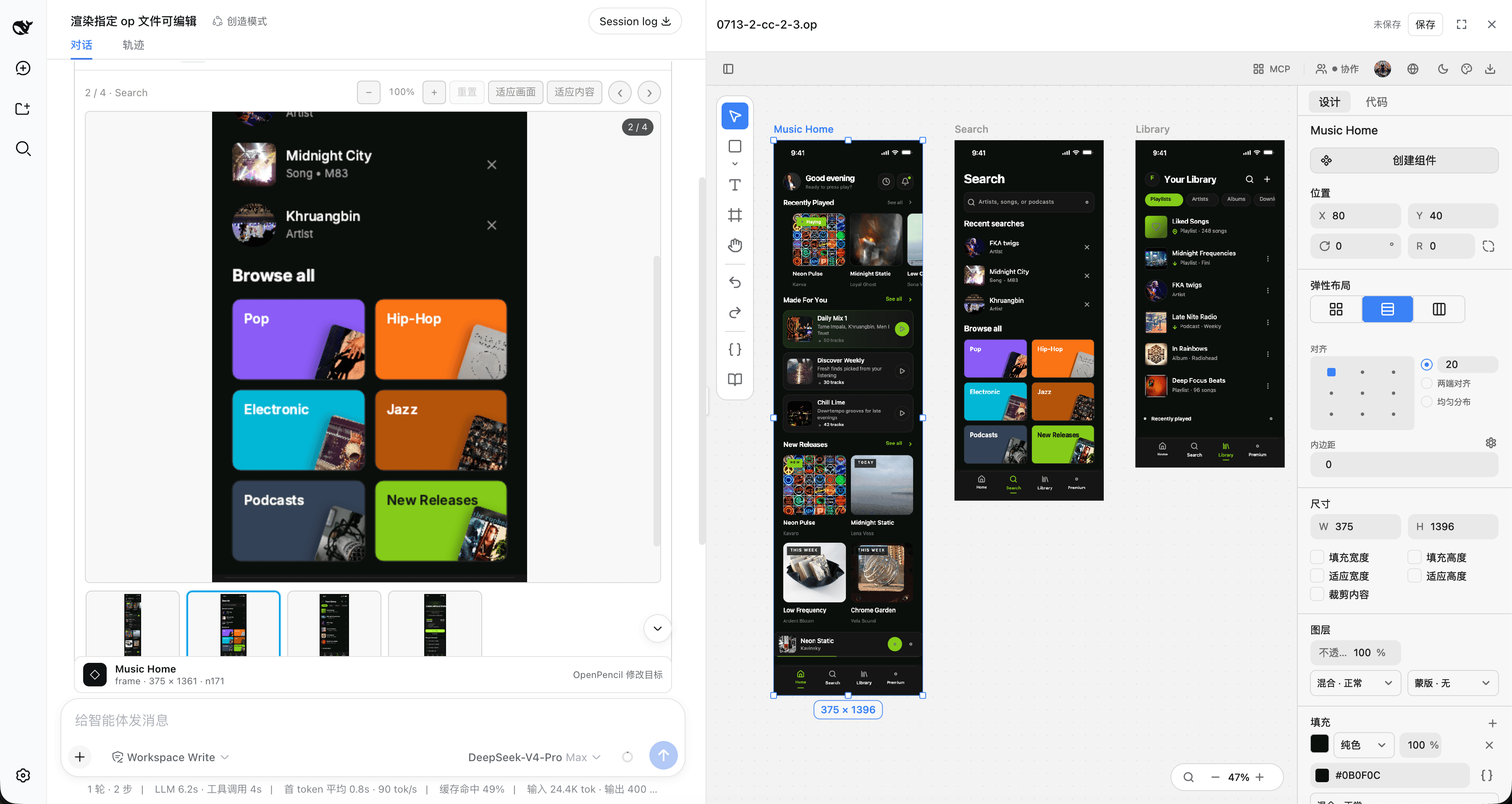
<br /> <p align="center"><sub>Exact multi-frame <code>.op</code> previews with an interactive canvas and the managed editor workbench</sub></p>Why DSH OpenPencil
DSH OpenPencil connects DeepSeek Harness with OpenPencil so an Agent drives a real, editable, interactive design canvas instead of returning a generated image.
🖼️ Exact Multi-Frame Previews
The installed OpenPencil headless exporter renders design-faithful previews: the first top-level frame as a large replay-safe PNG, plus a horizontally scrollable thumbnail rail, click-to-select, and previous/next navigation for multi-frame documents.
🗺️ Interactive Canvas
"Open interactive canvas" lazily mounts the read-only OpenPencil Web SDK with pan, zoom, and fit — inspect any page, nested node, or inactive page without leaving the conversation.
✏️ Managed Editor
With editable: true, the edit action opens the managed OpenPencil editor — selection, layers, properties, drawing tools, undo/redo, and explicit save semantics — in a resizable right-hand workbench with a full-screen option.
🤖 Agent-Native Design Tools
Five direct-canvas tools plus six openpencil_pipeline_* tools let the Agent create, inspect, refine, publish, modify, and read a real canvas through managed OpenPencil runtimes.
🔐 Capability-Gated Grants
Image and document grants are signed, hash-bound capabilities. Browser metadata never exposes an arbitrary host path, and signed preview/editor capabilities never enter the canonical tool result or model context.
⚡ Transactional Safety
A full-pipeline document stays in a private unpublished draft until every native and DSH quality gate passes. Publication never overwrites an existing path, and aborts or failed batches leave no empty target behind.
🌍 Follows DSH Look & Feel
The tool card and managed editor follow DSH's Chinese/English locale and light/dark theme without reloading the editing session.
🎯 One Complete Workflow
"Requirement → private draft → semantic batches → live user previews → deterministic structure/layout/quality validation → exact-PNG-integrity atomic publish" — one complete loop inside DSH.
Install into DSH
DSH is a separate package. Install it once if you do not already have it:
…
