ZSeven-W/dsh-ios
dsh-ios
DeepSeek Harness (DSH) plugin: a live iOS Simulator — and a USB-connected iPhone — inside the conversation. 22 agent tools for booting, building, driving the UI by accessibility identity, OCR text or list rows, plus a streaming sidebar panel you can tap and drag on.
Install
npx @deepseek-ai/dsh plugin --profile web add @zseven-w/dsh-ios@latestRestart `dsh web` after install. Bundle APIs can change during the developer preview.
README badge

[](https://dshhub.dev/plugins/dsh-ios)Paste this into your README. The star count updates with every catalog sync.
From the README
Excerpt from ZSeven-W/dsh-ios, cleaned of badges and images.
<strong>A live, interactive iOS Simulator inside a <a href="https://github.com/deepseek-ai/deepseek-harness">DeepSeek Harness</a> conversation — plus your real iPhone over USB.</strong><br /> <sub>22 agent tools • live MJPEG sidebar panel • simulator & real iPhone over USB • list/feed row actions • SwiftUI preview hot reload</sub>
<sub>npm: <code>@zseven-w/dsh-ios</code> · Current plugin release: <code>0.1.0-rc.3</code> · Tested with DSH <code>0.1.1-rc.1</code></sub>
<b>English</b> · <a href="./README.zh.md">简体中文</a> · <a href="./README.zh-TW.md">繁體中文</a> · <a href="./README.ja.md">日本語</a> · <a href="./README.ko.md">한국어</a> · <a href="./README.fr.md">Français</a> · <a href="./README.es.md">Español</a> · <a href="./README.de.md">Deutsch</a> · <a href="./README.pt.md">Português</a> · <a href="./README.ru.md">Русский</a> · <a href="./README.hi.md">हिन्दी</a> · <a href="./README.tr.md">Türkçe</a> · <a href="./README.th.md">ไทย</a> · <a href="./README.vi.md">Tiếng Việt</a> · <a href="./README.id.md">Bahasa Indonesia</a>
<sub>npm: <code>@zseven-w/dsh-ios</code> · Current plugin release: <code>0.1.0-rc.3</code> · Tested with DSH <code>0.1.1-rc.1</code></sub>
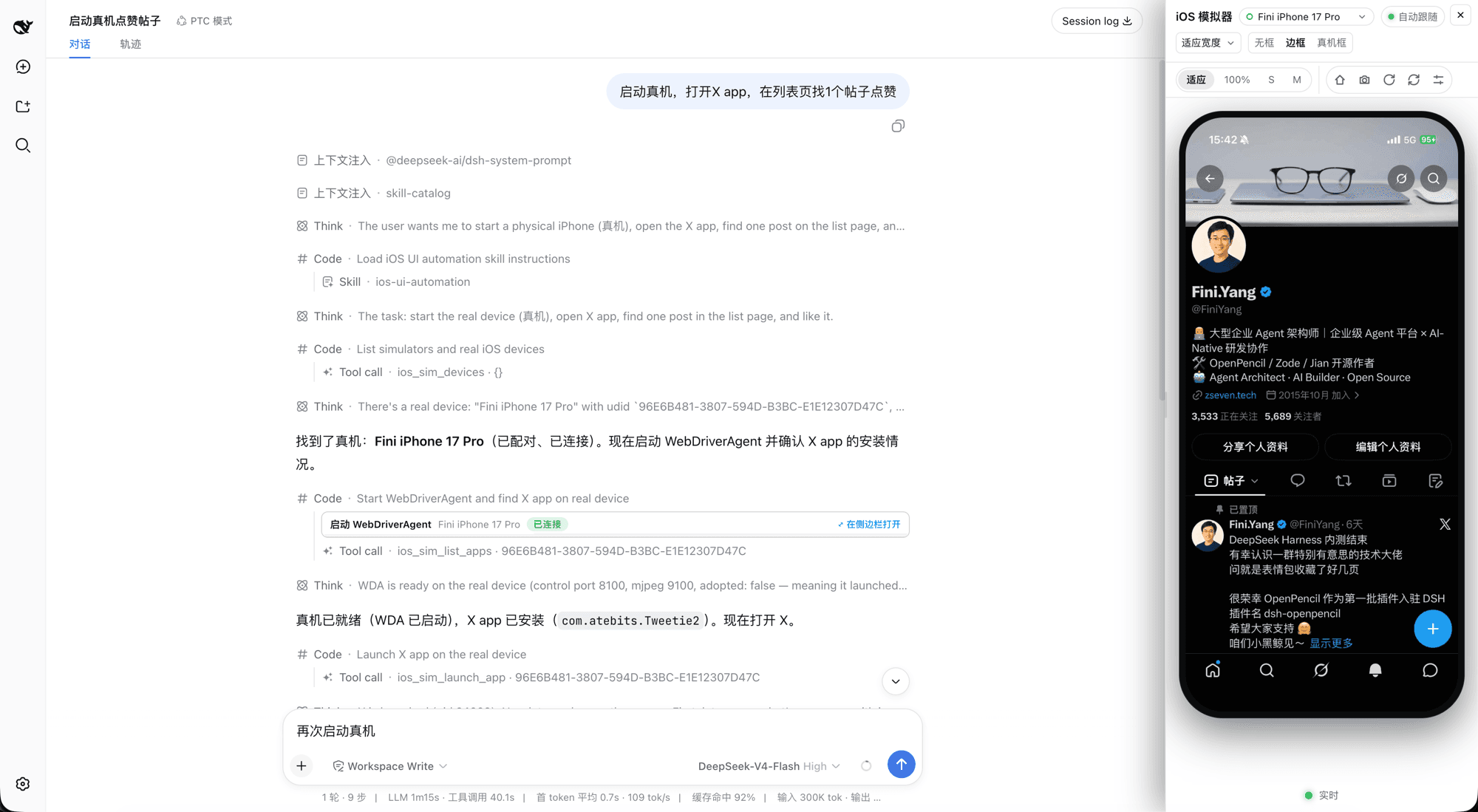
<br /> <p align="center"><sub>A real iPhone driven from inside a DSH conversation — the agent's tool calls on the left, the live device panel on the right</sub></p>Why DSH iOS Simulator
DSH iOS Simulator gives the agent a real iOS Simulator inside the conversation — and gives you the pixels. The agent can boot a device, build and run an Xcode project or Swift package, drive the UI by accessibility identity or by OCR text, read unified logs, and inspect processes, backtraces, and leaks, while a live stream of the device renders in a persistent sidebar panel where you can tap, drag, rotate, and press Home directly on the video. The same verbs also work on a real iPhone connected over USB: the plugin builds and launches WebDriverAgent on the phone, tunnels its control and screen ports over loopback, and streams the device into the same panel, cards, and tools. No image blocks, no screen-recording files: visual bytes reach the UI only through signed, expiring URLs served by the DSH webserver.
…

