zhuiyueya/dsh-im-gateway
dsh-im-gateway
Aggregate IM gateway for DeepSeek Harness (dsh): connect your agents to WeChat, Feishu, Telegram, Discord & 20+ chat platforms
Install
npx @deepseek-ai/dsh plugin --profile web add dsh-im-gatewayRestart `dsh web` after install. Bundle APIs can change during the developer preview.
README badge

[](https://dshhub.dev/plugins/dsh-im-gateway)Paste this into your README. The star count updates with every catalog sync.
From the README
Excerpt from zhuiyueya/dsh-im-gateway, cleaned of badges and images.
🐋 dsh-im-gateway
<h3 align="center">把 DeepSeek Harness 接入你常用的每一个聊天软件</h3> <p align="center">Aggregated IM gateway for <b>DeepSeek Harness (dsh)</b> — drive your coding agents from <b>WeChat, Feishu, Telegram, Discord, QQ</b> and 25+ chat platforms, with unified sessions, remote approvals, interactive questions and one-command setup.</p> <p align="center"><a href="README.en.md">English</a> · <b>简体中文</b></p>📸 效果预览
⚡ 一键安装
任选一种方式,把下面整段提示词发给你的 dsh(Web GUI 聊天框、dsh --profile headless "…" 或已接入的 IM 聊天),agent 会自动完成安装。安装插件后重启一次 dsh web。
<b>方式 A · npm 安装(推荐)</b>
请安装 dsh-im-gateway 插件:dsh plugin --profile web add dsh-im-gateway
装完提醒我重启 dsh web。
<b>方式 B · GitHub 克隆安装</b>
请帮我安装 dsh-im-gateway 插件(DeepSeek Harness 的聚合 IM 网关):
1. 执行 git clone --depth 1 https://github.com/zhuiyueya/dsh-im-gateway.git /tmp/dsh-im-gateway
2. 执行 cd /tmp/dsh-im-gateway && npm install && npm run build
3. 执行 dsh plugin --profile web add /tmp/dsh-im-gateway
4. 汇报结果;如果提示需要重启,提醒我重启 dsh web。
<b>方式 C · 远程仓库直装</b>
请安装 dsh-im-gateway 插件:dsh plugin --profile web add https://github.com/zhuiyueya/dsh-im-gateway.git
装完提醒我重启 dsh web(首次安装依赖约 1-2 分钟)。
<b>方式 D · 本机已有项目目录</b>
请把本机项目 dsh-im-gateway 安装为 dsh 插件:
1. 进入项目目录执行 npm install && npm run build
2. 执行 dsh plugin --profile web add <项目绝对路径>
3. 提醒我重启 dsh web。
🚀 快速开始
1. 安装并打开设置
安装完成后重启 dsh web,打开:设置 ⚙️ → 🐋 IM 网关。
2. 连接渠道
- 微信 / WhatsApp:点击「连接(扫码)」,用手机关联设备。
- 飞书 / QQ / 钉钉 / 企业微信:点击「扫码接入机器人」,使用对应平台 App 扫码确认;也可以手动填写凭据。
- Telegram / Discord / Slack 等:按卡片中的官方文档和凭据表单完成接入。
连接后无需重启,状态统一显示为:已连接 / 未连接 / 连接中 / 异常。重启 dsh 后,已保存配置的渠道会自动恢复;微信登录态已持久化,无需重复扫码。
断开 vs 删除配置:暂时断开只停止运行并保留配置,重启后会自动恢复;删除配置会移除凭据,之后需要重新接入。
3. 开始使用
在连接好的聊天软件里给机器人发消息:
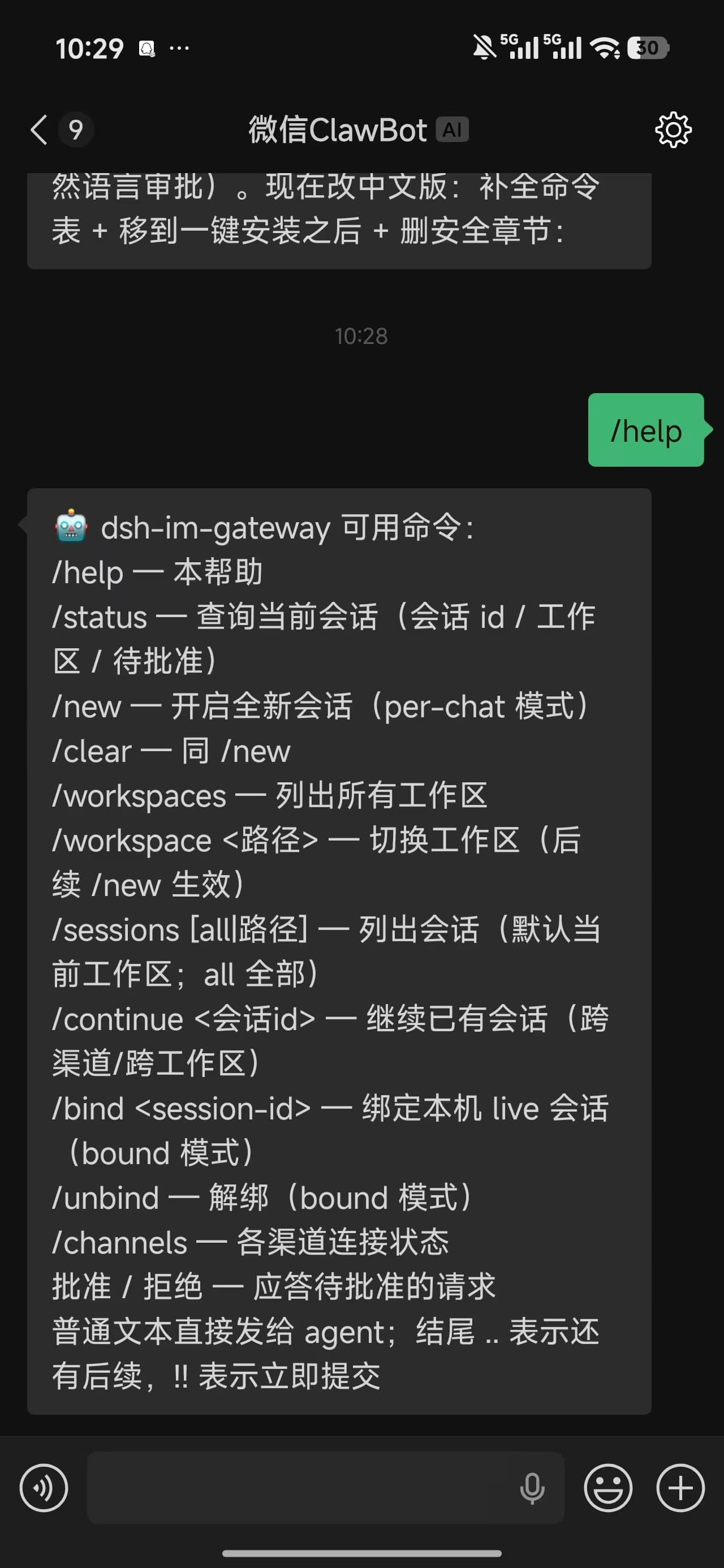
/help        ← 查看可用命令
你好,帮我看看当前工作区    ← 普通聊天 = 驱动 agent
如果设置了 allowAllUsers: false,未授权用户首次发消息会收到授权提示,Web 设置页顶部会出现访问请求;默认 allowAllUsers: true 时无需授权步骤。
agent 回复会实时回推;需要批准时在聊天里回复「批准 / 拒绝」;agent 也可以使用 im_send_file 将工作区文件发送到聊天。
各平台为什么支持或不支持扫码,见 docs/qr-login-matrix.md。
📡 支持的渠道
| 渠道 | 状态 | 接收方式 | 接入方式 |
|---|---|---|---|
| Telegram | ✅ 完整 | Bot API 长轮询 | @BotFather token |
| Discord | ✅ 完整 | Gateway WebSocket | Bot token |
| Slack | ✅ 完整 | Socket Mode | xoxb- + xapp- token |
| 飞书 / Lark | ✅ 完整 | 官方 SDK 长连接 | 官方扫码或 App ID + Secret |
| 钉钉 | ✅ 完整 | 官方 Stream 长连接 | 官方扫码或 Client ID + Secret |
| 企业微信 | ✅ 完整 | 官方智能机器人 WebSocket | 官方扫码或 Bot ID + Secret |
| 微信 | ✅ 完整* | 腾讯官方 iLink 长轮询(设备扫码) | 官方 iLink 账号(建议专用账号) |
| QQ 机器人 | ✅ 完整 | 官方 WebSocket | 官方扫码或 AppID + Secret |
| LINE | ✅ 完整 | REST + webhook | Channel token |
| Matrix | ✅ 完整 | 客户端同步 | Homeserver + token |
| Mattermost | ✅ 完整 | WebSocket + REST | Server URL + token |
| IRC | ✅ 完整 | 原生 socket | 服务器地址 |
| Twitch | ✅ 完整 | WebSocket IRC | OAuth token |
| Signal | ✅ 完整 | signal-cli 子进程 | 本机 signal-cli |
| Nextcloud Talk | ✅ 完整 | REST 轮询 | 实例账号 |
| Synology Chat | ✅ 完整 | webhook | Incoming webhook |
| Zalo | ✅ 完整 | REST + webhook | OA token |
| iMessage | ✅ 完整* | imsg / osascript | macOS |
| 🔄 动态依赖 | Baileys 扫码 | npm i @whiskeysockets/baileys | |
| Nostr | 🔄 动态依赖 | NIP-04 私信 | npm i @noble/curves |
| Teams | 🧪 实验性 | Bot Framework | Azure 注册 |
| Google Chat | 🧪 实验性 | webhook | 公网地址 |
| Tlon / 元宝 / 语音 | 🧪 骨架 | — | 基础设施 |
…

