MichengAI/dsh-im-connect
dsh-im-connect
dsh-im-connect is a community DeepSeek Harness plugin. Read the repository README before installing.
Install
npx @deepseek-ai/dsh plugin --profile web add @michengai/dsh-im-connect@latestRestart `dsh web` after install. Bundle APIs can change during the developer preview.
README badge

[](https://dshhub.dev/plugins/dsh-im-connect)Paste this into your README. The star count updates with every catalog sync.
From the README
Excerpt from MichengAI/dsh-im-connect, cleaned of badges and images.
DSH IM Connect
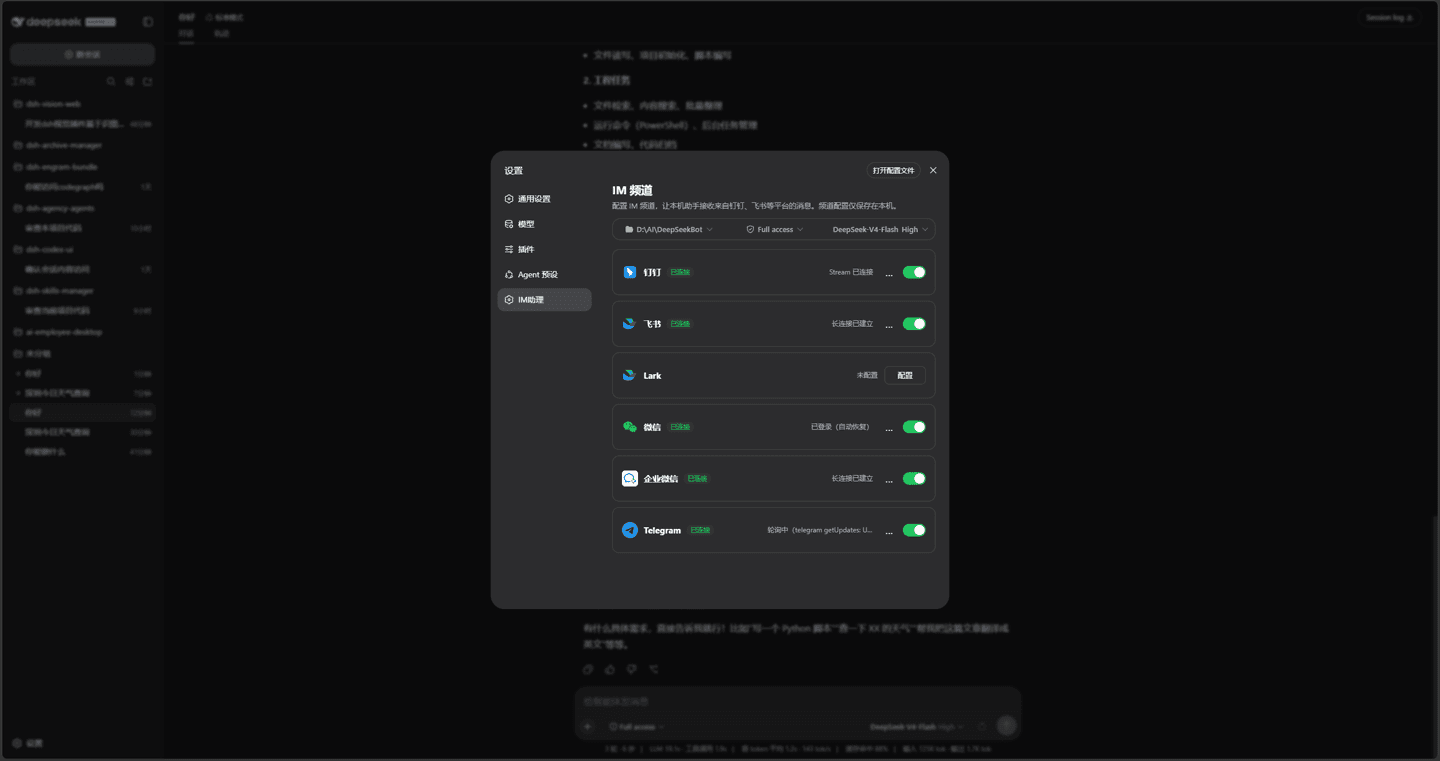
Connect Feishu, Lark, DingTalk, WeCom, WeChat, QQ, Telegram, Discord, and Slack to local DeepSeek Harness
简体中文 · Changelog · QQ reference notes · Apache-2.0
DSH IM Connect is a community-maintained DeepSeek Harness (DSH) plugin, not an official DeepSeek AI product.
Features
Send tasks to your local DSH through your usual messenger, even when you are away from the computer. Receive replies, answer questions, and handle tool approvals in the same chat.
- Connect familiar platforms: DingTalk, Feishu, Lark, WeChat, WeCom, QQ, Telegram, Discord, and Slack.
- Configure accounts separately: each account has its own workspace, model, reasoning effort, permissions, private-access mode, and send mode.
- Handle task interactions on your phone: send work, read replies, and answer single- or multiple-choice questions. Approved users can approve or deny tools in private chats.
- Keep chat records separate: each IM chat has its own session under Channels in the web workspace.
- Connect by QR code or credentials: use the platform-specific setup in Settings → IM Assistant, then control message reception per account.
- Control access: groups trigger through mentions and private chats follow each account’s access settings, as detailed below.
Who can drive the assistant
Inbound messages are identified before commands, tool approvals, or injection.
| Case | Behavior |
|---|---|
| Group without a mention of this bot | Ignored without a reply or pending approval request; mentioning someone else also does not trigger it |
| Group explicitly mentioning this bot | No binding. Anyone can send work |
| DM from the QR scanner | WeChat / Feishu / Lark / QQ scanners are allowlisted automatically |
| DM from anyone else | Appears on the settings pending list until approved |
| DM after QR binding that does not return user identity | DingTalk / WeCom QR setup returns bot credentials only, so the scanner still needs settings approval |
| DM after manual credentials | Telegram, Discord, Slack, and DingTalk / WeCom / QQ bound manually, require approval for every DM |
| DM without a userId | Denied |
| Tool approval | Reply Approve / Deny (or 批准 / 拒绝) in the chat bound to that session; works in DMs and groups, and never falls back to the web. No reply within 5 minutes cancels the action, and other text is not queued behind it |
| Interactive choice | Reply with an option number or text in the originating IM conversation; separate multiple choices with commas or add a custom answer; only the initiating user can answer in a group |
WeChat is QR-only and DM-only, so the same WeChat account that scanned can talk immediately. A different WeChat account DMing the bot waits for settings approval.
📡 Supported channels
<code>🔔 DingTalk</code> <code>🐦 Feishu</code> <code>🌐 Lark</code> <code>💬 WeChat</code> <code>🏢 WeCom</code> <code>🐧 QQ</code> <code>✈️ Telegram</code> <code>🎮 Discord</code> <code>🧩 Slack</code>
…

