omdsh-dev/dsh-genui
dsh-genui
GenUI for DeepSeek Harness: interactive UI components rendered inline in assistant replies via the dsh-ui fence — layout, charts, plots, forms, quizzes, mermaid, 3D scenes, and an action event loop back to the model. Ships the fence-teaching host plugin, the browser renderer (client half), and the genui skill.
Install
npx @deepseek-ai/dsh plugin --profile web add @changfenhuang/dsh-genuiRestart `dsh web` after install. Bundle APIs can change during the developer preview.
README badge

[](https://dshhub.dev/plugins/dsh-genui)Paste this into your README. The star count updates with every catalog sync.
From the README
Excerpt from omdsh-dev/dsh-genui, cleaned of badges and images.
🎨 dsh-genui
English · 简体中文
<br>Open the live product site · Watch the real demo · Install in DSH
Give the model's answers a face — the text is still there, and an interactive UI is already live.
🔌 Ecosystem: the repo carries the
#dsh·#dsh-plugintopics — welcome to be listed by @dsh-plugin.
dsh-genui turns a model reply into a safe, interactive DSH surface. Ask “how are this month’s orders doing?” and the answer can include a sortable data panel, a native video, a draggable plot, a local quiz, or a persistent session panel — without replacing the surrounding text.
Start with the evidence
| If you want to… | Go straight to… | What you can verify |
|---|---|---|
| See the complete DSH flow first | 40-second real walkthrough | Components are rendered inside a real DSH conversation. |
| Inspect concrete UI outputs | Three real outputs | Monitoring, function plots, and composable layout primitives. |
| Try it in your own DSH | Quick start | A public npm install, a prompt to run, and an activation check. |
| Learn the JSON language | Component syntax | The supported, guarded dsh-ui component specification. |
Watch the real interface
No concept mockups. The recording and images in this section are captured from
dsh-genuirendering in the DSH interface. Use them to see the actual visual language before installing.
40-second walkthrough
https://github.com/user-attachments/assets/f5db33ec-7471-4d4a-a85b-79c9962ab4ef
<a href="./assets/demo.mp4"><img src="./assets/demo-thumb.png" width="92%" alt="Preview of the complete dsh-genui walkthrough video"></a> <br><em>Click the preview to download the original MP4 if the GitHub player is unavailable.</em>
The walkthrough moves from an answer-embedded panel through forms, plotting, Mermaid, and 3D-oriented components. The player does not auto-play. If it does not load, use the original MP4; the four-step prompt sequence is documented in demo-prompts.md.
Three real outputs inside a DSH reply
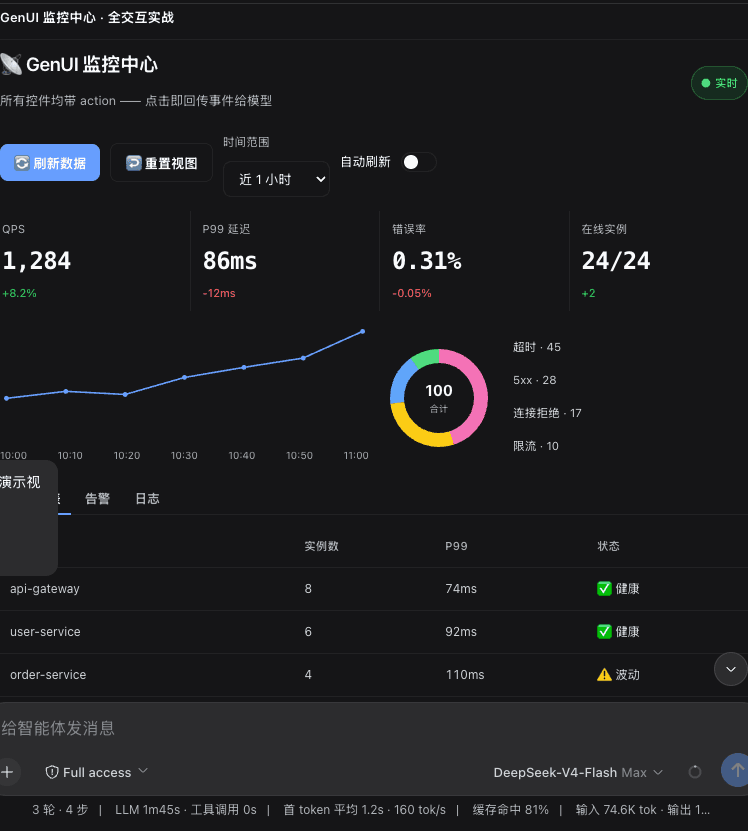
1. A monitoring panel is an answer, not a separate dashboard
<br><em>Real output: refresh/reset controls, time-range selection, statistics, charts, and a service table live inside the assistant reply.</em>
2. A function plot redraws locally as its parameters change
<br><em>Real output: plot renders curves while sliders, reset, and animation controls update the graph locally.</em>
3. Layout primitives compose into structured work surfaces
<br><em>Real output: typography, grid, card, and row/column primitives combine into a hierarchy the model can describe declaratively.</em>
⚠️ Read this first: dual-channel rendering (no host source patch required)
The plugin ships two rendering channels and picks one automatically after the host activates its browser module:
…
