acefun29/dsh-file-mount
dsh-file-mount
dsh-file-mount is a community DeepSeek Harness plugin. Read the repository README before installing.
Install
npx @deepseek-ai/dsh plugin --profile web add https://github.com/acefun29/dsh-file-mount/releases/latest/download/dsh-file-mount.tgzRestart `dsh web` after install. Bundle APIs can change during the developer preview.
README badge

[](https://dshhub.dev/plugins/dsh-file-mount)Paste this into your README. The star count updates with every catalog sync.
From the README
Excerpt from acefun29/dsh-file-mount, cleaned of badges and images.
dsh-file-mount
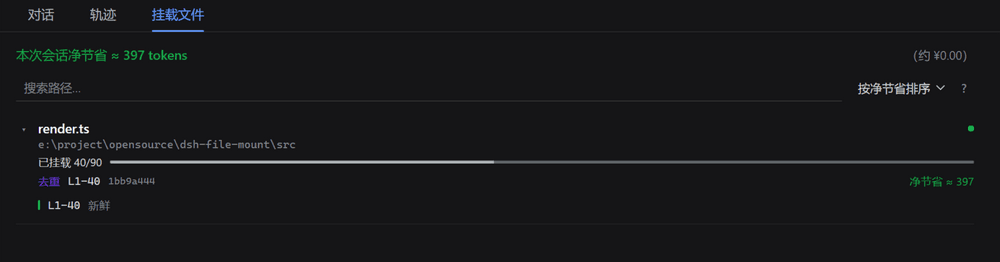
DeepSeek Harness 插件:文件增量挂载 + 重复读取去重。记录每个文件哪些行范围已经进入模型上下文,重复读取只补缺失的部分;文件在磁盘上变化时按行级对比只补改动的行;并用「挂载文件」仪表盘实时展示账本。
移植自 piwpi 的 context-mount 机制。
为什么需要它
Agent 会反复读同一个文件:刚看过一眼的实现,改两行再看一次;或者换个窗口范围再读一遍。每一次都是完整的 token 开销,而其中绝大部分内容模型刚刚才看过。
这个插件把「读过什么」记成账本。第二次之后的读取只把真正缺失或改动的行送进上下文,重复的部分换成一行去重说明——省下的是上下文,也是钱。
效果
- 模型侧:读过的行范围不重复进上下文(去重 marker);缺失/改动的正文写进本次 read 的工具结果(增量 / 重挂),纸条只记账本声明;文件改动后只补改动的行(行级 diff,日志追加只补新尾巴——超出行级底稿上限的大文件也走追加识别);AI 自己写过的文件回头读直接免单(写后磁盘内容与模型写入不一致时除外,例如被 format-on-save 钩子改写);
file_mount_forget工具让模型能主动强制重读。 - 界面侧:「挂载文件」标签页是仪表盘——打开时停在顶部,净节省与路径搜索固定在顶栏,文件列表单独滚动;每个文件行可展开成文件段列表,每段带新鲜度色带(绿=新鲜 / 黄=一般 / 橙=接近过期 / 红=已过期 / 灰=未知)和过期次数;另有覆盖图(色块标出已挂载行在文件中的位置)、搜索、排序、净节省与人民币折算;对话区有上下文注入折叠行,「文件已变更」时行上有角标。
- 节省统计:中文按 1 字 ≈ 1 token、其他按 4 字符 ≈ 1 token 估算;同时记账「省下的」和「插件开销」(状态通知、marker、过期重发正文),界面显示净值(为负时按 0 显示);可选把跨会话总账落盘(
statsFile)。
安装
一个包两面:dsh.bundle.patch 挂载宿主插件行,dsh.client manifest 让 Web 端扫描出浏览器半部。装进 profile 后必须重启 harness(刷新页面不够)。需要本机有 pnpm(dsh plugin 转调它)和 Node ^22.19 || >=24。
快速开始(推荐)
npx --yes @deepseek-ai/dsh plugin --profile web add https://github.com/acefun29/dsh-file-mount/releases/latest/download/dsh-file-mount.tgz
npx --yes @deepseek-ai/dsh --profile web
已有全局 dsh 时,第一行换成 dsh plugin --profile web add <同一个地址>。装的是预构建包:不走 npm,也不需要 allowBuilds。
DSH 桌面版用的是 desktop profile,把命令里的 --profile web 换成 --profile desktop 即可。改完源码要让已装进 profile 的那份生效,用 pnpm dsh:install 重装——安装器默认只装 web profile,PowerShell 里先设 $env:DSH_PROFILE = 'desktop' 再跑即切到桌面 profile。
若 npx @deepseek-ai/dsh 长时间没输出,多半在拉 CLI(首次要下整棵依赖树),等它结束即可。
从本仓库源码安装
pnpm dsh:install
安装器会构建、打包 tarball,再用 file:E:/...tgz 交给 pnpm。
Windows 注意:不要对目录路径用
dsh plugin add .或file:E:\...(反斜杠)。pnpm 会把盘符拼进 profile 目录(profile\E:\...),插件装上但不激活。安装器已经处理了这个坑。
手动装本地 tarball
pnpm run build
npm pack --ignore-scripts
dsh plugin --profile web add file:$(pwd)/dsh-file-mount-$(node -p "require('./package.json').version").tgz
Windows PowerShell:
pnpm run build
npm pack --ignore-scripts
$Tgz = ((Get-Location).Path -replace '\\','/') + "/dsh-file-mount-$((Get-Content package.json -Raw | ConvertFrom-Json).version).tgz"
npx --yes @deepseek-ai/dsh plugin --profile web add "file:$Tgz"
不要用 github:acefun29/dsh-file-mount 装源码:仓库不含 lib/,包也已去掉 prepare。请用上面的 Release 或安装器。
配置
在 profile 的插件行里写 config,例如:
- id: file-mount
  name: dsh-file-mount
  config:
    excludeGlobs: ['**/node_modules/**']
    statsFile: ./dsh-file-mount-stats.json
全部键(含默认值):
…

