ph4310822/dsh-edex-ui
dsh-edex-ui
dsh-edex-ui is a community DeepSeek Harness plugin. Read the repository README before installing.
Install
npx @deepseek-ai/dsh plugin --profile web add @danielng23/dsh-edex-uiRestart `dsh web` after install. Bundle APIs can change during the developer preview.
README badge

[](https://dshhub.dev/plugins/dsh-edex-ui)Paste this into your README. The star count updates with every catalog sync.
From the README
Excerpt from ph4310822/dsh-edex-ui, cleaned of badges and images.
dsh-edex-ui
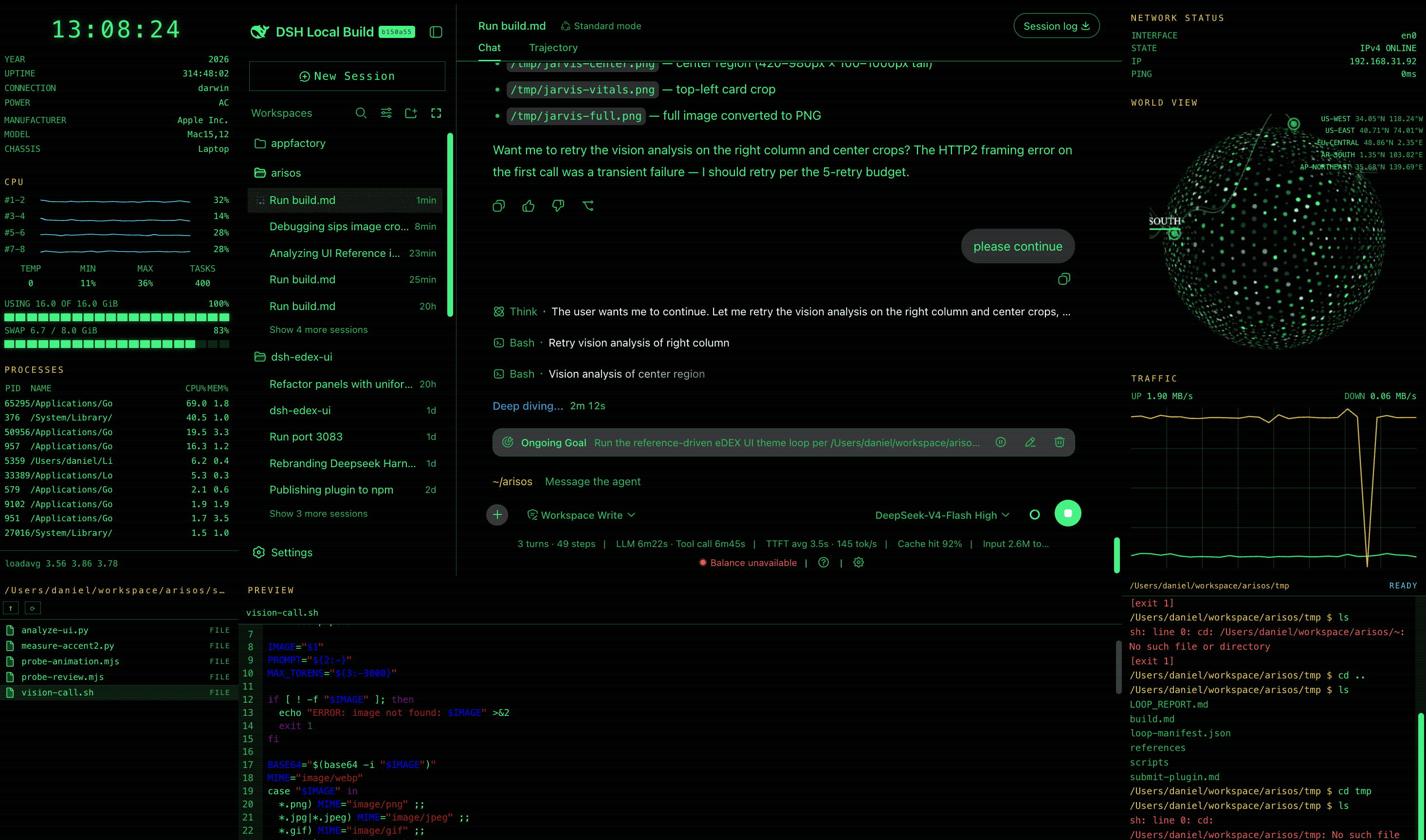
DeepSeek Harness eDEX-UI shell plugin — a terminal-inspired by https://github.com/GitSquared/edex-ui overlay for the DSH web GUI. Adds a classic eDEX-UI layout: system telemetry left bar, world-map right bar, filesystem browser, and a terminal-styled composer input — all wrapped around the original UI.
Features
- Left bar — system overview panel: CPU, memory, swap, processes, platform info, and thermal/power state, with per-core CPU sparklines
- Right bar — network status + encom-globe world view with endpoint markers and spline links, plus a dual up/down traffic chart with grid
- Top panel — an empty full-width strip overlaying the shell's top edge above every layer (ready for future chrome)
- Bottom panel — one strip hosting three swappable widgets, each wrapped in
the same title/border chrome:
- DIR — filesystem browser as a terminal-style LIST (icon + name + DIR/FILE), the same width as the left bar, with storage bar
- PREVIEW — file preview / editor pane (text, code, images), spanning the center region
- TERMINAL — a real host shell: commands execute through the
systemMetrics.runCommandRemote (sh -c, 30s timeout), with client-sidecd/clear/help/pwd, ↑/↓ history, and a prompt that follows the filesystem browser until you run your first command
- Terminal-styled composer — flattened input capsule, green block caret, and
a
~/<workspace>path prompt at the left edge of the input area - Workspace-follow — the dir panel and prompt track the active conversation's workspace; switching sessions navigates both the filesystem browser and the prompt
- Green-on-black skin — token overrides recolour the entire original UI to terminal green, without touching the user's theme preference
Installation
The plugin is published to npm as @danielng23/dsh-edex-ui. From the harness
checkout:
pnpm dsh plugin --profile web add @danielng23/dsh-edex-ui
pnpm dsh web   # serves the eDEX shell over the default GUI
To run the local checkout instead of the npm release (for development), add
the bundle with a file: path — its file: dependency specs link the local
sub-packages:
pnpm dsh plugin --profile web add file:/path/to/dsh-edex-ui/packages/bundle
See LOCAL_DEVELOPMENT.md for the three-instance port layout (3080 baseline / 3081 npm / 3083 local), the build, and the iteration workflow.
Development
See LOCAL_DEVELOPMENT.md for the full build, install, and iteration workflow. The widget architecture for the shell bars is documented in WIDGETS.md.
Packages
| Package | Host/Client | Description |
|---|---|---|
packages/bundle | — | Installable bundle (cordis.patch.yml) |
packages/ui-edex | client | The eDEX shell frame and all panels |
packages/ui-theme-terminal | client | Appearance → Terminal theme row |
packages/host/system-metrics | host | System telemetry RPC + file read/write + runCommand shell execution |
License
MIT
