SheepofSheep/dsh-doyourweb
dsh-doyourweb
Reference and control existing Chrome and Edge tabs from DeepSeek Harness (DSH plugin + companion extension)
Install
npx @deepseek-ai/dsh plugin --profile web add github:SheepofSheep/dsh-doyourwebRestart `dsh web` after install. Bundle APIs can change during the developer preview.
README badge

[](https://dshhub.dev/plugins/dsh-doyourweb)Paste this into your README. The star count updates with every catalog sync.
From the README
Excerpt from SheepofSheep/dsh-doyourweb, cleaned of badges and images.
dsh-doyourweb
Reference and control your existing, logged-in Chrome and Edge tabs from DeepSeek Harness, with compact page context and batched browser actions.
Version 0.1.6 improves desktop snapshots, input diagnostics and connection UI, and adds app_type for text plus key chords. It supports draggable element annotations collected in the chat draft and @ references to running Windows apps. App control discovers matching MCPs first. Installed local MCPs connect directly; installation requests approval. With no matching MCP, use computer use. Windows are shown when possible while background execution remains available. See annotations and app control.
English | 简体中文
Local Demo · Quick Start · Usage
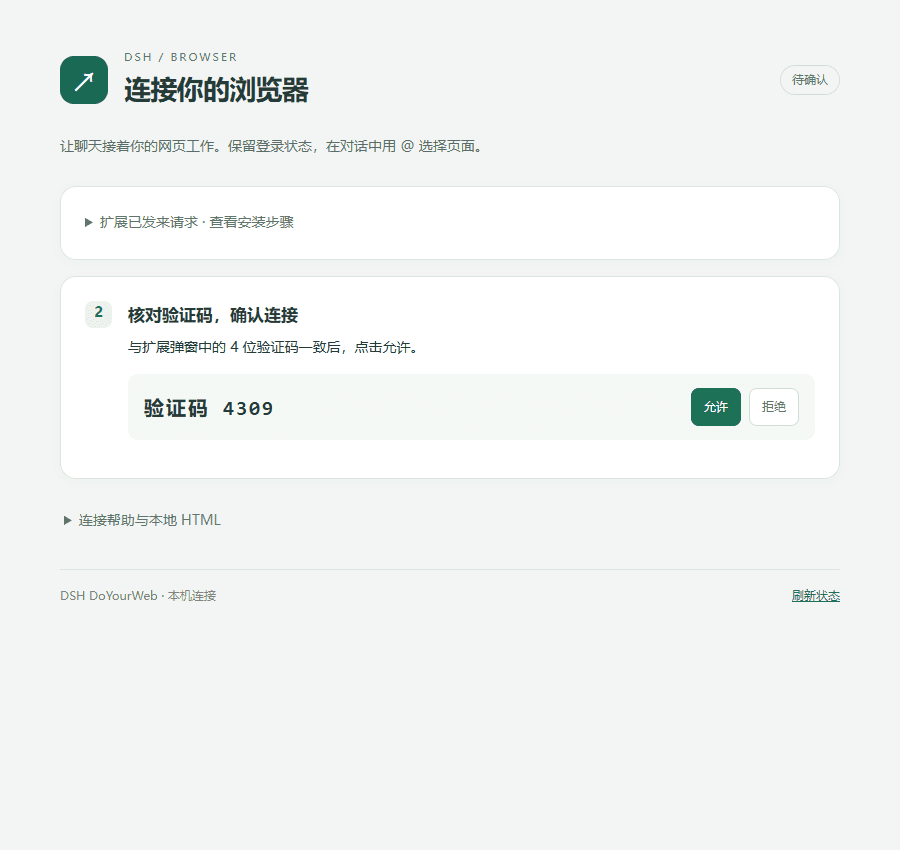
The local pairing page connects your browser extension to the DSH plugin.
01 · Introduction
Browser tasks often depend on pages you have already opened and accounts you have already signed into. dsh-doyourweb connects those tabs to DeepSeek Harness instead of launching a separate automation browser or exporting cookies.
The project has two parts: a DSH plugin and a companion Manifest V3 extension. The plugin adds browser references to the native @ and / menus; the extension supplies tab metadata and browser control. Once paired, the extension reconnects in the background without keeping its popup open.
Current version: 0.1.6 for both the package and browser extension. See the changelog.
02 · Preview
- Use
/browserto open the connection page and locate the extension folder. - Load the extension in Chrome or Edge, then approve its matching four-digit pairing code.
- Select an existing page with
@and describe the task in DSH.
The screenshot above shows the pairing interface, not a recorded automation run.
<a id="local-demo"></a>
Local Demo
There is no public hosted demo. After the DSH plugin starts, its default local connection page is http://127.0.0.1:43187/setup. Browser control runs through this local bridge and the installed extension.
03 · Core Features
…

