berhbro/dsh-cyrene-theme
dsh-cyrene-theme
Cyrene theme dsh plugin
Install
npx @deepseek-ai/dsh plugin --profile web add dsh-cyrene-theme`Restart `dsh web` after install. Bundle APIs can change during the developer preview.
README badge

[](https://dshhub.dev/plugins/dsh-cyrene-theme)Paste this into your README. The star count updates with every catalog sync.
From the README
Excerpt from berhbro/dsh-cyrene-theme, cleaned of badges and images.
dsh-cyrene-theme · 昔涟主题
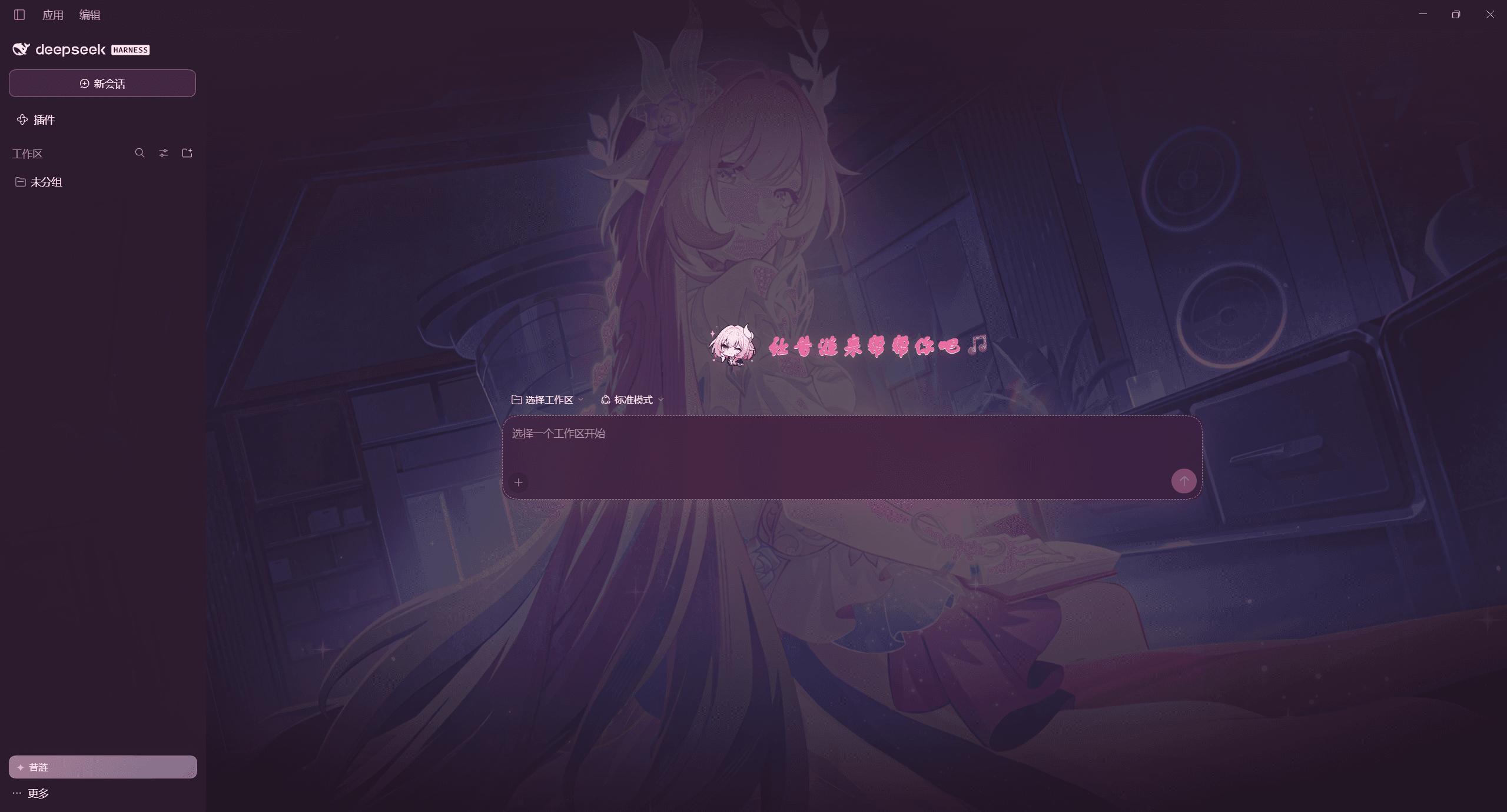
把 DSH Web GUI 换成《崩坏:星穹铁道》昔涟(Cyrene)的粉白渐变毛玻璃主题,把 agent 的人格设定改成昔涟——人格提示词可以直接在侧边栏里改——让她在该有情绪的时候贴一张自己的表情包,把新会话欢迎页的鱼换成她、顺手把输入框的默认提示换成她的话,还能把整页背景换成 Background/ 里放的那几张图(可以在面板里开关、选起点、自动轮换,也能自己上传新的;深色模式下还能自动换成指定的那一张)。
English — A pink-and-white frosted-glass skin for the DSH Web GUI, themed after Cyrene from Honkai: Star Rail. It also rewrites the agent persona (editable from the sidebar), teaches the agent to post Cyrene reaction stickers, replaces the new-session hero fish with her, and adds a full-page background manager (enable / pick / rotate / fade the images in
Background/, upload your own, and bind one image to dark mode).Install:
dsh plugin --profile web add dsh-cyrene-theme(npm, pinned version) or… add github:berhbro/dsh-cyrene-theme(tracks the latest commit) — then reload the page. UI text is Chinese.Unofficial fan project. Cyrene and all Honkai: Star Rail character art, names and assets are © miHoYo / HoYoverse, used here as non-commercial fan work. Not affiliated with or endorsed by miHoYo, HoYoverse or DeepSeek — see 「版权与致谢」 below.
能力
| 部分 | 实现 |
|---|---|
| 主题 UI | 客户端半注入一份作用域化样式表(body[data-dsh-cyrene][data-cyrene-skin="on"]):整体渐变背景、半透明表面 token、backdrop-filter 毛玻璃、粉色描边与柔和阴影、粉色滚动条/选区。全部随插件卸载自动还原。--dsw-alias-bg-base 被设成 transparent,所以渐变由 body::before 铺满视口;桌面版窗口带原生材质(backgroundMaterial: "acrylic"),因此 html 画布上也补了一层不透明底色,避免整窗透出系统模糊。 |
| 人格设定 | 宿主半注册 systemPrompt.section({ name: 'cyrene:persona', order: 部署人格前缀 order + 100 })——运行版 dsh-system-prompt 的键是 DEPLOYMENT_PERSONA_PREFIX(0),旧版是 DEPLOYMENT_PERSONA(0),两个都试;都取不到就落到 100,仍然排在通用人格之后、工具策略 PLAN_POLICY(500) 之前。每次保存后重挂这个 section,所以改完立刻对之后每一轮对话(含新对话)生效,不需要重载插件。section 名用本包自己的 cyrene:persona,绝不占用保留名 deployment:persona(那是 @deepseek-ai/dsh-persona 的位置,全局重名注册会直接失败)。 |
| 侧边栏编辑 | 客户端半向 sidebar.footer.action 注册「✦ 昔涟」按钮(点开浮动面板),并额外向 settings.section 注册一整页「昔涟 · 主题」,两处用的是同一个编辑器。 |
| 表情包 | 素材放在包内 meme/ 下(文件名就是表情名字),stickers.json 是清单(id / 名称 / 什么时候用 / 文件)。宿主半把清单折算成一段附在人格之后的「【表情包】」说明——每张图的绝对路径整行写好,模型直接照抄(路径里带括号、空格或非 ASCII 时,自己拼很容易抄错)——并开两条只读路由:GET /cyrene/stickers(清单,支持 ?reload=1)与 GET /cyrene/sticker/<id>(图片字节,带 ETag/304)。设置页里能看到缩略图与「允许发表情包」开关;关掉后这段说明就从系统提示词里消失。 |
| 表情包管理 | 面板里只有一行入口(「✦ 表情包管理 N 张」+「打开管理器」),点开是一整页管理器(挂在 body 上的覆盖层,Escape 或右上「关闭」退出):里面加图(选文件 → 转成 data URL → POST /cyrene/stickers)、删图(只删自己加的,POST /cyrene/stickers/remove)、调大小(48–240px 滑杆,落进 state.stickerSize)。页面本身封顶 + 内层滚动,素材不会撑出管理器范围。自添加的图落在 stickers-custom/(gitignore,属运行时数据),条目存在状态文件的 customStickers 里,与包内清单合并成同一份「【表情包】」说明——加完立刻能贴,不用重载插件行。 |
| 背景图 | 两处素材来源:随包的 Background/(自己丢图进去)和面板里上传的 backgrounds-custom/。宿主半扫描两边(GET /cyrene/backgrounds,支持 ?reload=1)、按文件名把字节发出去(GET /cyrene/background/<文件名>,与表情包同一套响应头),并开 POST /cyrene/backgrounds(上传)、POST /cyrene/backgrounds/remove(只删自传的)。客户端半在 body 上挂一层 .cyre-bg(position:fixed;inset:0;z-index:-1;pointer-events:none):两层图交叉淡入 + 一层色纱,有图时铺满视口;整列对话区不刷白,照片直接透上来,只把用户气泡的底色调厚、再给正文一圈淡光晕。控制板里只留一行入口(「✦ 背景图管理 N 张」+「打开管理器」);管理器是一整页覆盖层:顶部的外观两档「浅色 / 深色」(调宿主自己的主题服务,整个应用跟着换)、「背景图 / 简约(无图)」二选一、上传、点缩略图选起点、开自动轮换(15–3600 秒)、拖浓度(0.2–0.85)、删掉自传的图。详见「背景图」。 |
| 持久化 | 宿主半自带 fenced 路由 /cyrene/state(GET 读 / POST 写),落盘到 $DSH_HOME/cyrene-theme.json(默认 ~/.dsh/cyrene-theme.json)。写入走乐观并发:写请求必须带上 GET 拿到的 rev,缺 rev(旧版客户端半 / 手搓脚本)→ 400 client-outdated,rev 过期 → 409 stale —— 没刷新的旧页面不可能再把别处的改动盖回去。 |
| 对话界面 | 新会话欢迎页:客户端半占用 `conver |
…

