xiajiajun516/dsh-config-manager
dsh-config-manager
DeepSeek Harness (DSH) backup & restore plugin — export, import, migrate and sync your complete DSH configuration, plugins, MCP servers, skills and workspace. One-click migration to another machine.
Install
npx @deepseek-ai/dsh plugin --profile web add dsh-config-manager@latestRestart `dsh web` after install. Bundle APIs can change during the developer preview.
README badge

[](https://dshhub.dev/plugins/dsh-config-manager)Paste this into your README. The star count updates with every catalog sync.
From the README
Excerpt from xiajiajun516/dsh-config-manager, cleaned of badges and images.
🎒 DSH Config Manager
DeepSeek Harness Backup, Restore & Migration Plugin.
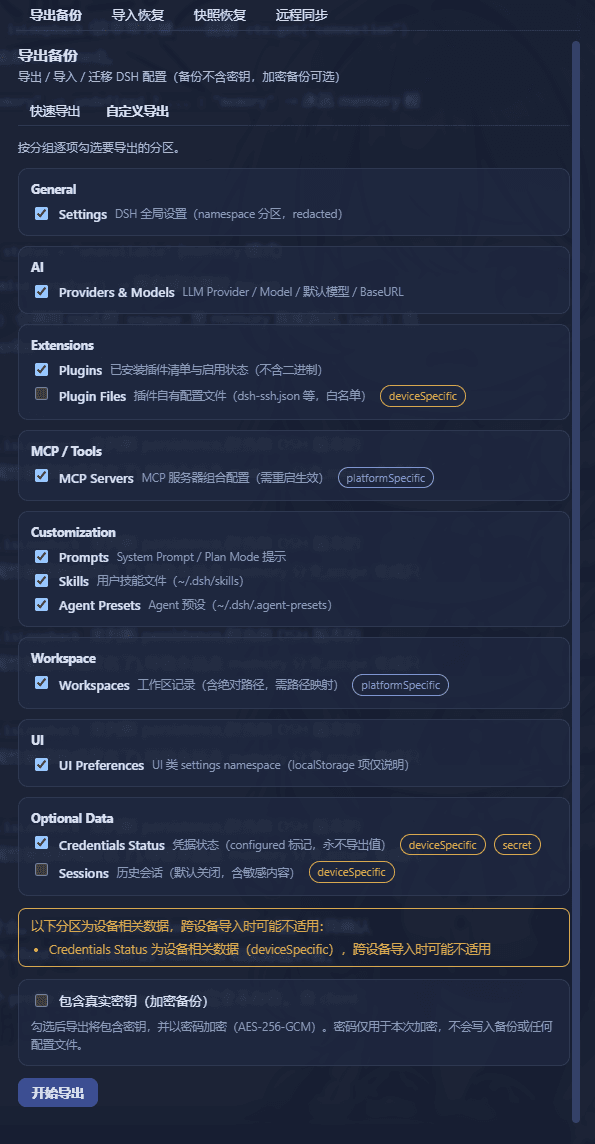
Backup, restore, export, import, migrate and sync your complete DeepSeek Harness (DSH) configuration — settings, model providers, plugins, MCP servers, skills, agent presets and workspaces — and restore your whole environment on a new machine with one click.
- 🔄 Backup & Restore DeepSeek Harness configuration
- 📦 Export / Import complete DSH configuration
- 🚚 Migrate DSH to another machine
- 🔌 Backup installed plugins and plugin configuration
- 🧩 Backup MCP servers and Skills
- 🔐 Encrypted backups with optional credentials
- ☁️ Git / WebDAV configuration sync
- 🛒 Configuration market — browse & one-click install shared configs
- ↩️ Automatic snapshot and rollback before restore
What is this? 🤔
DSH is your AI assistant workbench — it holds your settings: model configs, plugins, skills, workspaces…
DSH Config Manager is its "moving service":
┌──────────────┐   ① one-click    ┌─────────────────┐   ② one-click    ┌──────────────┐
│  Machine A    │ ──── export ───► │ dsh-config.zip   │ ──── import ───► │  Machine B    │
│  my config    │                  │   (one file)     │                  │  all restored │
└──────────────┘                  └─────────────────┘                  └──────────────┘
⚠️ Security first: no secrets (API Key / Token / Password) are exported by default. See Security.
🎯 Use Cases
Backup DeepSeek Harness configuration
Create a portable backup of your DSH settings, model providers, plugins, MCP servers, skills, agent presets, profiles and workspace — one ZIP file, no secret values included by default.
Restore DeepSeek Harness on another machine
Export your current DSH environment as a single ZIP and import it on a new Windows, macOS or Linux machine. One click brings back settings, plugins, MCP servers, skills and global instructions (AGENTS.md).
Migrate DSH configuration to a new computer
Move your complete DeepSeek Harness setup without manually reinstalling plugins, MCP servers and skills. Dead absolute paths are detected and remapped automatically (batch prefix mapping supported).
Sync DSH configuration across machines
Keep portable configuration synchronized between machines through a private Git repository or WebDAV — secrets never sync.
Discover & install configurations from the marketplace
Browse the built-in official market for ready-made configurations (model providers, plugins, MCP servers, skills, agent presets…), preview what would be imported (dry-run), and install with one click — supply-chain warnings are always shown and every section must be explicitly approved before anything is written.
✨ Highlights
…

