Nwflower/dsh-claude-style
dsh-claude-style
Claude Code Desktop theme for DeepSeek Harness
Install
npx @deepseek-ai/dsh plugin --profile web add dsh-claude-styleRestart `dsh web` after install. Bundle APIs can change during the developer preview.
README badge

[](https://dshhub.dev/plugins/dsh-claude-style)Paste this into your README. The star count updates with every catalog sync.
From the README
Excerpt from Nwflower/dsh-claude-style, cleaned of badges and images.
DSH Claude Style
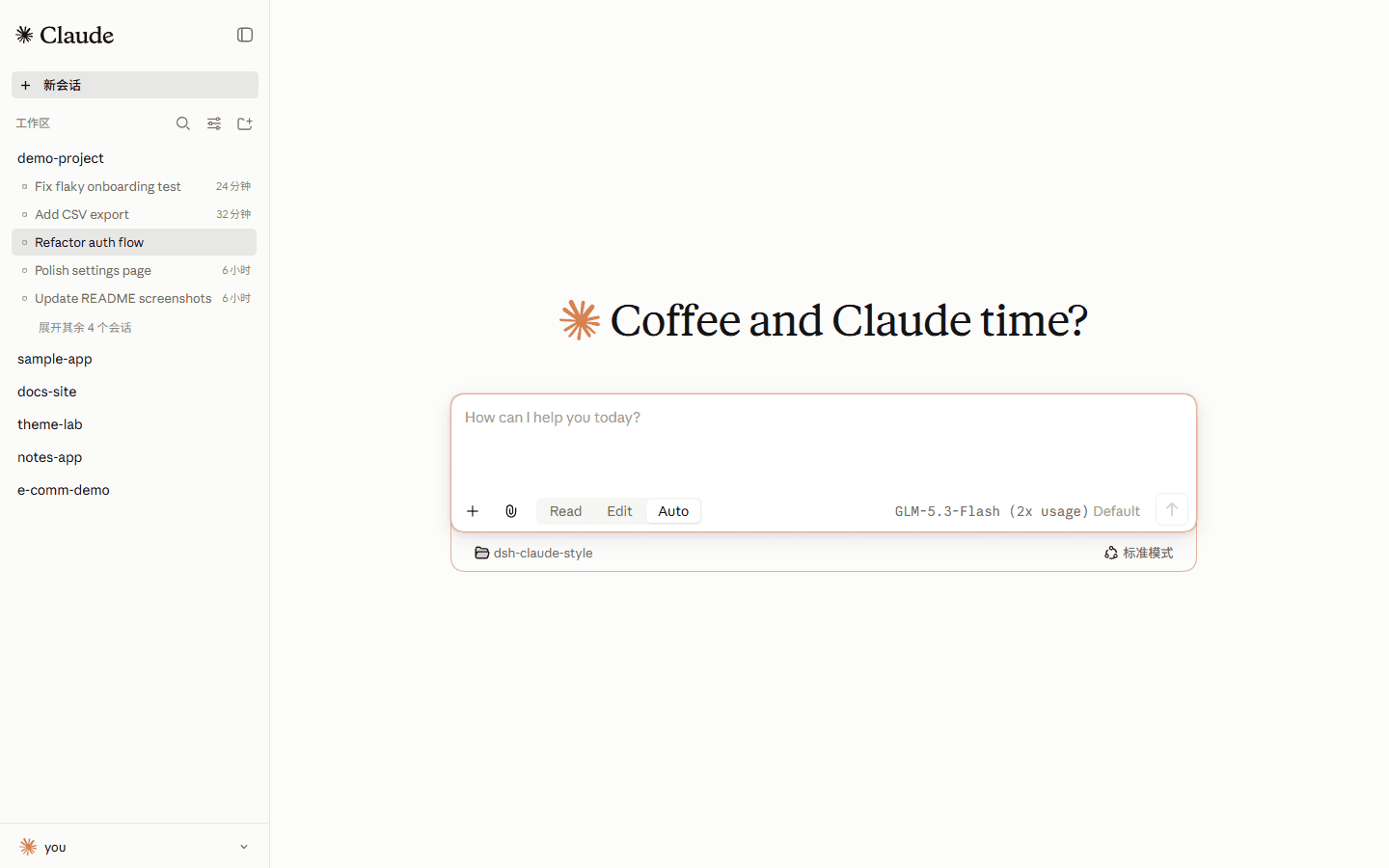
为 DeepSeek Harness 复刻 Claude Code Desktop 风格与交互体验的主题插件。
你的下一个 Claude Code Desktop ,何必是Claude Code。
预览
两套主题在插件设置里切换,亮暗跟随系统。
Claude
<td align="center" width="50%"><img src="./docs/screenshots/claude-home-light.png" alt="Claude 档编程首页 —— 亮色" /></td>
<td align="center" width="50%"><img src="./docs/screenshots/claude-home-dark.png" alt="Claude 档编程首页 —— 暗色" /></td>
<td align="center" width="50%"><img src="./docs/screenshots/claude-conversation-light.png" alt="Claude 档 Markdown 对话 —— 亮色" /></td>
<td align="center" width="50%"><img src="./docs/screenshots/claude-conversation-dark.png" alt="Claude 档 Markdown 对话 —— 暗色" /></td>
编程首页(上),对话界面(下);浅色在左,深色在右。
DeepSeek
<td align="center" width="50%"><img src="./docs/screenshots/deepseek-home-light.png" alt="DeepSeek 档编程首页 —— 亮色" /></td>
<td align="center" width="50%"><img src="./docs/screenshots/deepseek-home-dark.png" alt="DeepSeek 档编程首页 —— 暗色" /></td>
<td align="center" width="50%"><img src="./docs/screenshots/deepseek-conversation-light.png" alt="DeepSeek 档 Markdown 对话 —— 亮色" /></td>
<td align="center" width="50%"><img src="./docs/screenshots/deepseek-conversation-dark.png" alt="DeepSeek 档 Markdown 对话 —— 暗色" /></td>
输入框上沿站着宠物小鲸鱼 Deepy,八个状态:
<td align="center" width="25%"><img src="./docs/gifs/idle.gif" width="120" alt="空闲" /><br />空闲</td>
<td align="center" width="25%"><img src="./docs/gifs/thinking.gif" width="120" alt="思考" /><br />思考</td>
<td align="center" width="25%"><img src="./docs/gifs/typing.gif" width="120" alt="写回答、调用工具" /><br />写回答、调用工具</td>
<td align="center" width="25%"><img src="./docs/gifs/conducting.gif" width="120" alt="指挥子代理" /><br />指挥子代理</td>
<td align="center" width="25%"><img src="./docs/gifs/notification.gif" width="120" alt="等你操作" /><br />等你操作</td>
<td align="center" width="25%"><img src="./docs/gifs/error.gif" width="120" alt="失败" /><br />失败</td>
<td align="center" width="25%"><img src="./docs/gifs/happy.gif" width="120" alt="完成" /><br />完成</td>
<td align="center" width="25%"><img src="./docs/gifs/sleeping.gif" width="120" alt="睡着" /><br />睡着</td>
安装
官方插件页添加这个包名,或从终端安装:
dsh-claude-style
dsh plugin --profile web add dsh-claude-style                    # npm 包(推荐)
dsh plugin --profile web add Nwflower/dsh-claude-style#dist      # GitHub 发布分支
也可从插件市场或 dsh-web-all 的皮肤中心安装。同一时刻只启用一个主题,装好后重启 DeepSeek Harness。
字体
Anthropic 没有公开发行这三款字体;本仓库只提供下载与研究的副本。
启用时二选一:装进系统,或把 .ttf 复制到 $DSH_HOME/dsh-claude-style/fonts/。
文档
| 文档 | 说明 |
|---|---|
| 设计令牌 | 配色、字体、形状、动效与层级 |
| 架构决策 | 每条方向一页:背景、决定、后果与重审条件 |
| 更新日志 | 版本历史 |
| 贡献指南 | 构建、提交规范与回归工具 |
许可
除特别说明,本仓库以 MIT 授权。
钠(Sodium)渲染引擎以 PolyForm Shield 1.0.0 授权。
鸣谢
…

