jiezeng2004-design/dsh-chatgpt-bridge
dsh-chatgpt-bridge
MCP bridge that lets ChatGPT web create, view, continue, and control DeepSeek Harness (DSH) agent sessions.
Install
npx @deepseek-ai/dsh plugin --profile web add [email protected]Restart `dsh web` after install. Bundle APIs can change during the developer preview.
README badge

[](https://dshhub.dev/plugins/dsh-chatgpt-bridge)Paste this into your README. The star count updates with every catalog sync.
From the README
Excerpt from jiezeng2004-design/dsh-chatgpt-bridge, cleaned of badges and images.
dsh-chatgpt-bridge
Let ChatGPT drive your local DSH agents.
在 ChatGPT 里创建任务、继续会话、监督 Goal、处理审批并检查结果,不用在 ChatGPT 和 DSH 之间反复复制 Prompt。
dsh-chatgpt-bridge connects ChatGPT Web → secure MCP tunnel → DeepSeek Harness (DSH). ChatGPT becomes the control surface; DSH keeps the agent loop, tools, skills, subagents, workflows, sandbox, approvals and workspace security model.
The bridge connects the two sides. It does not replace DSH, modify DSH core, or route DSH model traffic through ChatGPT.
Published 0.6.0 targets DSH 0.1.7-rc.2 exactly. The unpublished working tree now targets 0.2.0-rc.2, with local tests and packed official CLI/Web/MCP acceptance passing on 2026-10-08. The package version has not been bumped or republished. See the current compatibility evidence and published-release evidence. After a successful connection, ChatGPT should see tool count = 23.
Why this exists
A normal ChatGPT + local-agent workflow has too much manual glue:
Think in ChatGPT
      ↓
copy prompt to DSH
      ↓
wait / inspect logs
      ↓
copy result back
      ↓
review in ChatGPT
      ↓
repeat
With the bridge:
ChatGPT Web
   ↓  create / continue / supervise / approve
Secure MCP tunnel
   ↓
dsh-chatgpt-bridge
   ↓
DeepSeek Harness
   ↓
local workspace + tools + agent runtime
You stay in ChatGPT while DSH remains the execution engine.
What you can do from ChatGPT
- create and inspect native DSH sessions;
- send follow-up instructions without copying context between apps;
- start, inspect, update and wait on Goals;
- approve DSH actions through the bridge when your DSH policy requires it;
- list registered workspaces and inspect runtime health;
- keep using DSH's own sandbox, approval and workspace boundaries;
- manage the supported tunnel runtime from the DSH Web settings UI.
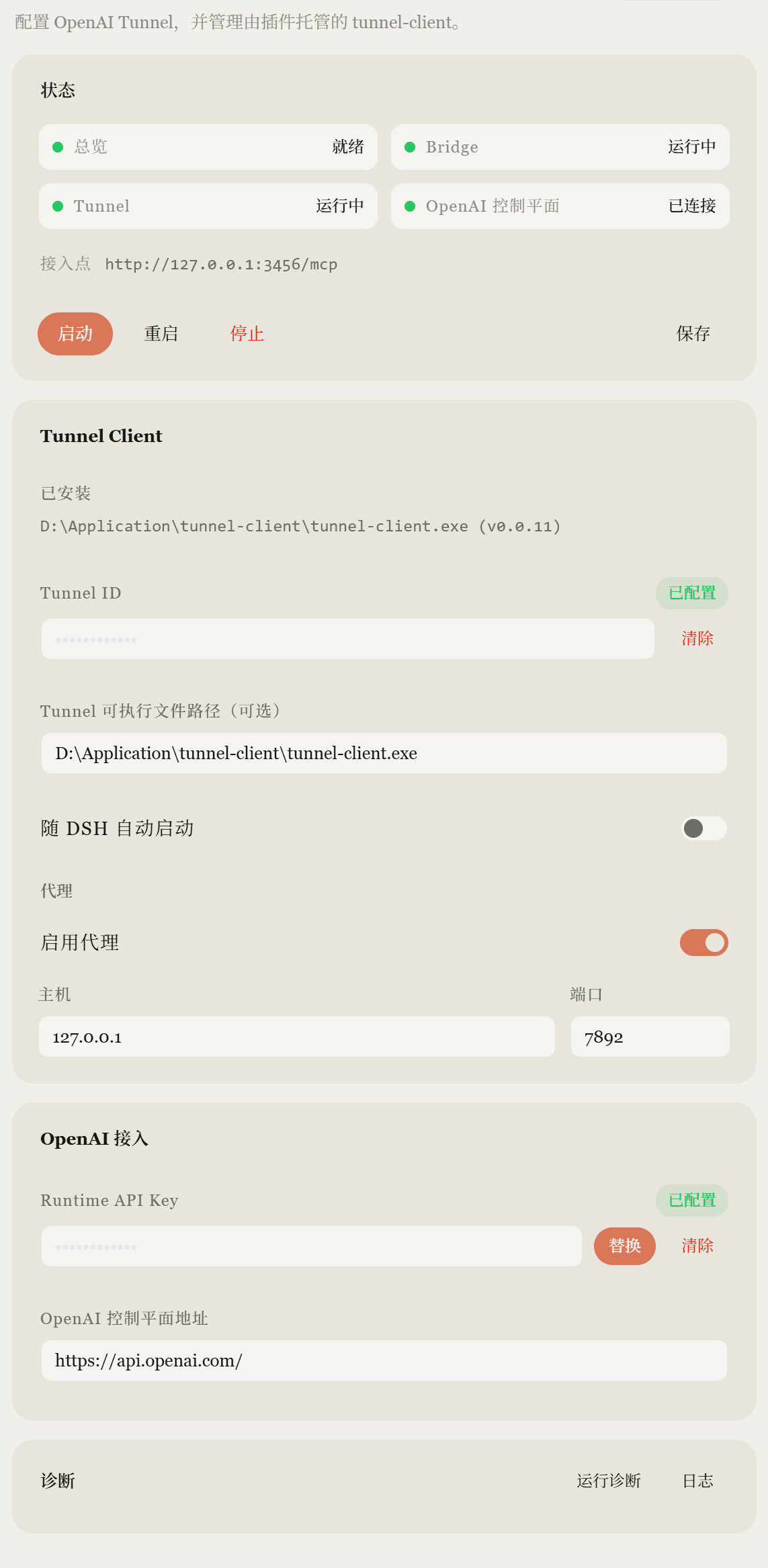
Real setup
The screenshot is from a real DSH Web installation with sensitive values masked.
Quick start
Requirements
- Node.js 22+
- DeepSeek Harness
0.1.7-rc.2(dshonPATH) - a DSH Web profile/runtime
- ChatGPT access that can use the currently supported MCP/custom-app connection flow
1. Install the plugin
Install v0.6.0 into the matching DSH 0.1.7-rc.2 host:
dsh plugin --profile web add [email protected]
To install from a reviewed source checkout instead:
npm ci
npm run typecheck
npm run build
npm test
npm run test:release
pnpm dlx @deepseek-ai/[email protected] plugin --profile web add "file:$PWD"
Source installation into a real profile was not part of release verification. Back up the profile before upgrading DSH: DSH owns V3 session migration. npm install dsh-chatgpt-bridge alone is not enough: the plugin must be added to a DSH profile bundle. Published v0.5.1 remains tied to the older DSH 0.1.1-rc.2 host.
2. Start DSH Web
dsh web
Keep DSH Web and the bridge in the same web profile/runtime so ChatGPT-created sessions appear live in the UI.
Default local endpoints:
| Service | Endpoint |
|---|---|
| DSH Web | http://127.0.0.1:3080 |
| Bridge MCP | http://127.0.0.1:3456/mcp |
3. Read the bridge token
Windows PowerShell:
Get-Content "$HOME\.dsh\chatgpt-bridge.token"
macOS / Linux:
cat ~/.dsh/chatgpt-bridge.token
…