zoahdev/dsh-artifacts
dsh-artifacts
Claude-Artifacts-style rendering for DeepSeek Harness: Markdown + JSON -> beautiful self-contained HTML documents, cards, dashboards, and galleries. Zero runtime dependencies.
Install
npx @deepseek-ai/dsh plugin --profile web add dsh-artifactsRestart `dsh web` after install. Bundle APIs can change during the developer preview.
README badge

[](https://dshhub.dev/plugins/dsh-artifacts)Paste this into your README. The star count updates with every catalog sync.
From the README
Excerpt from zoahdev/dsh-artifacts, cleaned of badges and images.
dsh-artifacts
Claude-Artifacts-style rendering for DeepSeek Harness. Turn raw agent output — Markdown + JSON — into beautiful, shareable, self-contained HTML documents, cards, dashboards, and galleries. One command. Zero runtime dependencies.
English | 中文
Your agent produces Markdown and JSON all day. Most of it ends up as unstyled
terminal text that nobody shares. dsh-artifacts fixes that: the same content,
rendered as a polished, dependency-free HTML artifact you can open from disk,
attach to an email, or drop on any static host.
Live demo: https://zoahdev.github.io/dsh-artifacts/
Published on npm: dsh-artifacts
Why
- No design skills required. Pick a template + theme, get a finished page.
- Self-contained. All CSS is inlined — no external fonts, frameworks, or tracking. The output works offline and forever.
- Works two ways. A CLI for you, and an
artifact_rendertool for the agent itself. - Zero runtime dependencies. Node ≥ 18 only; nothing to audit.
Quick start
# As a standalone CLI
pnpm add -g dsh-artifacts
# or: npm install -g dsh-artifacts
dsh-artifacts notes.md --title "Release notes" --theme dark --out notes.html
dsh-artifacts notes.md --serve 8080          # live preview

# Or via npx without installing
npx dsh-artifacts notes.md --theme paper --out notes.html
Install as a DeepSeek Harness plugin:
dsh plugin --profile web add dsh-artifacts
# or, using the upstream CLI directly:
pnpm dlx @deepseek-ai/dsh plugin --profile web add dsh-artifacts
Then the agent can call artifact_render from chat to write a styled report to
disk and hand you back the path.
Templates
| Template | Use it for |
|---|---|
doc | Prose, notes, reports, README-style content |
card | A single shareable statement / hero card |
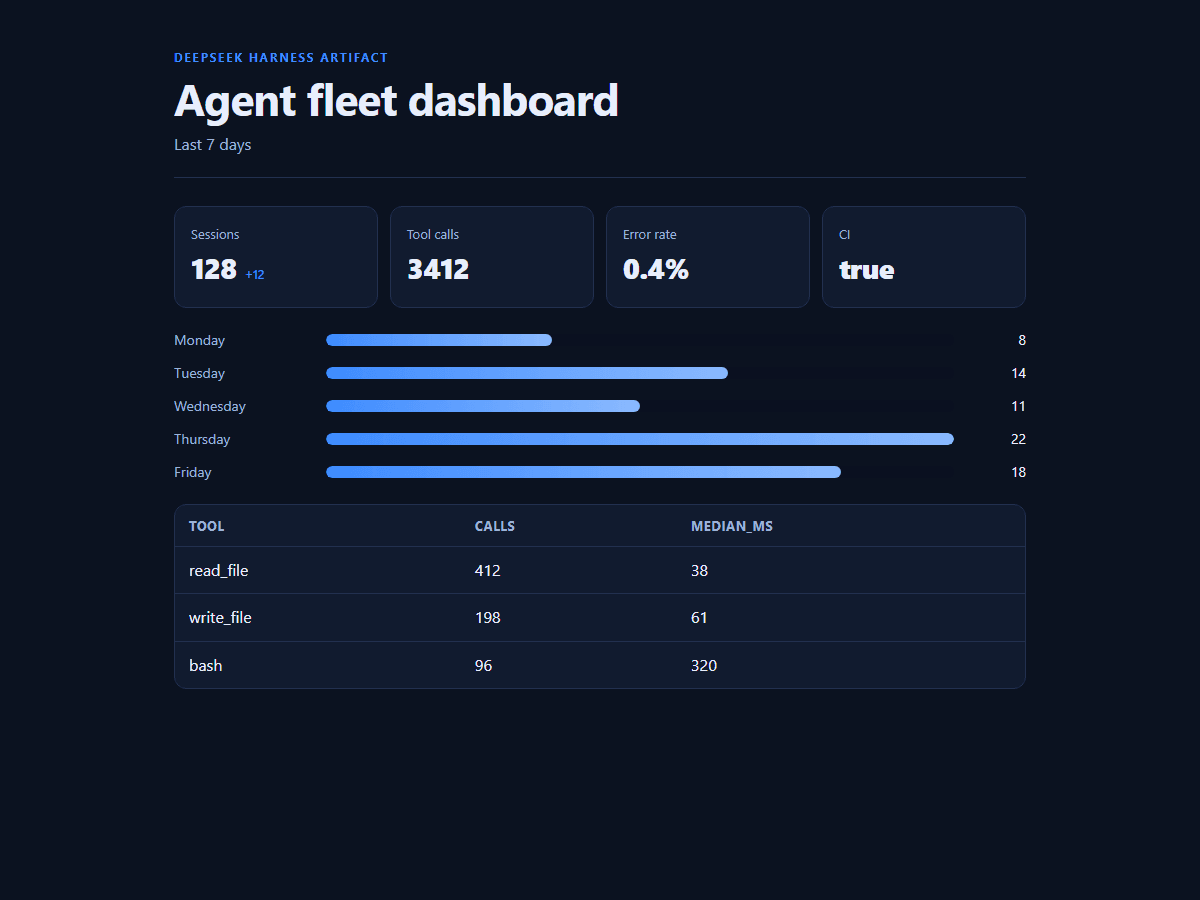
dashboard | Metrics, bars, and tables from JSON |
gallery | Image / item grids |
All four templates, rendered from the same demo inputs in this repo:
<td><img src="demo/preview-doc.png" alt="doc"></td>
<td><img src="demo/preview-dashboard.png" alt="dashboard"></td>
<td><img src="demo/preview-card.png" alt="card"></td>
<td><img src="demo/preview-gallery.png" alt="gallery"></td>
Themes
| Theme | Vibe |
|---|---|
dark | GitHub-dark, default |
light | Clean light UI |
paper | Warm, editorial serif |
terminal | Green-on-black monospace |
brand | DeepSeek-blue |
Examples
Document from Markdown:
dsh-artifacts demo/sample.md \
  --title "Release notes" \
  --subtitle "dsh-artifacts v0.1.0" \
  --theme dark \
  --out release-notes.html
Dashboard from JSON:
dsh-artifacts --data demo/metrics.json \
  --title "Agent fleet dashboard" \
  --template dashboard \
  --theme brand \
  --out dashboard.html
{
  "metrics": [
    { "label": "Sessions", "value": 128, "delta": "+12" },
    { "label": "CI", "value": true }
  ],
  "bars": [
    { "label": "Monday", "value": 8 },
    { "label": "Tuesday", "value": 14 }
  ],
  "columns": ["tool", "calls", "median_ms"],
  "rows": [["read_file", "412", "38"]]
}
Gallery from JSON:
dsh-artifacts --data gallery.json --template gallery --theme light
{ "items": [ { "title": "A", "image": "https://…/a.png", "tag": "new" } ] }
Vault export (Obsidian / VS Code / any folder of Markdown)
…
