Tkingxiao/dsh-any-background
dsh-any-background
dsh-any-background is a community DeepSeek Harness plugin. Read the repository README before installing.
Install
npx @deepseek-ai/dsh plugin --profile web add dsh-any-backgroundRestart `dsh web` after install. Bundle APIs can change during the developer preview.
README badge

[](https://dshhub.dev/plugins/dsh-any-background)Paste this into your README. The star count updates with every catalog sync.
From the README
Excerpt from Tkingxiao/dsh-any-background, cleaned of badges and images.
dsh-any-background
English | 中文
A DeepSeek Harness appearance plugin: custom theme color, background wallpaper (image / video / algorithmically generated), and fine-grained per-surface opacity & blur controls. Compatible with DSH 0.2.0-rc.1 through 0.2.1-rc.3 — and every host release above it (official-Sidebar UI such as the "Theme" card enables itself where the host exposes the Sidebar registry extension point, and is skipped silently where it does not).
Screenshots
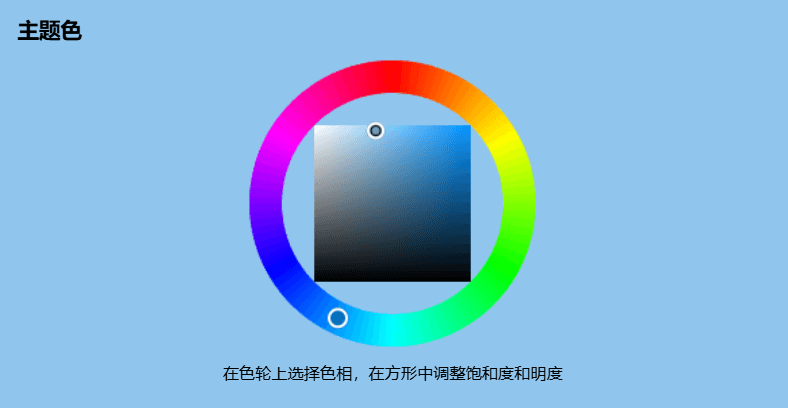
<br/> <em>Custom homepage · wallpaper + theme color applied</em> <br/> <em>Theme color picker · PS-style wheel + precise HSL/RGB inputs</em> <br/> <em>Per-part opacity and blur · main background, sidebar, cards, settings</em> <br/> <em>Background editor · image/video wallpapers support drag-to-pan and scroll-to-zoom</em> <br/> <em>Generated dynamic background · mesh gradient / Shader / geometric presets</em> <br/> <em>Generated dynamic background · geometric low-poly mode preview</em> <br/> <em>Export and import configs to share</em>Features
- PS-style Color Wheel — Pick hue on the ring, adjust saturation & lightness in the inscribed square. Generates 30+ CSS design tokens in real time.
- Precise HSL / RGB Input — Enter exact color values numerically with instant bidirectional sync to the wheel.
- Smart Color Extraction — One click derives a theme color from your wallpaper by sampling the visible region, quantizing, and filtering out gray / near-black / near-white pixels. Video wallpapers contribute via an auto-captured frame. Fully client-side.
- Eyedropper — Hover the wallpaper to preview a color and click to pick it as the theme color.
- Background Wallpaper — Upload any image as your wallpaper. Drag to pan and scroll to zoom inside a viewport-proportional editor (one finger to pan, two to pinch-zoom on touchscreens).
- Video Wallpaper — Use a video as a live wallpaper: muted looping playback that survives refreshes (file persistence + HTTP streaming with Range seek), with an auto-captured frame powering the preview, theme-color extraction, and the position editor.
- Position Editor — One shared editor for images and videos: drag to pan, scroll or pinch to zoom, one-click reset. Image and video placements are stored separately and never overwrite each other.
- Layout Modes — Fit / Fill / Stretch / Tile / Center for both images and videos; in Fit mode the editor-committed framing stays consistent across window resizes and cross-monitor moves.
- Generated Dynamic Backgrounds — Choose mesh gradient, Shader, or geometric patterns with adjustable spread, intensity, and seed locking.
- Per-surface Interface Opacity — Independent sliders for the main background, sidebar, cards & panels (including the dropdowns and menus around the dialog), the input & controls (composer box, Cordis panel), the settings panel, the conversation text frame, the trajectory view, the right sidebar (or bettersidebar), produced / highlighted content, the header popovers (Agent Team panel, background-job list and the session-header dropdowns), and the header bar (the conversation's title / view-tab row).
- Per-surface Interface Blur — Frosted-glass
backdrop-filterblur (0–60 px) per surface, including a real backdrop on the composer, the Cordis panel and popover surfaces via stable host selectors. The slider IS the frost amount, and 0 means no frost — including over the ho
…

