openAGFS/dsh-agfs
dsh-agfs
Agent FileBrowser for DeepSeek Harness
Install
npx @deepseek-ai/dsh plugin --profile web add @open-agfs/dsh-agfsRestart `dsh web` after install. Bundle APIs can change during the developer preview.
README badge

[](https://dshhub.dev/plugins/dsh-agfs)Paste this into your README. The star count updates with every catalog sync.
From the README
Excerpt from openAGFS/dsh-agfs, cleaned of badges and images.
@open-agfs/dsh-agfs
English | 中文
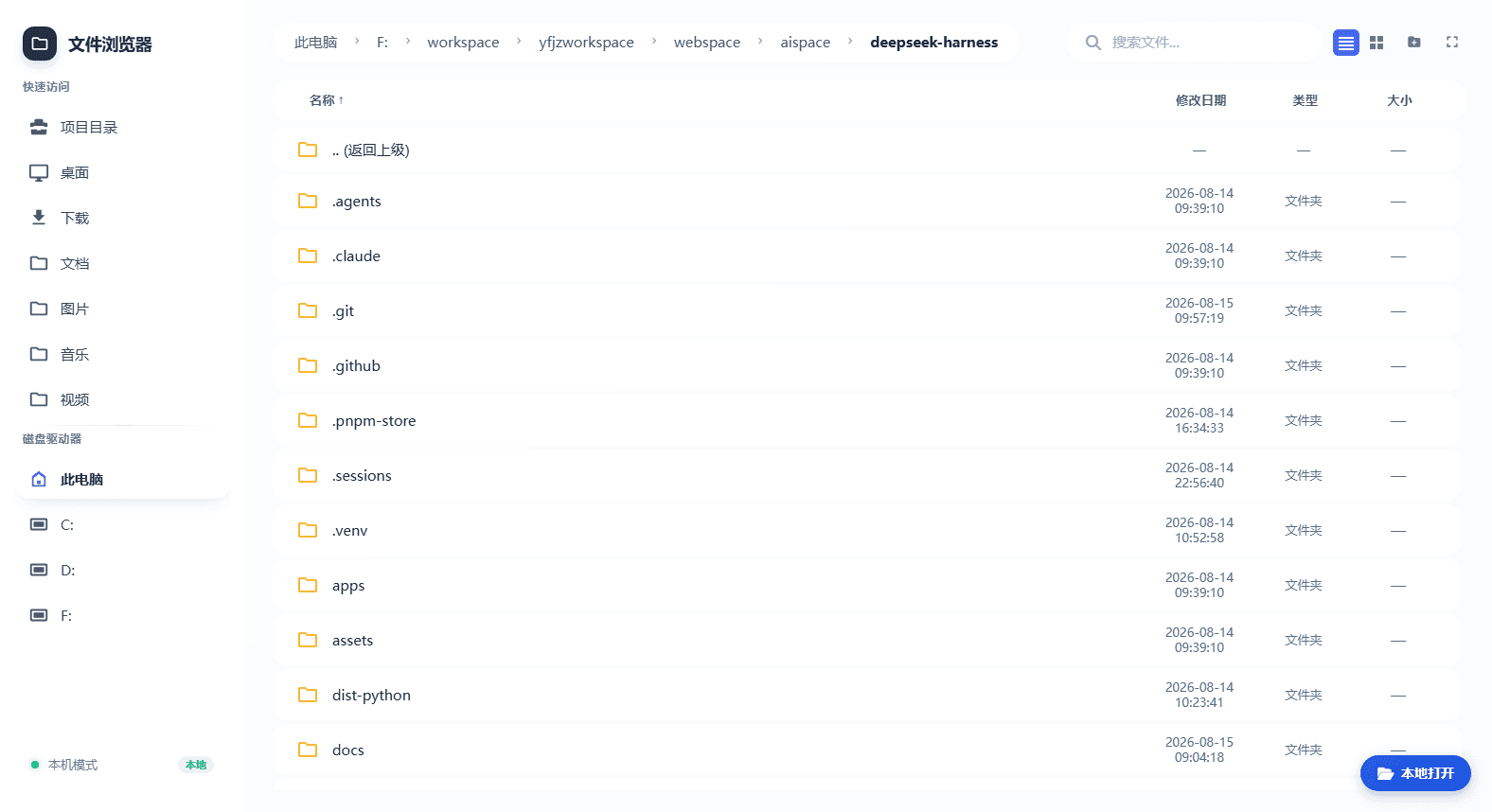
A file-browser web app for DeepSeek Harness — a React frontend and REST API served by the host webserver, plus a /dsh-agfs command and browse_files/read_file model tools. It rides the composing dsh web server: no separate port, no subprocess.
Features
| 面包屑导航 Breadcrumbs | 视图切换 View switch | 侧边栏 Sidebar |
|---|---|---|
| 搜索 Search | 本地打开 Local open |
|---|---|
- 面包屑导航 — clickable breadcrumbs navigate every level of the current path back to the root.
- 视图切换 — list and card (grid) views, one click apart.
- 三种显示尺寸 — a toolbar button (showing the current mode) cycles 视图大小 (windowed panel, the default) → 整个视图 (fills the viewport) → 全屏 (browser fullscreen).
- 侧边栏 — project directory, quick access (Desktop/Downloads/Documents…), custom roots, and drives.
- 搜索 — toolbar search with optional recursive mode (200-hit cap).
- 本地打开 — in local mode, a floating button in the bottom-right opens the system file manager at the current directory.
- 一键AI分析 — right-click a file/folder → enter a requirement → dsh creates a workspace for that directory and wakes a fresh session whose agent analyzes it (local mode only). The analysis session uses the host's default model and joins the same agent preset as a manually created session, so it gets the full standard tool set (read/write/glob/grep, shell, goal, web search, …), not just the browser tools.
- Full file browser — list/search, text preview (markdown, code, logs), image preview, and create/rename/copy/delete folders.
/dsh-agfscommand — opens the file browser in the system default browser and automatically navigates to the current session's workspace directory (session cwd); switch workspaces and it follows.browse_files/read_filemodel tools — the model can list or recursively search the browser root, and read text files under it, directly.- Path safety — browsing confined to the root,
strictRootreal-path checks, symlink/junction escape interception (clean 400 envelope),readOnlymode,remoteMode. - Offline frontend — React/ReactDOM ship in the package; boots without a CDN or Babel.
- Security headers —
X-Content-Type-Options: nosniff,X-Frame-Options: DENY,Referrer-Policy: no-referrer. dsh.bundleone-line install — activates as a profile layer.
Install
Option 1: one-click via natural language in the dsh dialog (recommended)
In the DeepSeek Harness web dialog, ask the agent directly, for example:
Install the file-browser plugin
dsh-agfs
Install the npm package
@open-agfs/dsh-agfs
The agent invokes a shell tool to run:
dsh plugin --profile web add @open-agfs/dsh-agfs
Then restart dsh web (or ask the agent to restart it) and run /dsh-agfs in the dialog to open the file browser.
Prerequisite: this flow needs the agent's shell tools (
bash/pwsh) enabled and permitted. The web profile disables shell tools by default — enable them under Settings → tools/permissions, or approve the command when the agent asks. Without shell tools, use Option 2.
Option 2: one-line CLI install
dsh plugin --profile web add @open-agfs/dsh-agfs
After the install, restart dsh web and run /dsh-agfs in the dialog.
Upgrade to the latest version:
dsh plugin --profile web add @open-agfs/dsh-agfs@latest
Option 3: source overlay (for development)
…
