xxxyz/DeepSeekHarness-MCP-Manager
dsh-mcp-manager
DSH durable MCP server manager plugin — Settings UI + HTTP API + mcp_manager_* model tools, cross-platform installers
Install
npx @deepseek-ai/dsh plugin --profile desktop add @xxxyz/dsh-mcp-manager@latestRestart `dsh web` after install. Bundle APIs can change during the developer preview.
README badge

[](https://dshhub.dev/plugins/deepseekharness-mcp-manager)Paste this into your README. The star count updates with every catalog sync.
From the README
Excerpt from xxxyz/DeepSeekHarness-MCP-Manager, cleaned of badges and images.
dsh-mcp-manager
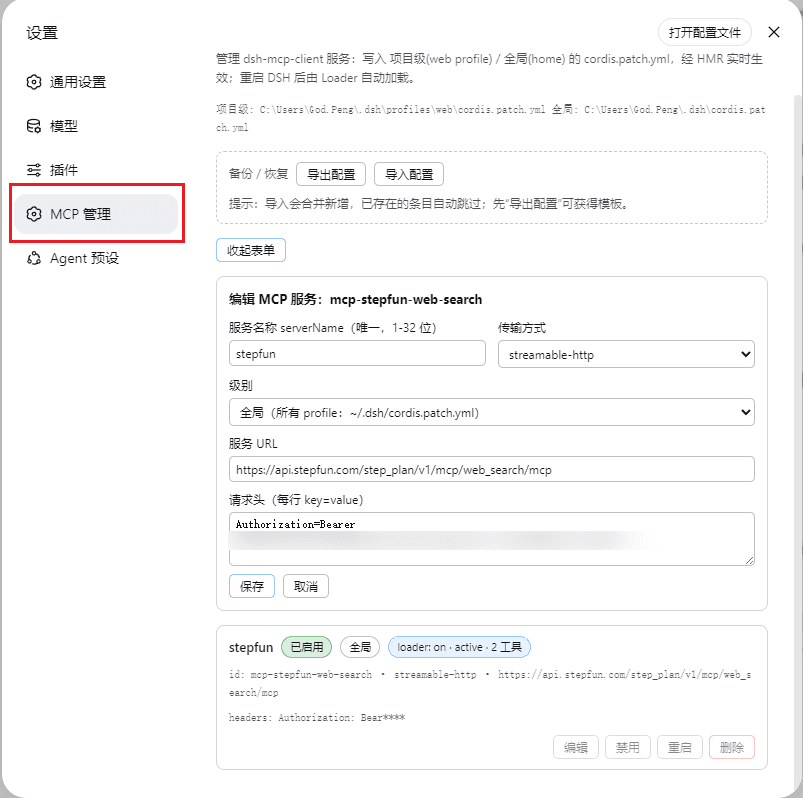
<b style="font-size: 1.15em;">DeepSeek Harness 的 MCP 服务与技能管理器:装没装、连没连、一页管完。</b><br /><br /> <code>服务器列表</code> <code>新增 / 编辑 / 删除</code> <code>启用 / 停用</code> <code>重启</code> <code>工具数健康</code> <code>JSON 导出 / 导入</code><br /> <code>Skills 浏览 / 搜索 / 停用</code> <code>4 个模型工具</code> <code>HTTP API</code> <code>dsh plugin 一条命令</code><br /><br /> <b>设置 → MCP 服务</b> 管理<strong>当前 profile</strong> 的 <code>cordis.patch.yml</code> 中的 <code>@deepseek-ai/dsh-mcp-client</code> 行,全局 home 层只读展示;<br /> <b>设置 → Skills</b> 浏览并停用全局、项目根、用户根与插件提供技能——无需再手改配置文件,修改经 Loader 热应用。
🛒 已收录于 <a href="https://dsh.market"><b>dsh.market</b></a> · <a href="https://awesome-dsh-plugin.com"><b>awesome-dsh-plugin.com</b></a> · <a href="https://whyihaveyou.github.io/dsh-suite/"><b>dsh-suite</b></a>
🌏 <a href="./README.md"><b>中文</b></a> · <a href="./README_EN.md">English</a>
✨ 功能一览
- 📋 服务器列表:列出所有已配置的 MCP 服务器(
@deepseek-ai/dsh-mcp-client实例)——serverName、传输方式(stdio/streamable-http)、URL / 命令、启用状态、Loader 实时阶段、已注册工具数 - ➕ 新增 / ➖ 删除:表单添加 MCP 服务器(支持 env / headers / args / cwd / 超时 / 重连),带格式与重名校验;一键删除
- 🔌 启用 / 停用:只管理当前 profile 的行,优先走 DSH 官方
pluginManager.setPluginEnabled();不可寻址时回退到当前 profile patch - 🔄 重启:禁用 + 重新启用,自动重连并重新同步工具;实时等待 Loader 阶段变化
- 💾 持久化:写入当前 profile(
profiles/<profile>/cordis.patch.yml),重启后保留;~/.dsh/cordis.patch.yml的全局 home 行只读展示(可查看、不参与编辑/启停/导出)。路径区默认只显示当前 profile,仅当 home 层确实有 MCP 行(或覆盖了 profile 行)时才显示 home 路径。 - 🩺 健康检查:每台服务器实时工具数与 Loader 阶段;失败/零工具给出提示
- ⚙️ 0.2.x 配置字段:
cwd、toolCallTimeoutMs、failOnStartupError、maxInstructionBytes、reconnect.{enabled,initialDelayMs,maxDelayMs,maxAttempts} - 📦 备份 / 恢复:JSON 导出 / 导入,合并新增、已存在自动跳过
- 🤖 模型工具:宿主持久注册 4 个
mcp_manager_*工具,模型可直接查询与操作 MCP 服务 - 🧠 技能管理:设置 → Skills 聚合全局与每个活动会话作用域的技能,按来源分组(项目根 / 运行时 / 扩展根 / 用户根 / 预置根 / 插件提供);项目根、用户根与插件技能都能真正停用(global + 每个 agent scope 的 rank-0 override provider),状态持久化到
dsh-skill-manager.json,HMR 即时生效 - 🌐 HTTP API:
POST /dsh-mcp-manager/api(JSON{op, args}→{ok, ...}),供客户端与脚本调用。仅接受 POST、必须携带x-dsh-plugin: dsh-mcp-manager请求头、校验同源 Origin(curl 等本地脚本无需 Origin) - 🎨 与 DSH 默认插件一致:页面宽度、字号、卡片、状态 chip、开关、搜索框与对话框沿用
--dsw-alias-*主题 token;中英文本地化经 Client locale 服务注册;对话框支持 Escape / 遮罩关闭 / 焦点还原 - 📦 一键安装:
dsh plugin --profile <profile> add一条命令装包 + 自动挂载(Windows / macOS / Linux)
🚀 安装
前置:DSH >= 0.2.1-rc.2 < 0.3,Node.js ≥ 20、pnpm ≥ 9。
方式一 · dsh 命令安装(推荐)
一条命令装包 + 自动挂载(dsh.bundle.patch 机制,无需手动改任何配置文件):
dsh plugin --profile desktop add @xxxyz/dsh-mcp-manager@latest
desktop 是 DeepSeek Desktop 的 profile;CLI 的 Web profile 用 web,其他 profile 换成对应名称。
装完硬刷新浏览器(Cmd/Ctrl+Shift+R)即可看到 设置 → MCP 服务 / Skills(DSH 对 client 改动热加载,无需重启;仅 host 半更新时需要重启 DSH)。
方式二 · 让 DSH 自己装
把下面这段提示词发给任意一个 DSH 会话:
帮我安装 dsh-mcp-manager 插件(DSH MCP 服务管理器),步骤:
1. 执行 dsh plugin --profile desktop add @xxxyz/dsh-mcp-manager@latest
2. 完成后提醒我硬刷新浏览器(Cmd/Ctrl+Shift+R)
遇到报错先查 https://github.com/xxxyz/DeepSeekHarness-MCP-Manager README 的常见问题表。
更新
dsh plugin --profile desktop add @xxxyz/dsh-mcp-manager@latest
也可把 ~/.dsh/profiles/<profile>/package.json 里的版本号改高后 pnpm install。改完硬刷新浏览器(Cmd/Ctrl+Shift+R)即可(client 改动无需重启 DSH)。
版本要求:本包声明
engines.dsh = ">=0.2.1-rc.2 <0.3.0"。在更旧的 DSH(如 0.1.x)上会被启动检查拒绝挂载;在 0.3+ 上需要按新契约升级。
<b>常见问题</b>
…