QingYunA/answer-me-with-html
answer-me-with-html
answer-me-with-html is a community DeepSeek Harness plugin. Read the repository README before installing.
Install
npx @deepseek-ai/dsh plugin --profile web add github:QingYunA/answer-me-with-htmlRestart `dsh web` after install. Bundle APIs can change during the developer preview.
README badge

[](https://dshhub.dev/plugins/answer-me-with-html)Paste this into your README. The star count updates with every catalog sync.
From the README
Excerpt from QingYunA/answer-me-with-html, cleaned of badges and images.
<b>Super Fast | ASD-STE100 | Explainer Videos | One File, Offline</b>
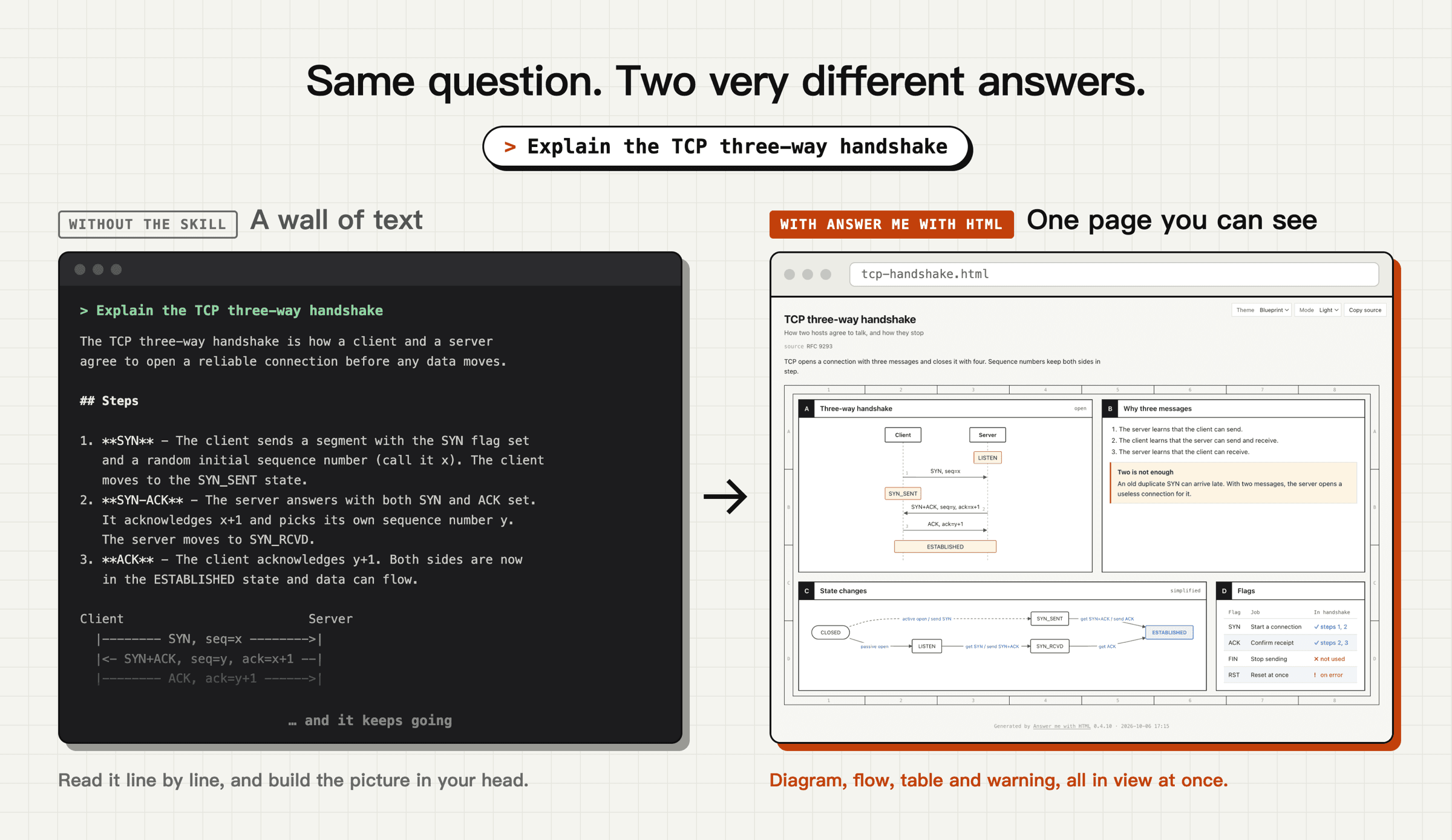
<b>An agent skill. Ask a hard question, get a page you can actually read instead of a wall of text.<br>The model writes about 1/8 of the tokens it would need to hand-write the HTML.</b>
<a href="https://answer-me-with-html.com/"><b>Website</b></a> · <a href="#install">Install</a> · <a href="#what-you-ask-what-you-get">Examples</a> · <a href="#explainer-videos">Videos</a> · <a href="#always-on-mode-recommended">Always-on mode</a> · <a href="docs/reference.md">Reference</a> · <a href="README.zh-CN.md">简体中文</a>
Once installed, ask questions the way you always do:
> Explain the TCP three-way handshake
> Map out how the modules in this repo fit together
> Redis or Memcached for our cache?
The agent writes a short Markdown draft and hands it to the CLI that ships with the skill. About 50 ms later you have a page:
https://github.com/user-attachments/assets/d3063a28-5dfd-4c44-a562-be901c49b249
<p align="center"><sub>24-second demo. Turn the sound on for the music.</sub></p>Why not just ask for HTML?
You can. Models write decent HTML now. But most of what they write is not content. We counted the tokens in 9 pages the model wrote by hand, 4,893 tokens on average:
| Part of the page | Share | With this skill |
|---|---|---|
| SVG diagrams: coordinates and paths | 47% | The CLI writes it |
| CSS | 15% | The CLI writes it |
| HTML tags | 17% | The CLI writes it |
| Text | 21% | The model writes it, as Markdown |
With this skill the model writes only a Markdown draft. For the same questions that was 612 tokens on average, about 1/8 of the hand-written HTML. Less to write means less to wait for (3 topics × 3 runs, medians, Claude Sonnet 5.5, a plain Claude Code setup):
| Ask for HTML directly | Answer me with HTML | ||
|---|---|---|---|
| Tokens the model writes | 4,893 | 612 | 8× fewer |
| Time | 31 s | 12 s | 2.6× faster |
The token counts are saved in bench/corpus/tokens.json, so node bench/corpus.mjs gives the same numbers every time. The pages themselves are a download. The bill drops less than the writing, about 15% here, because every turn also reads the system prompt, your question and the conversation, with or without the skill. See where the cost goes.
Explainer videos save even more: about 18× fewer output tokens and 12× faster in a small test.
Install
You need Node.js 20 or newer. There is no npm install step. The CLI is bundled inside the skill. No Node.js yet? With the recommended install below, your agent asks you and then installs it.
Let your agent install it (recommended)
Paste this into Claude Code, Codex, Cursor, OpenCode or any other agent:
Install Answer me with HTML: read https://raw.githubusercontent.com/QingYunA/answer-me-with-html/main/INSTALL.md and follow it.
…