xmanrui/dsh-feishu
dsh-feishu
dsh-feishu is a community DeepSeek Harness plugin. Read the repository README before installing.
Install
npx -y @deepseek-ai/dsh plugin --profile web add @xmanrui/dsh-feishuRestart `dsh web` after install. Bundle APIs can change during the developer preview.
README badge

[](https://dshhub.dev/plugins/xmanrui-dsh-feishu)Paste this into your README. The star count updates with every catalog sync.
From the README
Excerpt from xmanrui/dsh-feishu, cleaned of badges and images.
本项目不维护了,有刚好的插件dsh-im了,支持微信、飞书、钉钉、QQ、企微、Slack、telegram、discord、WhatsApp:https://github.com/xmanrui/dsh-im
dsh-feishu
中文
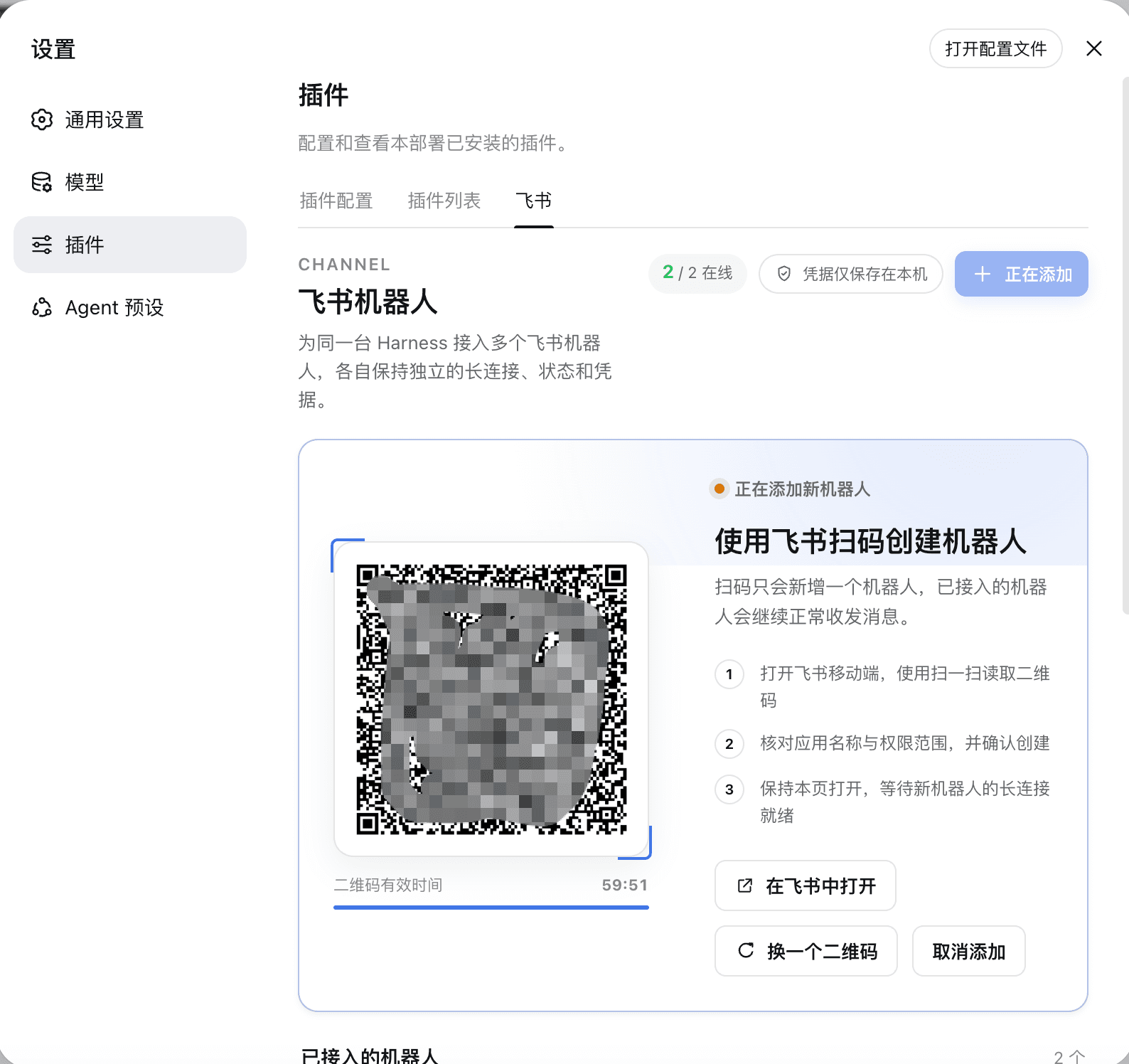
把一个或多个飞书机器人直接接入 DeepSeek Harness。安装插件后,在 Harness 的设置页扫码即可逐个创建机器人;每次确认完成并通过连接检查后,都能立即在飞书里与同一个 Harness 智能体连续对话。
界面预览
主要能力
- 在 Harness「设置 → 插件 → 飞书」内反复扫码添加多个机器人,无需手动复制 App ID 或 App Secret
- 每个机器人拥有独立凭据、飞书长连接、授权用户、会话映射和消息去重状态
- 单个机器人断线、重连或移除不会中断其他机器人
- 扫码用户自动成为首位授权用户,创建后即可私聊机器人
- 收到消息立即添加处理中 Reaction,成功或失败后更新状态
- 使用飞书 CardKit 原生流式卡片输出,失败时安全回退为普通文本
- 每个飞书会话映射到持久的 Harness 会话,支持多轮上下文
- 默认使用 Harness
standard智能体预设,包括网页搜索等工具能力 - App Secret 仅保存在 DSH Host 的凭据存储中,不进入浏览器、二维码或插件配置文件
安装
从 GitHub 一条命令安装:
npx -y github:xmanrui/dsh-feishu install
安装后重启 dsh web,打开「设置 → 插件 → 飞书」,点击「添加机器人」,再用飞书扫码确认。需要更多机器人时再次点击「添加机器人」即可;扫码只会新增,不会覆盖现有机器人。页面只有在以下条件全部满足后才把该机器人显示为“已连接”:
- 飞书应用创建成功;
- 凭据已安全保存;
- 机器人身份校验成功;
- 飞书长连接已建立;
- DeepSeek Harness Host 可访问。
连接成功后,在飞书中找到刚创建的机器人并发送消息即可。每个机器人都支持 /new、/status 和 /help。
本地开发
git clone https://github.com/xmanrui/dsh-feishu.git
cd dsh-feishu
npm install
npm test
npm run build
node bin/dsh-feishu.mjs install --source .
插件运行在 dsh web 的 Host 进程内,不需要再维护独立桥接服务。非敏感配置保存在 $DSH_HOME/integrations/dsh-feishu/,各机器人的会话状态彼此隔离;每个 App Secret 都由 Harness 的 credential provider 独立管理。
当前按 DeepSeek Harness 0.1.0-rc.6 的插件与 Connection RPC 接口开发。更新 Harness 后,建议先运行测试并验证设置页、扫码和消息收发闭环。
安全默认值
- RPC 仅允许本机 Harness 页面访问;
- 浏览器不能提交或读取 App Secret;
- 默认只接受扫码创建机器人的飞书用户消息;
- 机器人使用
standard工具集,但不会自动批准 Harness 的高风险操作; - 移除某个机器人会只停止它自己的长连接并清除它自己的插件凭据,不影响其他机器人;
- 重复扫码得到同一个飞书应用时会复用原机器人记录,不会产生重复接入。
旧版独立桥接
仓库仍保留 src/index.mjs 与 .env.example,用于兼容早期的独立进程部署。新安装优先使用 Harness 插件模式。
许可证
MIT
English
Connect one or more Feishu bots directly to DeepSeek Harness. After installing the plugin, you can create bots one by one by scanning a QR code in the Harness settings page. Once registration and connection checks succeed, each bot is immediately ready for continuous conversations with the same Harness agent.
Interface preview
Features
- Add multiple bots by repeatedly scanning QR codes under Harness → Settings → Plugins → Feishu, without manually copying an App ID or App Secret
- Keep separate credentials, Feishu long connections, authorized users, session mappings, and message deduplication state for every bot
- Reconnect or remove one bot without interrupting any other bot
- Automatically authorize the user who scans the QR code, so the bot is ready for direct messages immediately after setup
- Add a processing reaction as soon as a message arrives, then update it when the request succeeds or fails
- Stream replies through native Feishu CardKit cards, with a safe fallback to plain text
- Map every Feishu conversation to a persistent Harness session for multi-turn context
- Use the Harness
standardagent preset by default, including tools such as web search - Store every App Secret only in the DSH Host credential store—never in the browser, QR code, or plugin configuration file
Installation
Install from GitHub with one command:
npx -y github:xmanrui/dsh-feishu install
Restart dsh web after installation. Open Settings → Plugins → Feishu in Harness, click Add bot, and scan the QR code with Feishu. Repeat the same process to add more bots; a new scan never overwrites an existing bot. A bot is shown as Connected only after all of the following checks succeed:
…

