xiaweiliang060035/dsh-opencode-go-usage
dsh-opencode-go-usage
dsh-opencode-go-usage is a community DeepSeek Harness plugin. Read the repository README before installing.
Install
npx -y @deepseek-ai/dsh plugin --profile web add @xiaweiliang060035/dsh-opencode-go-usageRestart `dsh web` after install. Bundle APIs can change during the developer preview.
README badge

[](https://dshhub.dev/plugins/xiaweiliang060035-dsh-opencode-go-usage)Paste this into your README. The star count updates with every catalog sync.
From the README
Excerpt from xiaweiliang060035/dsh-opencode-go-usage, cleaned of badges and images.
dsh-opencode-go-usage
简体中文 · English
A DeepSeek Harness web-GUI plugin that shows your OpenCode Go subscription usage in real time — a floating widget that tracks rolling / weekly / monthly quota for every API key in your pool, with color-coded progress bars and reset countdowns.
Features
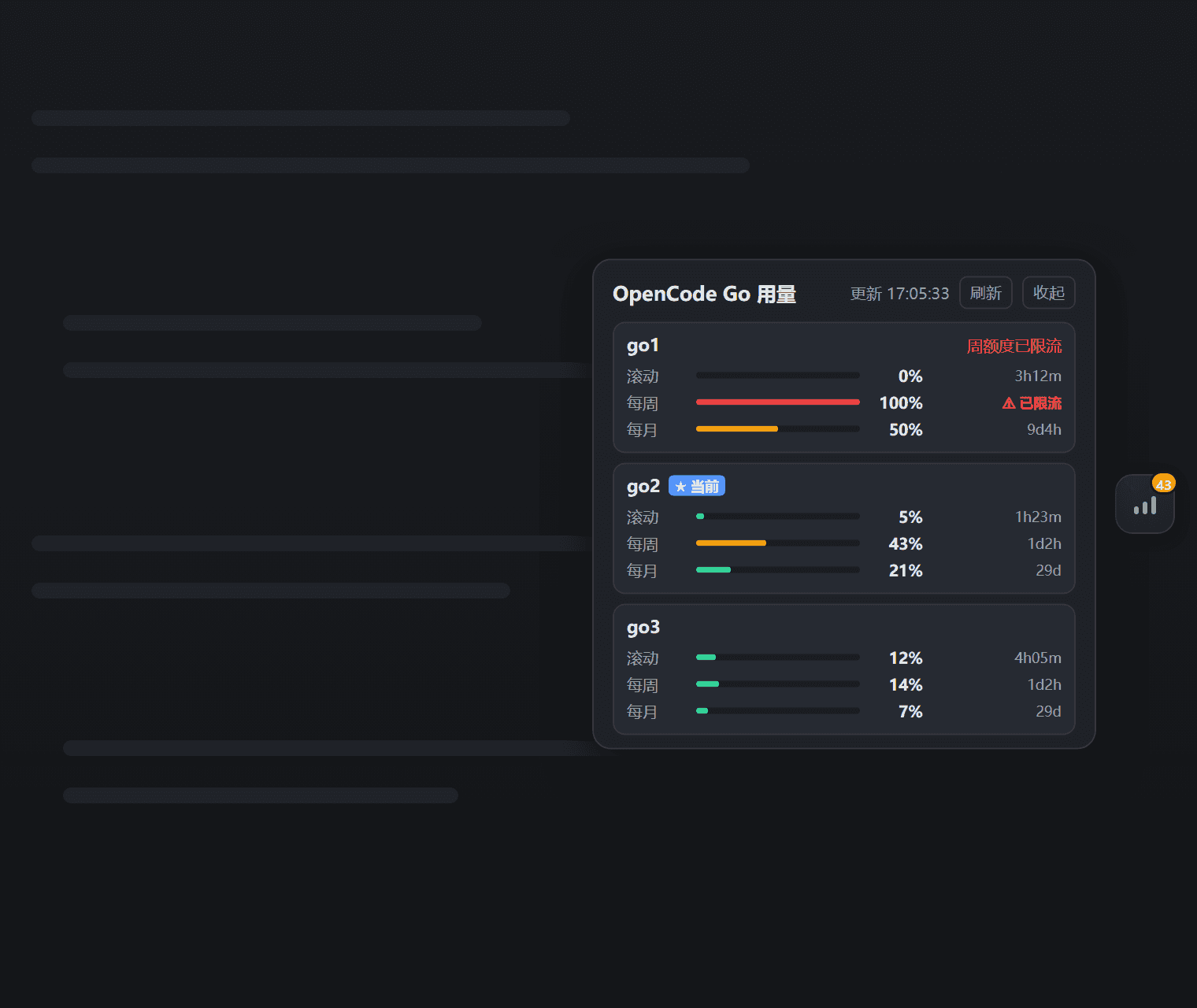
- Floating widget — a compact button pinned to the right edge of the page. Its badge shows the worst window across all keys at a glance; the color (green / orange / pulsing red) tells you whether any key is close to its quota limit.
- Expandable panel — click the button to open a panel with one card per key (the currently active key is marked with a ★), each showing rolling / weekly / monthly usage as progress bars, percentages, and time-until-reset. Rate-limited windows are flagged with ⚠.
- Real-time — the Host polls the official usage endpoint every 60 seconds (configurable); the panel refreshes automatically and has a manual refresh button.
- Auto key-pool discovery — reads your key pool from
$DSH_HOME/.credentials.yaml(anyOPENCODE_GO_KEY_<name>entries), so there is no hardcoded key count or name. Falls back to the single current key (OPENCODE_GO_API_KEY) when no pool exists. - i18n — Chinese / English, auto-selected from your browser language.
- Theme-aware — uses DSH theme tokens; works in both light and dark themes.
Screenshot
How it works
Host half (plain Node ESM):
- Discovers key-pool names — from
config.keyNamesif provided, otherwise by scanning.credentials.yamlforOPENCODE_GO_KEY_*entries. - Resolves each key value through the
credentialsservice (environment → credentials file →.envlayering). - Calls the official usage endpoint with
Authorization: Bearer <key>:
GET https://opencode.ai/zen/go/v1/usage
Authorization: Bearer <API_KEY>
Response example:
{
  "usage": {
    "rolling": { "status": "ok", "percent": 9,  "resetsAt": "2026-08-14T07:20:04.810Z" },
    "weekly":  { "status": "ok", "percent": 12, "resetsAt": "2026-08-17T00:00:00.810Z" },
    "monthly": { "status": "ok", "percent": 6,  "resetsAt": "2026-09-09T00:41:03.810Z" }
  }
}
The usage endpoint is not yet part of OpenCode's public documentation; it was discovered and verified via farion1231/cc-switch#6433. Parsing is defensive.
Client half (browser bundle) registers in the shell.overlay slot and polls the Host's web-server route /plugins/dsh-opencode-go-usage/snapshot. Keys never leave the Host.
Requirements
- Node.js + a DeepSeek Harness web profile (the default
dsh webprofile mountswebServer,credentials, andtimer, which this plugin needs).
Install
Option A — local package via file: dependency (recommended)
- Copy the package directory anywhere on disk, e.g.
D:\tools\dsh-opencode-go-usage. - In your profile's
package.json(e.g.$DSH_HOME/profiles/web/package.json), add todependencies:
"@xiaweiliang060035/dsh-opencode-go-usage": "file:D:/tools/dsh-opencode-go-usage"
- Add the package to the profile's bundle list (
dsh.profile.bundles):
"dsh": {
  "profile": {
    "bundles": [ "...existing...", "dsh-opencode-go-usage" ]
  }
}
- Install and restart:
cd $DSH_HOME/profiles/web
pnpm install
# restart dsh web
…

