wuxiangru915/dsh-session-manager
dsh-session-manager
Session manager for DeepSeek Harness: restore archived sessions, delete-all, inline content preview.
Install
npx @deepseek-ai/dsh plugin --profile web add github:omdsh-dev/dsh-session-managerRestart `dsh web` after install. Bundle APIs can change during the developer preview.
README badge

[](https://dshhub.dev/plugins/wuxiangru915-dsh-session-manager)Paste this into your README. The star count updates with every catalog sync.
From the README
Excerpt from wuxiangru915/dsh-session-manager, cleaned of badges and images.
dsh-session-manager
Session manager for DeepSeek Harness.
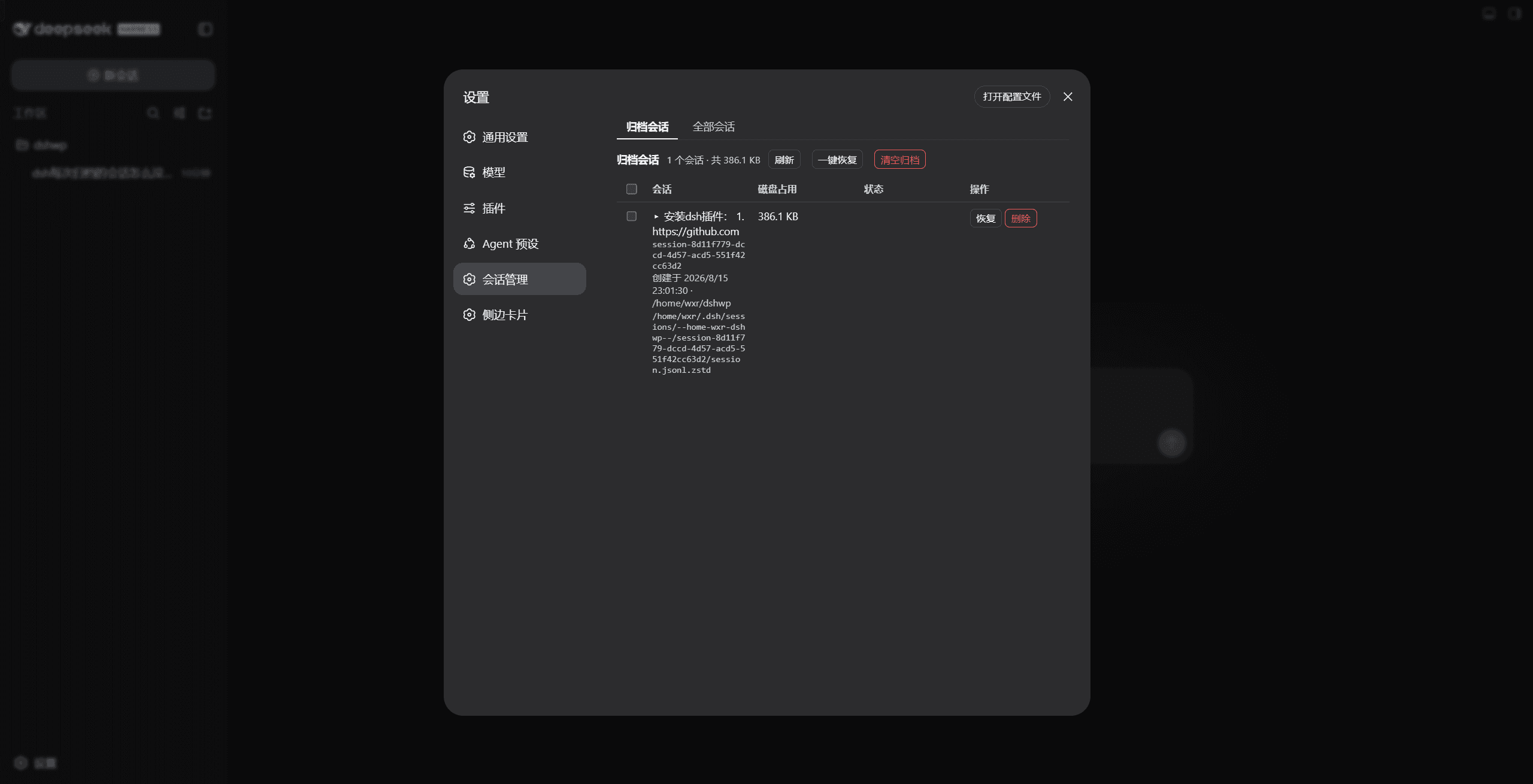
dsh-session-manager gives the Harness Web UI a full session-management surface: browse all sessions and the archived ones, restore (unarchive) archived sessions back to their original workspace, archive any session, delete sessions with a two-step confirmation, and preview conversation content — all from the Settings panel, with zero modification to official packages.
What it solves
Stock DSH archives sessions one-way: the sidebar's Archive action hides a session from every view (workspace groups, ungrouped, search, flat list), and there is no view or API to bring it back — archived sessions are effectively lost until you hand-edit ~/.dsh/storages/workspace.json. This plugin makes archiving a reversible, manageable state and adds an overview of every session on disk:
right-click a session -> Archive (stock DSH)
  -> the session vanishes from the sidebar (nowhere to see it again)
  -> this plugin: Settings -> Session manager -> archived tab
       preview its content, Restore it (back to its original workspace
       position), or Delete it from disk (two-step confirmation)
  -> the all-sessions tab lists every persisted session (grouped by
     workspace, ungrouped ones included) so nothing is ever lost sight of
Features
- Restore archived sessions: an archived session keeps its workspace accounting slot, so unarchiving puts it back exactly where it was — single, batch, or all at once.
- Delete with two-step confirmation: the Delete button arms first and needs a second click within 5 seconds; sessions whose agent is running are rejected server-side.
- Delete all: clears every deletable session (archived, ungrouped, and workspace-attached alike) in one confirmed action, skipping sessions that are currently running or open, and reports per-session success / failure / skip.
- All-sessions overview: every session known to the persistence layer — title, id, creation time, owning workspace (or ungrouped), status badges (archived / live / running) — with archive and delete actions.
- Content preview: click a session title to expand the first 100 user / assistant / tool messages without opening the conversation.
- Disk footprint: per-session size and the full on-disk path help you find what is eating space.
- Zero core modification: a pure bundle plugin (
dsh.bundlepatch layer); every operation goes through official services (workspaceRegistry,sessionPersistence,sessionQuery,fs,shell, …) — no official package is patched or overridden. - Loopback-only API: the
/dsh-sm/*routes reject non-loopback hosts and cross-origin requests (Host + Origin / Sec-Fetch-Site fence).
Installation
# one line, from a git source
dsh plugin --profile web add github:omdsh-dev/dsh-session-manager

# restart the web server, then hard-refresh the page
Local development:
dsh plugin --profile web add /path/to/dsh-session-manager
The repository ships plain-JS lib/ artifacts with no build step, so git-source installs work without any build tooling on the user's machine.
Usage
Web UI
Open Settings → Session manager:
…

