Mu-scorpio/token-usage-counter
dsh-token-usage-counter
Persistent provider-reported token usage statistics for DeepSeek Harness with per-session, per-model, and daily activity data.
Install
npx @deepseek-ai/dsh plugin --profile web add -wRestart `dsh web` after install. Bundle APIs can change during the developer preview.
README badge

[](https://dshhub.dev/plugins/token-usage-counter)Paste this into your README. The star count updates with every catalog sync.
From the README
Excerpt from Mu-scorpio/token-usage-counter, cleaned of badges and images.
Token 用量统计插件
为 DeepSeek Harness 提供持久、准确的 Token 用量统计,以及自定义 Provider
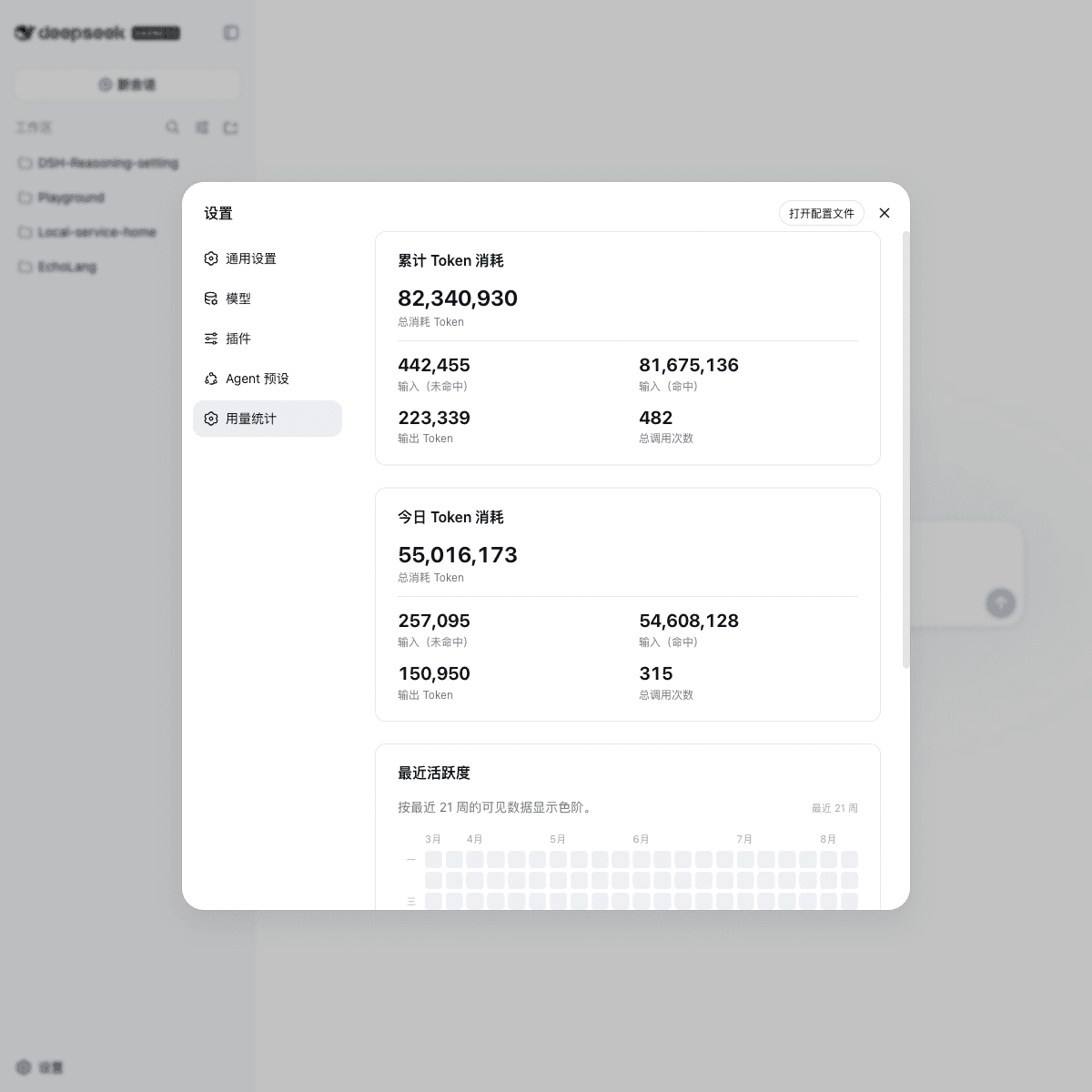
的模型推理强度配置。插件读取 provider 上报的真实用量,区分输入(未命中)、
输入(命中)、缓存写入和输出,并提供累计统计、今日数据、热力图、分模型统计、
推理等级同步以及 /tokens 命令。
功能
| 能力 | 说明 |
|---|---|
| 精确分桶 | 输入(未命中)、输入(命中)、缓存写入和输出保持独立。 |
| 持久化累计 | 数据写入 Harness 的 usage-stats settings 命名空间,重启不会归零。 |
| 多维统计 | 支持全局、会话、Provider / 模型三个维度。 |
| 今日数据 | 单独展示当前本地日的 Token 用量和调用次数。 |
| 自带设置页 | Bundle 同时提供统计服务和 Web 设置页面,不依赖 Harness 内置用量页面。 |
| 推理强度 | 为自定义 Provider / 模型补充 Low、Medium、High、XHigh、Max 等推理等级。 |
| 动态热力图 | 根据容器宽度在 12–52 周之间调整,避免右侧留下大片空白。 |
| 悬停详情 | 悬停或键盘聚焦热力图单元格,查看日期、总 Token 和调用次数。 |
| 安全提交 | 只在成功消息确认后提交 usage-only chunk,避免失败请求和重试重复计数。 |
| 交互命令 | 挂载 commands 服务时提供 /tokens,随时查看累计摘要。 |
安装
推荐安装已经发布到 npm 的 DSH Bundle。下面的命令会把插件安装到 web
profile,并自动维护 profile 的 Bundle 列表:
dsh plugin --profile web add -w --config.auto-install-peers=false dsh-token-usage-counter
安装后可以先检查最终配置,再启动 Web:
dsh --profile web --dump-config
dsh web
-w 用于允许 pnpm 把包添加到 profile workspace;--config.auto-install-peers=false
用于避免 pnpm 试图从 npm 安装 Harness 内部提供的 peer 包。安装完成后,
dsh.profile.bundles 会自动加入该 Bundle,不需要再手写 cordis.patch.yml。
Bundle 内含 dsh.bundle 和 dsh.client manifest,以及宿主端和浏览器端的构建产物。
安装时会自动禁用 Harness 内置的 usage-stats 累加器和 ui-usage-stats 页面,
再挂载本插件自己的统计服务与设置页;这样既不会重复写入同一个 settings 命名空间,
也不会因为 Harness 版本不同而出现“有数据但没有设置页面”。
安装或更新 Bundle 后,需要重启已经运行的 Web Harness,浏览器端插件模块会在启动时 自动加入设置导航。界面语言跟随 Harness 的当前语言设置;本仓库默认 README 使用中文。
配置模型推理强度
安装 Bundle 后,插件会自动提供推理强度同步能力,但不会猜测你的 Provider,
也不会覆盖已经手工声明的 reasoningEfforts。在自己的 cordis.yml 或最后
应用的 patch 中,为同一个 token-usage-counter 条目补充配置:
- id: token-usage-counter
  name: dsh-token-usage-counter
  config:
    providers:
      cliproxyapi:
        api: openai-responses
        reasoning: high       # 可选:Provider 默认等级
        efforts:              # 可选:覆盖默认的 wire 值
          low: low
          medium: medium
          high: high
          xhigh: xhigh
          max: max
      jyld:
        api: openai-completions
        models:
          deepseek-v4-flash-0731:
            efforts:
              low: low
              medium: medium
              high: high
              xhigh: xhigh
              max: max
规则如下:
api只用于选择默认的协议映射;网关使用特殊字符串时,用efforts覆盖。reasoning会设置 Provider 级默认推理等级;不填写时由模型选择器决定。models.<id>.efforts可以单独覆盖某个模型,disabled: true可以显式关闭。- 已存在的
reasoningEfforts和reasoningEfforts: false永远不会被覆盖。 - Provider 必须已经存在于
@deepseek-ai/dsh-llm-pi-ai设置中,插件只补齐缺失字段。
如果当前设置里已经有模型推理等级声明,插件会保持现状;因此可以安全地与已有 的手写配置一起使用。
本地开发
直接使用 checkout 中的源码时,在仓库根目录执行:
dsh web --patch ./cordis.yml
或者在自己的 cordis.yml 中加入:
- id: usage-stats
  disabled: true

- insert:
    - id: token-usage-counter
      name: './src/index.ts'
手动挂载时不要同时启用 @deepseek-ai/dsh-usage-stats,否则会产生 settings
命名空间冲突。
从源码构建
仓库提交了生成后的 lib/index.js,从 npm 或 GitHub 安装时不需要安装阶段的
构建授权。修改源码后,在仓库根目录执行:
pnpm install --config.auto-install-peers=false
pnpm build
统计规则
插件监听持久化的 session/event 事件流,并在加载时接管已经存在的会话。只有
成功完成的锚点才会提交用量:
assistant/message.usage只计入一次;compaction/summary.usage也会作为一次 provider 调用计入;- 单独的
assistant/chunk会等待匹配的assistant/message到达; - 同一个
(turn, step)同时出现 chunk 和最终消息时,以最终值替换早期样本; - 失败请求、重试请求和 fork 会话的种子历史不会重复计入。
因此页面展示的是已完成的 provider 工作量,而不是原始流事件数量。
API
插件提供 ctx.tokenUsageCounter:
…

