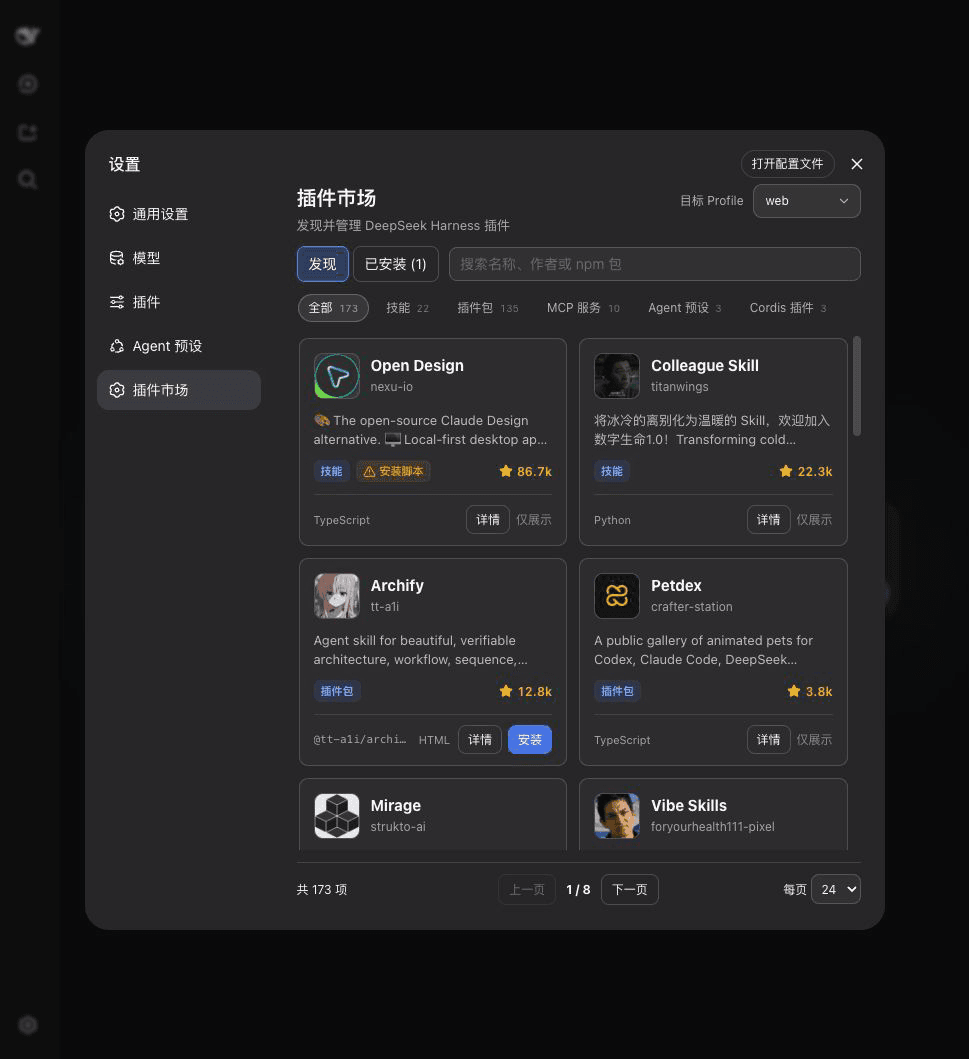
springbrand-lab/dsh-plugin-market
dsh-plugin-marketplace
Plugin marketplace for DeepSeek Harness Web settings: install, update and remove plugins across any local profile.
Install
npx @deepseek-ai/dsh plugin --profile web add @springbrand/dsh-plugin-marketplaceRestart `dsh web` after install. Bundle APIs can change during the developer preview.
README badge

[](https://dshhub.dev/plugins/springbrand-lab-dsh-plugin-market)Paste this into your README. The star count updates with every catalog sync.
From the README
Excerpt from springbrand-lab/dsh-plugin-market, cleaned of badges and images.
@springbrand/dsh-plugin-marketplace
English | 中文
The visual plugin marketplace built into DeepSeek Harness Web settings and bundled with SpringBrand Desktop. Open Settings → Plugin Marketplace to browse and search the catalog, then install, update, or remove plugins.
Install from scratch
You do not need DSH preinstalled.
-
Install the LTS version of Node.js, then close and reopen your terminal.
-
Install DSH and pnpm:
npm install --global pnpm @deepseek-ai/dsh -
Confirm that DSH is available:
dsh --version -
Install the marketplace:
dsh plugin --profile web add @springbrand/dsh-plugin-marketplace -
Start DSH Web:
dsh web
Keep the terminal open. Your browser normally opens automatically; otherwise, open the http://127.0.0.1:... address printed in the terminal. Then go to Settings → Plugin Marketplace.
If dsh is still not found after reopening the terminal, use:
npx @deepseek-ai/dsh plugin --profile web add @springbrand/dsh-plugin-marketplace
npx @deepseek-ai/dsh web
Already have DSH?
dsh plugin --profile web add @springbrand/dsh-plugin-marketplace
dsh web
What you get
- Browse and search by name, author, description, or npm package, with visible plugin categories, repository avatars, and compact GitHub Star counts.
- Profile management across
web,headless, and other local profiles under ordinary DSH; SpringBrand Desktop limits operations to its active profile. - Install, update, and remove in one place, with exact installed versions, visible update badges and counts, and one-click updates to the latest published version.
- Installed view covering both catalog entries and profile dependencies that are not listed in the catalog.
- Marketplace self-updates in SpringBrand Desktop by installing the latest release into the active profile; removing that profile override falls back to the version bundled with the app.
- Clear activation timing: changes to the current profile restart DSH automatically; changes to other profiles apply on their next launch.
Security
- Installation is limited to catalog entries marked
bundle,installable, andnpm. - The server resolves the npm package name from the catalog again instead of accepting an arbitrary source from the browser.
- Updates and removals accept only valid npm package names already installed in the selected profile.
- Mutation endpoints accept same-origin JSON POST requests only, with an 8 KiB body limit.
- Ordinary DSH commands are launched with argument arrays, never through a shell. SpringBrand Desktop delegates to its managed package-operation service. Only one plugin operation runs at a time.
Plugins are third-party code. Catalog inclusion is not a security endorsement; install only sources you trust.
How it works
[Web settings]
      |
      v
[Local HTTP API from this plugin]
      |
      +--> [dshplugin.market/api/catalog]
      |
      +--> ordinary DSH: dsh plugin --profile <profile> add|update|remove <package>
      |
      +--> SpringBrand Desktop plugins: desktopPnpm.runPlugin()
      |
      +--> SpringBrand Desktop marketplace override: desktopPnpm.run()
…

