Windsander/Mebular
core
One shared graph for every AI assistant and device — memory and tasks, local-first, signed, auditable, direct P2P sync. MCP tools; no hosted account.
Install
npx @deepseek-ai/dsh plugin --profile web add @mebular/[email protected]</code><br>Restart `dsh web` after install. Bundle APIs can change during the developer preview.
README badge

[](https://dshhub.dev/plugins/mebular)Paste this into your README. The star count updates with every catalog sync.
From the README
Excerpt from Windsander/Mebular, cleaned of badges and images.
One memory. Every assistant. Every device.
A distributed memory network for your AI assistants.<br> Memory and tasks stay on your devices; devices sync directly.
Start in 5 minutes · How it works · Website · 中文
<sub>No hosted account · No central coordinator</sub>
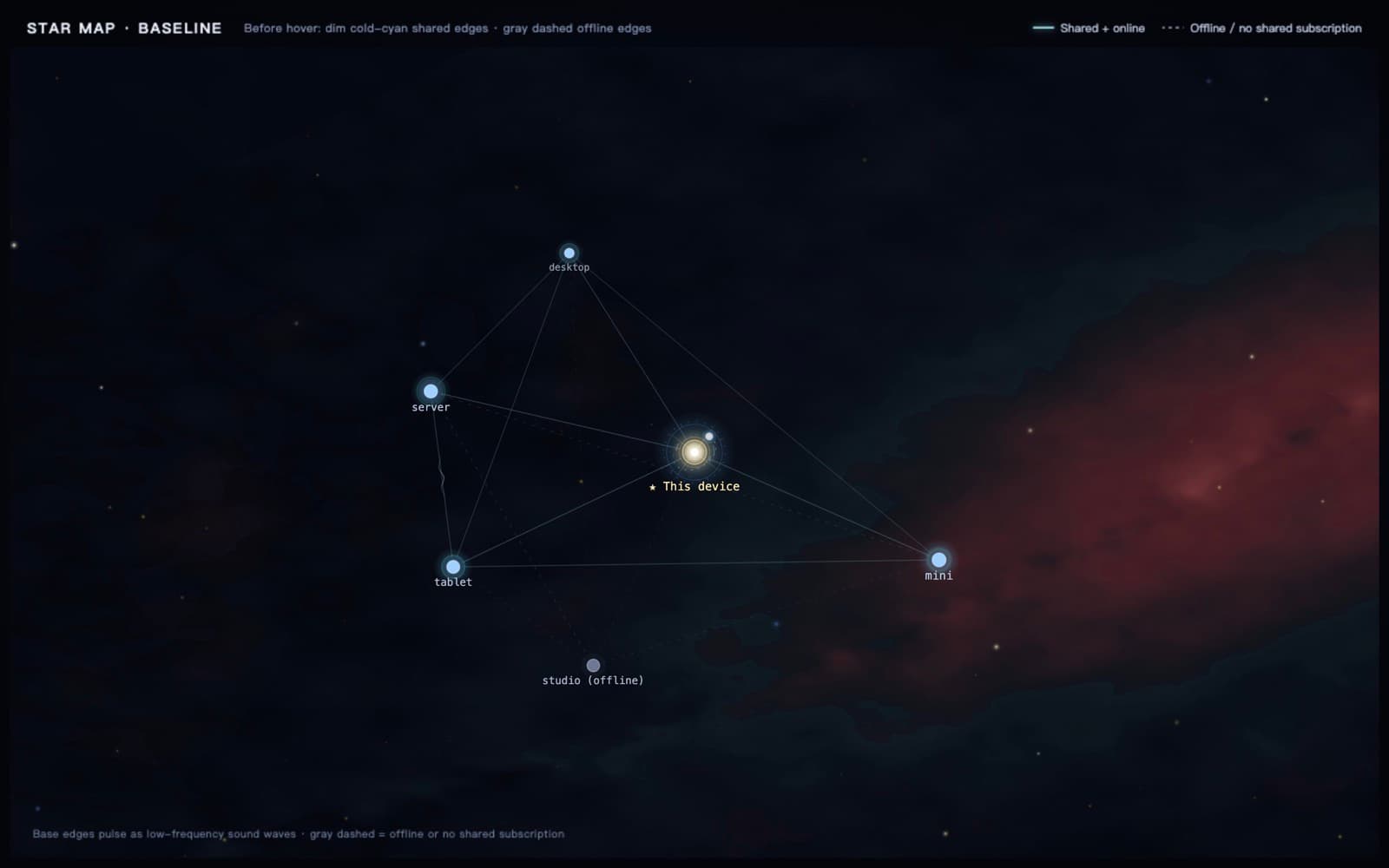
<p align="center"><sub>The map at rest: devices and their shared-subscription edges. · On hover: task-domain lanes plus live fleet traffic.<br>Blue and gold show this device's two-way task-domain reachability, not peer-to-peer links.</sub></p>
One memory
Get started
<th align="left" width="30%">Desktop app · v0.2.1</th>
<th align="left">Download & first launch</th>
<td><strong>Unsigned release</strong><br><sub>macOS Universal · Windows x64 · Linux x64</sub></td>
<td><a href="https://github.com/Windsander/Mebular/releases/tag/v0.2.1">Download from GitHub Releases</a><br><sub>Verify with <code>SHA256SUMS.txt</code>. macOS: right-click → <strong>Open</strong>. Windows: <strong>More info → Run anyway</strong>. Bundles Electron and its runtime.</sub></td>
Or install the CLI and server:
npm install -g @mebular/core
mebular serve                                  # browser console
fleet quickstart --daemon                      # CLI start
mebular print-config --client opencode         # MCP config
How it works
<p align="center"><sub>Write with <code>memory_write</code>, hand off with <code>task_submit</code> — the same graph, from any assistant.</sub></p>Docs
<th align="left">Start</th>
<th align="left">Learn</th>
<th align="left">Run</th>
<th align="left">Trust</th>
<td><strong><a href="docs/getting-started/QUICKSTART.md">Quickstart</a></strong><br><sub>Install & pair</sub></td>
<td><strong><a href="docs/architecture/ARCHITECT.md">Architecture</a></strong><br><sub>Nodes & sync</sub></td>
<td><strong><a href="docs/console/README.md">Console</a></strong><br><sub>Local GUI</sub></td>
<td><strong><a href="docs/limitations/LIMITATIONS.md">Limitations</a></strong><br><sub>Sensitive data</sub></td>
<td><strong><a href="packages/skill/SETUP.md">Agent skills</a></strong><br><sub>Setup playbooks</sub></td>
<td><strong><a href="packages/fleet/RUNBOOK.md">Fleet ops</a></strong><br><sub>Multi-machine</sub></td>
<td><strong><a href="docs/operations/RELEASE.md">Release SOP</a></strong><br><sub>Release steps</sub></td>
<td><strong><a href="SEALING.md">Sealing docs</a></strong><br><sub>Protocol rules</sub></td>
<td><strong><a href="CHANGELOG.md">Changelog</a> · <a href="ROADMAP.md">Roadmap</a></strong><br><sub>Released & planned</sub></td>
<td><strong><a href="CONTRIBUTING.md">Contributing</a></strong><br><sub>Quality gates</sub></td>
<td><strong><a href="SECURITY.md">Security</a></strong><br><sub>Report a vuln</sub></td>
<td><strong><a href="https://mebular.cyberfederal.io">Website</a></strong><br><sub>Product site</sub></td>
…