Frog755/dsh-wallpaper
dsh-wallpaper
Persistent wallpaper plugin for DeepSeek Harness with opacity, blur, and a fixed web origin.
Install
npx @deepseek-ai/dsh plugin --profile web add -wRestart `dsh web` after install. Bundle APIs can change during the developer preview.
README badge

[](https://dshhub.dev/plugins/frog755-dsh-wallpaper)Paste this into your README. The star count updates with every catalog sync.
From the README
Excerpt from Frog755/dsh-wallpaper, cleaned of badges and images.
dsh-wallpaper
Persistent custom wallpaper for the DeepSeek Harness Web profile.
dsh-wallpaper adds one settings row under Settings -> General:
- choose a local image or MP4 video;
- tune surface opacity and wallpaper blur;
- remove the wallpaper at any time.
Images are resized in the browser. MP4 videos up to 300 MB are uploaded only to
the local DSH Host. When ffmpeg and ffprobe are available, they are compressed
into high-quality H.264 wallpapers with a single fast encoding pass, a target
near 18 MB, 1080p maximum resolution, and 30 fps maximum. Audio is removed
because a background video is muted. Without those optional tools, the original
MP4 is retained so video wallpapers remain usable, although they may take more
disk space. Uploads stream directly to a temporary local file rather than being
buffered in the DSH Host process. The result is stored under ~/.dsh/wallpapers, while localStorage
keeps only its local URL. Replacing or removing a video deletes its prior local
file, and startup removes old unreferenced wallpaper videos. Video wallpapers are muted, looped, and
auto-played; media is restored on the next launch. Its bundle patch also fixes
the Web server to port 9191: browser storage is scoped to protocol + host +
port, so a random port would make saved wallpaper appear to disappear after
every restart.
Requirements
Image wallpapers need no extra software. Video wallpapers also work without
extra software by retaining the original MP4. Install ffmpeg and ffprobe on
PATH for the DSH Host process to enable local compression.
Screenshots
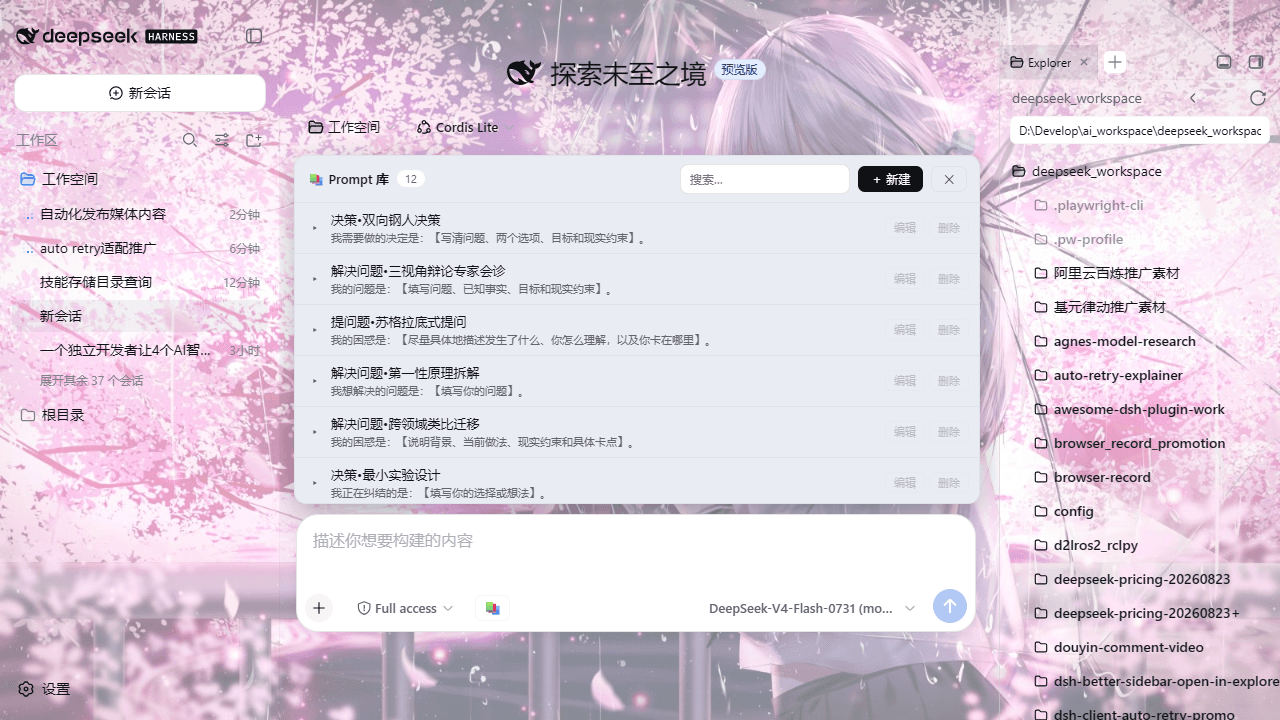
Wallpaper applied to the Web profile (image background with adjusted surface opacity):
The wallpaper settings card under Settings -> General:
Compatibility
- Target: the DeepSeek Harness Web profile (
dsh webor the desktop build's Web UI). The settings card is rendered by the DSH client runtime and needs a modern browser withlocalStoragesupport. - The bundle patch pins the Web server to
http://127.0.0.1:9191; see Fixed origin below for why, and what to do when the port is occupied. - Image wallpapers require no external tools. Video wallpapers accept MP4 files
up to 300 MB; without
ffmpeg/ffprobeonPATHthe original file is kept as-is, otherwise it is compressed locally to H.264 (target ~18 MB, max 1080p, max 30 fps, audio removed). - Peer dependencies:
react ^18.2.0,@deepseek-ai/cordis ^4.0.1, and the DSH client packages listed inpackage.json. They are provided by the DSH host installation; do not install them manually.
Install
Install the public npm package in one command:
dsh plugin --profile web add -w @frog755/dsh-wallpaper
Restart dsh web after initial installation so the host loader reads the new
bundle patch. Open Settings -> General -> Wallpaper to choose your image.
For local development from a cloned repository, run this from the repository root instead:
dsh plugin --profile web add -w .
Changing lib/client.js later is picked up by the DSH client HMR chain;
hard-refresh the page if the browser has an older module active.
Fixed origin
The package patch pins DSH Web to http://127.0.0.1:9191. This is intentional:
localStorage isolates values by origin, including the port.
…

