flymysql/dsh-remote
dsh-remote
Remote-work assistant for DeepSeek Harness (DSH): connect SSH (key or password), pick a remote workspace, operate with rw_* tools, and SFTP-mirror it into a real local DSH workspace.
Install
npx @deepseek-ai/dsh plugin --profile web add dsh-remoteRestart `dsh web` after install. Bundle APIs can change during the developer preview.
README badge

[](https://dshhub.dev/plugins/flymysql-dsh-remote)Paste this into your README. The star count updates with every catalog sync.
From the README
Excerpt from flymysql/dsh-remote, cleaned of badges and images.
English · 中文
dsh-remote
Remote-work assistant for DeepSeek Harness (DSH).
Manage several SSH machines, then pick a remote workspace (or a local one) and let the agent operate right there without leaving the harness — listing files, reading code, running builds & commands over the remote host, and keeping that remote directory mirrored into a real local workspace object.
The harness Web UI intentionally binds 127.0.0.1 (the CLI rejects --host 0.0.0.0 for safety). This plugin goes the other way: you connect out to the machines you maintain, pick a workspace, and work in it through the normal DSH workspace + agent fs flows — no changes to dsh-workspace or the harness core.
Screen previews
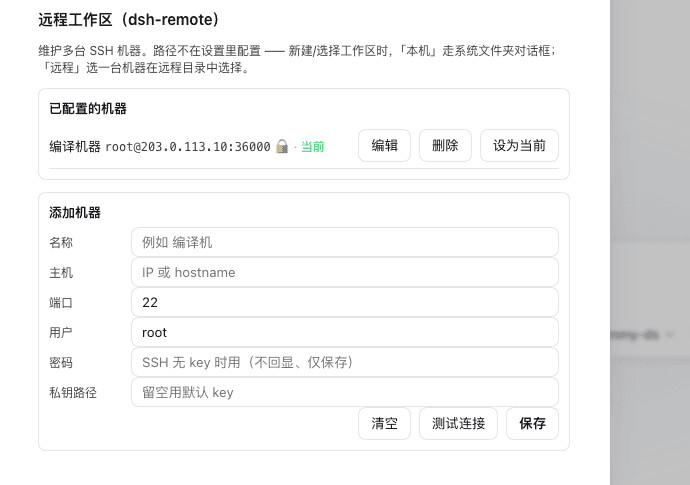
Settings → 远程工作区 — a multi-machine SSH registry (add / edit / delete / set-current, password stored locally):
The native "Add workspace" / "Select workspace" flow — a centered modal, two tabs, opens on 本机 (local); switch to 远程 (remote):
- 远程 — a machine
<select>, a path field that auto-prefills/and live-completes directories (picking one immediately reveals its next level, OS/VSCode-style), plus a 浏览… floating browser that fills the field without committing — you review, edit, then 设为远程工作区.
Real capture (host scrubbed to a placeholder):
Features
- Multi-machine SSH — save any number of hosts (
host/port/user+ private key or password). Passwords are stored locally and never shown back in the UI. Switch with one click in Settings. Per-machine passphrase / host-key mode / SSH agent / keyboard-interactive (OTP) / proxy jump (bastion) and an optional OS-keychain password (加密保存密码— macOS Keychain / Windows DPAPI / Linux secret-tool). ~/.ssh/configimport — the Settings page lists yourHostaliases; one click fills the form (path reference only, the plugin never reads key material).- Two-tab workspace picker (fills the native "Add workspace" flow):
- 本机 / Local — opens the native OS folder chooser over the host (macOS
osascript/ Linuxzenity→kdialog/ WindowsFolderBrowserDialog), or lets you type a local path → adopted directly as a normal DSH local workspace. - 远程 / Remote — the picker is a centered modal. Pick a machine → the path field is pre-filled with
/and live autocompletes directories; selecting a directory immediately lists its next level. A 浏览… floating browser (shows size + mtime, dirs first, follows symlinks) fills the field without committing. 最近 workspaces quick-pick,~主目录 shortcut and 新建目录 are one click away. On confirm it creates a real local mirror under$DSH_HOME/remote-workspaces/<host>-<user>-<port>/<base>that passesfs.realpath→ the harness adopts it as a real workspace while dsh-remote keeps it synced over SFTP.
- 本机 / Local — opens the native OS folder chooser over the host (macOS
- Bidirectional SFTP sync, conflict-aware —
rw_sync(remote → mirror) andrw_push(mirror → remote) are three-way (remote vs local vs last-synced snapshot): files changed on both sides are reported as conflicts and never silently overwritten (force=trueoverrides). Both support dry-run, background tasks, and honor gitignore-style ignore rules (.dsh-remote-ignoreunderremote-workspaces, defaults cover.git/node_modules/target/dist/build/…). - Model tools — 20 tools, all Windows/POSIX portable via SFTP: `rw_i
…

