Sutera-Diffusus/dsh-whale-musume
dsh-whale-musume
dsh-whale-musume is a community DeepSeek Harness plugin. Read the repository README before installing.
Install
npx @deepseek-ai/dsh plugin --profile web add dsh-whale-musumeRestart `dsh web` after install. Bundle APIs can change during the developer preview.
README badge

[](https://dshhub.dev/plugins/dsh-whale-musume)Paste this into your README. The star count updates with every catalog sync.
From the README
Excerpt from Sutera-Diffusus/dsh-whale-musume, cleaned of badges and images.
鲸鱼娘 · dsh-whale-musume
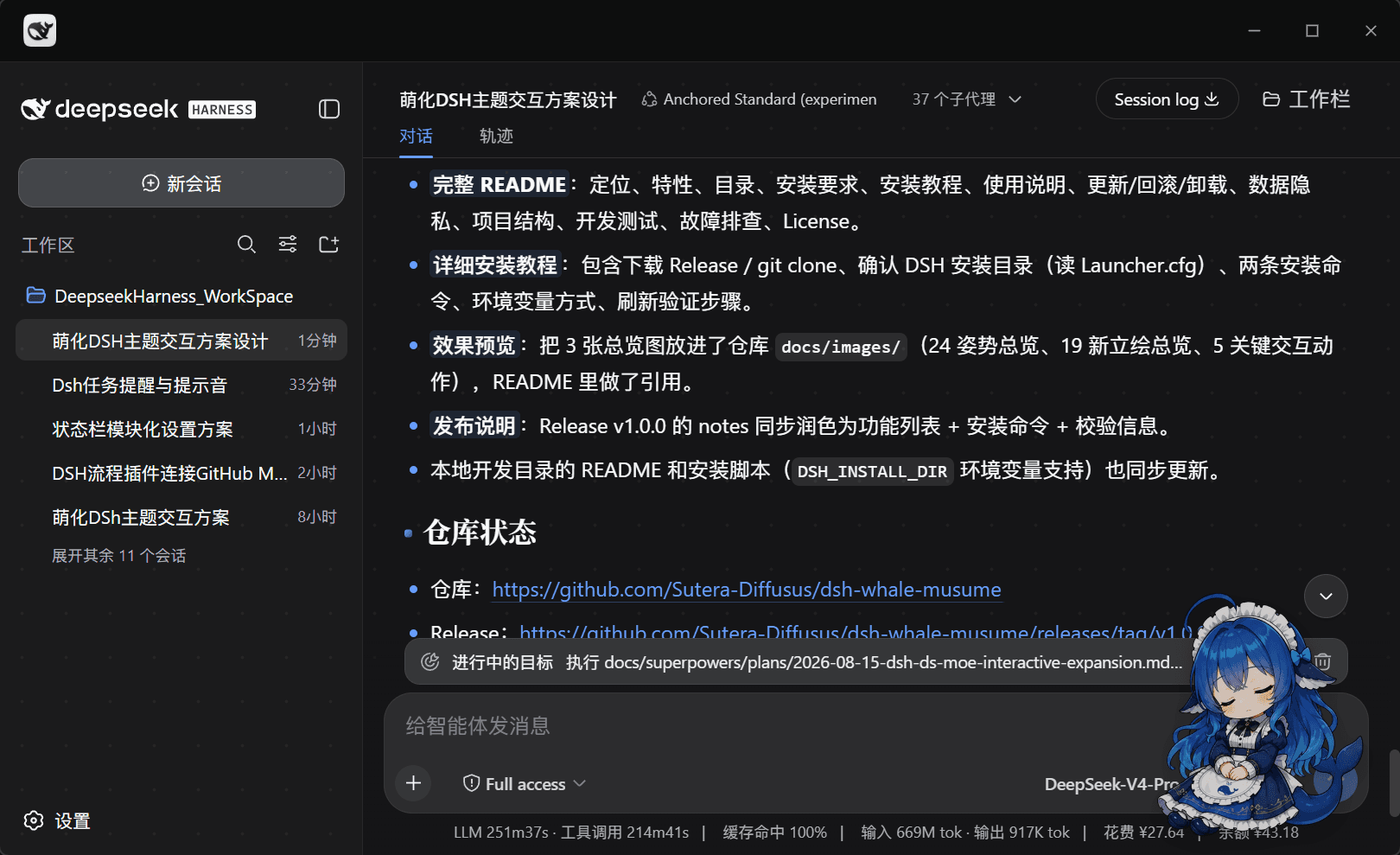
DeepSeek Harness 的桌宠看板娘:安静陪你写代码,工作一开始她就抱起笔记本,绝不插嘴。
一分钟上手 · 看看她长什么样 · 她有什么 · 常见问题 · English
为什么是鲸鱼娘
大部分桌宠要么只是「会动的图」,要么会在你专注时抢注意力。鲸鱼娘的三条硬规则:
| 原则 | 具体做法 |
|---|---|
| 不打断你 | 工作态(有工具在跑)绝不弹话、不乱切姿势;所有闲聊、关怀、播报都只在待机时发生 |
| 不抢你的焦点 | 默认是纯装饰:aria-hidden、不拦截键盘、不覆盖业务 DOM、不改任何内置包文件;连焦点都要你主动开无障碍模式才拿得到 |
| 不给你添隐私负担 | 无遥测、不上传、默认零外部请求;台词播报、关键词感知、余额、无障碍这些会读内容/金额的功能全部默认关闭 |
而且她是真的会看你在干什么:不是定时随机换图,而是读取宿主的结构化标记(工具卡状态、会话运行标记、终端块)来判断你在忙什么,再决定摆哪个姿势、要不要闭嘴。
目录
- 一分钟上手
- 看看她长什么样
- 她适合谁
- 她有什么
- 兼容性
- 第一次使用
- 使用说明
- 设置面板
- 更新 / 回滚 / 卸载
- 版本更新
- 数据与隐私
- 常见问题
- 故障排查
- 路线图
- 项目结构
- 开发与测试
- 参与贡献
- 致谢
- License
一分钟上手
最简:从 npm 装(不需要 git ls-remote 预检,网络受限时更稳):
# 桌面端(Electron 壳)——把路径换成你的安装位置
$Desktop = "D:\DeepseekHarnessDesktop"
$Cli = "$Desktop\resources\app.asar\dsh\node_modules\@deepseek-ai\dsh-desktop-host\lib\cli.js"
$env:ELECTRON_RUN_AS_NODE = "1"
& "$Desktop\DeepSeek Harness.exe" --expose-internals $Cli plugin --profile desktop add dsh-whale-musume
# 旧版 Web profile
dsh plugin --profile web add dsh-whale-musume
也可以继续从 GitHub 源装(等价;想跟 main 最新提交时用这个):
dsh plugin --profile web add github:Sutera-Diffusus/dsh-whale-musume
装完重启宿主(桌面端重启应用;旧版 Web 重启 dsh web 后 Ctrl+F5),她就出现在右下角了。
镜像同步提示:新包在 npmmirror 上可能短暂显示
0.0.0-stage(发布占位版本)。看到这个版本不要装;在插件管理器的 Registry 选择器切到 npm 官方源,或等镜像同步。官方源核验:npm view dsh-whale-musume version --registry=https://registry.npmjs.org应为2.5.0。
从插件市场或
dsh plugin add装不上时,见安装失败排查。日志被截成只剩[exit 1]、走 git 源时的git ls-remote超时、还有allowBuilds提示,那一节都写了。
装完怎么确认她真的进来了?
在宿主页面按 F12 打开控制台,执行:
window.__dshWhaleMusumeBooted                                  // true
document.querySelectorAll('[data-dsh-whale-root]').length      // 1
getComputedStyle(document.querySelector('[data-dsh-whale-root]')).display  // "block"(首页可见)
window.__dshWhaleMoeDebug                                      // state 非 "hidden",含当前姿势/视图等信息
四项都对说明安装成功。任一项不对,见故障排查。
另有一种脚本安装(注入前端资源 + 自带备份回滚),只适合主题集成或没有组合包支持的旧环境:见
scripts/apply-theme.mjs。两种方式二选一,不要混用。
看看她长什么样
| 待机陪伴 | 工作状态联动 |
|---|---|
| <img src="docs/images/preview-idle-coffee.png" width="330" alt="待机时喝咖啡"> | <img src="docs/images/preview-working.png" width="330" alt="工具运行时抱起笔记本"> |
| 默认悬浮在右下角,随机喝咖啡、伸懒腰 | 检测到工具运行,抱起笔记本,带淡蓝光晕 |
| 摸头互动 | 投喂互动 |
|---|---|
| <img src="docs/images/preview-headpat.png" width="330" alt="摸头触发台词气泡"> | <img src="docs/images/preview-feeding.png" width="330" alt="投喂小点心"> |
| 单击摸头,脸红立绘 + 爱心星星飞出 | 右键投喂,提升饱食度与好感度 |
| 悬浮形态(可拖拽) | 立绘总览(90+ 张) |
|---|---|
| <img src="docs/images/preview-idle-sparkle.png" width="330" alt="200px 悬浮形态"> | <img src="docs/images/showcase-board.png" width="330" alt="24 姿势总览"> |
| 200px 默认尺寸,拖到她喜欢的地方 | 状态 / 互动 / 成长 / 游戏 / 天气 / 节日 / 梗表情 |
更多素材:交互动作总览 · 新增立绘总览 · 宣传海报 v1 / v2 / [v3](docs/images/promo-poster-v3.
…