chendefine/dsh-web-fetch-playwright
dsh-web-fetch-playwright
Playwright/CDP web-fetch provider for DeepSeek Harness: renders pages in a real browser, denoises them (Readability + DOMPurify), and returns markdown.
Install
npx @deepseek-ai/dsh plugin --profile web add dsh-web-fetch-playwrightRestart `dsh web` after install. Bundle APIs can change during the developer preview.
README badge

[](https://dshhub.dev/plugins/dsh-web-fetch-playwright)Paste this into your README. The star count updates with every catalog sync.
From the README
Excerpt from chendefine/dsh-web-fetch-playwright, cleaned of badges and images.
dsh-web-fetch-playwright
A DeepSeek Harness (DSH) plugin that gives the built-in web_fetch tool a Playwright/CDP backend: pages are rendered in a real browser, denoised with Readability + DOMPurify + Turndown + GFM, and returned as Markdown.
Features
- Real browser rendering — loads the page the way a user sees it, so client-side rendered (SPA) content is captured, not just the raw HTML.
- Denoise pipeline — Mozilla Readability extracts the article, DOMPurify removes layout/noise tags (nav, sidebar, footer, ads, forms), and Turndown with the GFM plugin converts to Markdown with the same style options as the shipped
tool-webrenderer. - Two backends — launch a local Playwright browser, or drive an already-running browser over its DevTools Protocol (CDP) endpoint.
- Browser resolution — a configured path, a
playwrightCLI on$PATH, or the bundledplaywright-core; CDP needs no local browser at all. - Isolated sessions — every fetch uses its own browser context. Local launches close their browser per fetch; the CDP backend keeps one shared connection to the remote browser and each fetch opens an isolated context (a tab) inside it, closed when done.
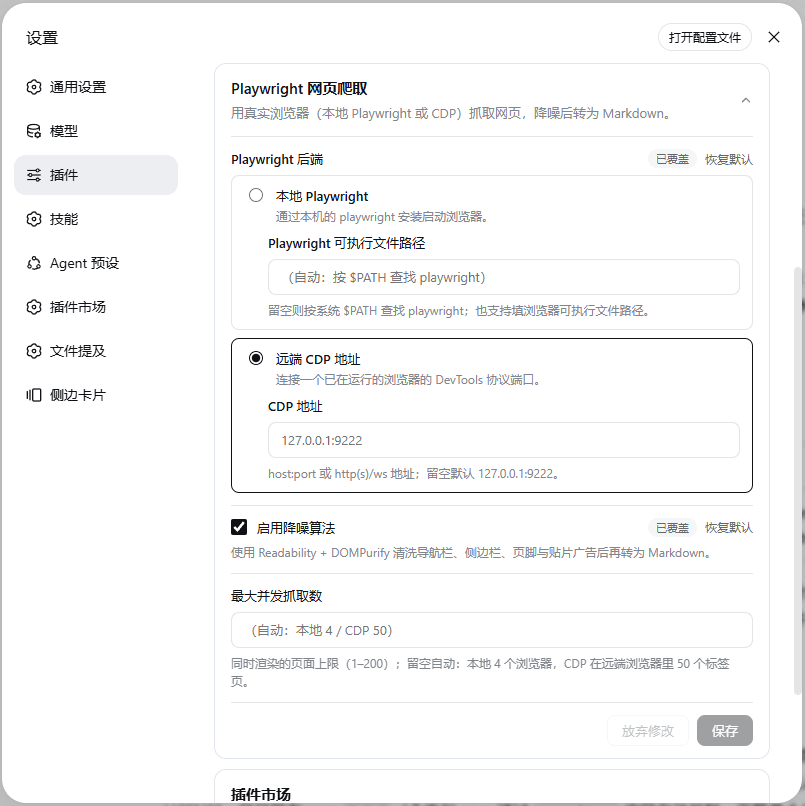
- Live configuration — a settings card (设置 → 插件 → 插件配置) edits the backend, denoise toggle, and concurrency; changes apply to the next fetch without a restart.
- Budget-aware — per-fetch deadline (45s); concurrency is backend-priced (
maxConcurrency, default 4 local browsers / 50 CDP tabs; queued fetches fail fast with a retry hint after 20s instead of hanging); image/font/media subrequests aborted; body capped at 100k chars.
How it works
| Half | Location | Responsibility |
|---|---|---|
| Host (server) | src/ | Registers the fetch provider (id playwright) into ctx.web; cordis.patch.yml pins the web seam's fetchProvider to it and enables the web_fetch tool with a 60s budget. |
| Browser (client) | src/client/ | Registers the Playwright 网页爬取 configuration card, which hot-writes the settings section into $DSH_HOME/settings.yaml. |
web_fetch (tool-web)
   └─ ctx.web.fetchProvider = playwright
        ├─ local: resolve (path → $PATH → bundled playwright-core) → chromium.launch
        ├─ cdp:   connectOverCDP(endpoint)
        ├─ page.goto → settle (networkidle, best-effort) → page.content()
        ├─ denoise: jsdom → Readability → DOMPurify → Turndown(GFM)
        └─ Markdown (or raw HTML when denoise is off)
Requirements
- DSH web profile (
dsh web), Node.js ≥ 20. - For the local backend: a Playwright installation with Chromium, a Chromium-family browser binary, or
playwright-corewith a browser in the default cache. - For the CDP backend: any browser already running with
--remote-debugging-port(e.g.chromium --headless --remote-debugging-port=9222).
Installation
From the npm registry (prebuilt — no build permission needed):
dsh plugin --profile web add dsh-web-fetch-playwright
From a GitHub repository (source — pnpm runs the prepare build; allowlist the package in profiles/web/pnpm-workspace.yaml if pnpm blocks the build script):
dsh plugin --profile web add github:chendefine/dsh-web-fetch-playwright
…

